This guide describes what you need to prepare before Miri can analyze and migrate your ABAP custom code to Simplifier. First, it lists the components, accounts and network connections. As a result, your SAP Basis, network and security teams can prepare everything upfront.
Architecture at a glance
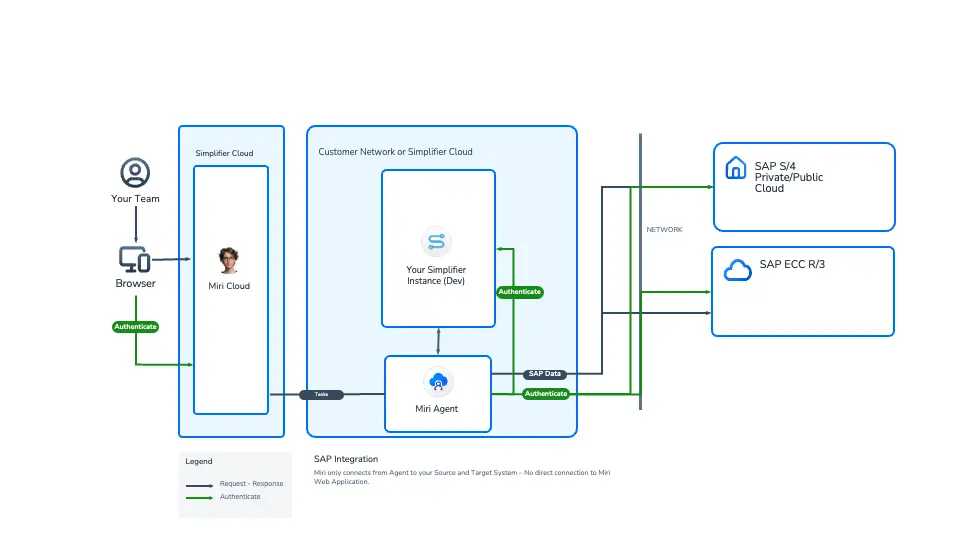
- Your team works in the browser with Miri Cloud (Simplifier Cloud), while the agent does the actual analysis in your network.
- Then Miri Cloud hands over tasks to the Miri Agent (daemon). The agent fetches its tasks itself, so the connection is outbound only and you need no inbound port.
- The Miri Agent runs in your network (or in the Simplifier Cloud) and reads your SAP system(s) via ADT. Besides, it never writes to SAP.
- In addition, the agent writes the migration result to your Simplifier instance (Dev).
- Finally, all AI processing runs in the agent, using your own, approved AI model (cloud or local).
Therefore, no direct connection exists between the Miri web application and your SAP systems.
Where does Miri process which data?
| Component | What it processes |
|---|---|
| Miri Agent (your network) | Analysis, scanning and refactoring of your source code, access to SAP and Simplifier, calls to your AI model |
| Miri web interface (AWS Frankfurt, EU) | Only non-AI data: task descriptions, attachments, login e-mail address, token costs per user/agent, audit log |
Your source code stays in your network. Therefore, Miri only sends it to the AI model that you have approved. Besides, Simplifier does not use customer data to train models.
How a migration works: overview
In short, a migration with Miri always follows three steps. However, Miri is deliberately not a fully autonomous agent. Instead, you review and approve the solution concept before Miri builds anything, so the result has the quality you expect. Also, a 1:1 migration is just as valid as a redesign.

Step 1: Create a task and provide the source
First, you create a migration task in the Miri web interface, for example for a custom ABAP report. Miri also works like a project-management tool. Several people and AI agents can work on tasks, ask open questions and report progress, which matters when you migrate hundreds of objects. As the source, you can use an ABAP object that Miri reads directly from the SAP system, source code, or additional material such as old documentation and screenshots. At least access to the source code is required. However, more context improves the result.
Step 2: Analysis and solution concept
Next, the agent connects to your source system and analyzes the object with all its dependencies. It also looks at the target system, either in the official SAP API documentation or, better, directly in your target system. This way, it validates which interfaces and OData services exist. In addition, it checks your Simplifier instance for reusable parts. After about 20 minutes in the demo, you receive a solution concept that you can download, for example as PDF. In particular, it contains:
- the as-is analysis and the dependencies of the object
- the mapping to the target architecture (for example S/4HANA Private Cloud) and a clean-core assessment, for example direct table accesses or internal function modules that SAP has not released as API
- a proposed solution in Simplifier (which part becomes an application, business object, connector or job)
- risks and open questions that your business or IT teams need to answer before the build
So this is where you decide. Then review the concept, answer the open questions and adapt the target solution.
Step 3: Build the solution
Finally, Miri works with the other Simplifier agents in the same task, based on the approved concept. Anna creates the SAPUI5/Fiori user interface, Ingo (Integration Specialist) builds the data connectivity (for example to OData services), Theo creates automated tests and Klara creates workflows. Meanwhile, you can add files and chat with the agents at any time. For example, an ABAP report that releases production orders becomes a Fiori application with the same search criteria and the approval run, decoupled from the SAP core. Once the users accept the result, you can then retire the old Z object.
What can be migrated
| ABAP artifact | Migration to Simplifier |
|---|---|
| Reports and Z transactions | Fiori applications |
| Interfaces (for example RFC) | Simplifier APIs and business objects |
| Workflows | Simplifier workflows |
| Conversion enhancements and forms | Not supported (they depend closely on ABAP logic, and SAP offers its own path for forms) |
For a clean result, however, the target system needs suitable interfaces, for example released OData services. If a program only selects directly on the database, you first need a solution for this gap.
What you need to prepare
- A host for the Miri Agent (Docker)
- Access to your approved AI model
- A Simplifier instance (Dev) with a developer user and token
- Network connections from the agent
- Technical SAP user(s) with read-only ADT authorization
1. Miri Agent (daemon) host
- Linux host (Debian or Ubuntu recommended) with at least 2 vCPUs and 4 GB RAM. A laptop works for tests, but use a dedicated host for stable operation.
- Docker and Docker Compose installed, so the agent can run as a container.
- Outbound: HTTPS (443) to
miri.simplifier.cloud. - Inbound: nothing. Therefore, you need no public IP and no reverse proxy.
- A registration token from Miri (administrator: Runtimes → Registration Token). However, without administrator rights, request it from your Simplifier contact.
In order to install the daemon, follow Daemon Docker Installation. Afterwards, the runtime appears on the Runtimes page with the status Connected.
2. Access to your AI model
Miri always uses the AI model of your organization. Therefore, you decide which model processes your data, and the processing stays compliant with your security and data-protection requirements.
- Use a model that your security and data-protection officer has approved, because this keeps the processing compliant.
- Cloud or local: Miri supports both. For example, cloud options are Anthropic, OpenRouter and GitHub Enterprise. Alternatively, you can use a model that you host on-premises in your own network. In this case, your code does not leave your network at all.
- Credentials: an API key for cloud models; for a local model, the endpoint URL (and a token, if required). Then store them as secrets in the daemon configuration.
- Requirements for local models: a context window of at least 256K tokens and a score of at least 65 % on SWE-bench, for example Qwen 3.8 or newer. Otherwise, smaller or weaker models deliver unreliable migration results.
- Also, the agent must reach the model endpoint (outbound for cloud models, internal for local models).
- For cloud models, you also need a data-processing agreement with the provider and a cost limit, because your provider charges the token costs.
3. Simplifier instance (Dev)
When the analysis is complete, Miri creates the migration result (application, business objects, connectors, tests and the documentation of the migration decisions) in a Simplifier instance. However, this is the only write access in the setup, and it is limited to a development instance.
- A Simplifier development instance (in your network or in the Simplifier Cloud).
- A Simplifier user with the role
SF_Developer, so the agent can create objects. - The Simplifier token of this user, which you store as a secret in the daemon.
- In addition, network access from the agent to the instance via HTTPS.
4. Network connections
| From | To | Protocol |
|---|---|---|
| Agent | miri.simplifier.cloud |
HTTPS 443, outbound |
| Agent | AI model endpoint | HTTPS, outbound (cloud) or internal (local model) |
| Agent | Simplifier instance (Dev) | HTTPS |
| Agent | SAP source system | HTTPS, ADT port (your Basis team provides the port) |
| Agent | SAP target system (if different from the source) | HTTPS, ADT port |
| Anything | Agent | No inbound connection required |
- The ICF service
/sap/bc/adtis active in the SAP system(s) (transaction SICF), because the agent uses ADT. - The agent host trusts the TLS certificates of the SAP systems (for example your internal CA).
- If Eclipse ADT works from the same network segment, the agent works as well. Therefore, this is a good quick test.
5. Technical SAP users (read-only)
Create one technical user for each SAP system, because Miri logs in separately to each system. The SAP source can also be the target, for example when you move custom code off the core within the same system. Then one user is sufficient. However, if source and target are different systems (for example ECC and S/4HANA), you need two users.
Also, all users are technical users (no personal users, no SAP_ALL) and read-only. As a result, Miri does not create, change, activate, delete or transport any object in your SAP systems.
| Area | Authorization |
|---|---|
| ADT access | S_ADT_RES |
| Development | S_DEVELOP with activity Display (03) only |
| Packages / objects | Read access to your custom packages (Z*/Y*, namespaces) and, where the analysis requires it, to the SAP standard objects |
| Not required | Any write activity (create, change, activate, delete), transport/CTS authorizations, reading table contents, free SQL |
We recommend a dedicated role (for example Z_MIRI_ADT_READ) that you assign to the technical user(s).
Authentication
- Because the agent runs headless in Docker on a server, it logs in with user name and password (Basic Authentication), and browser-based logins (SSO via SAML or Kerberos, OAuth login in the browser) do not work.
- Allow Basic Authentication for the ADT endpoint
/sap/bc/adtof the SAP systems, so the agent can log in. - Use a password without expiry or agree on a rotation process, because runs fail when the password expires.
- Because a wrong password can lock the user, test the logon with Eclipse ADT before the first run.
Customer checklist
A. Project and Miri
- ☐ Get Miri access with the administrator role (for the registration token)
- ☐ Name your contacts: Basis, network, security and ABAP development
- ☐ Obtain approval from IT security and data protection
B. AI model
- ☐ Get the model approved by your security or data-protection officer
- ☐ Choose the variant: cloud or local
- ☐ Local model: make sure it has a context window of at least 256K tokens and a SWE-bench score of at least 65 % (for example Qwen 3.8 or newer)
- ☐ Hand over the API key (cloud) or the endpoint URL and token (local) securely
- ☐ Cloud: sign the data-processing agreement and set a cost limit
C. Simplifier instance (Dev)
- ☐ Provide a development instance
- ☐ Create a user with the role
SF_Developer - ☐ Create the Simplifier token and hand it over securely
D. Agent host and network
- ☐ Provide a Linux server with 2 vCPUs, 4 GB RAM, Docker and Docker Compose
- ☐ Open outbound HTTPS to
miri.simplifier.cloud, the AI model, the Simplifier instance and the SAP system(s) - ☐ Make the host trust the certificates of the SAP systems
E. SAP systems and users
- ☐ Provide host, port, client and SID of the source (and target) system
- ☐ Activate the ICF service
/sap/bc/adtand allow Basic Authentication - ☐ Create technical read-only user(s) with
S_ADT_RESandS_DEVELOP(Display) - ☐ Hand over the passwords securely
F. Scope
- ☐ Define the scope of the migration (packages, namespaces, object types)
- ☐ Know your target release and clean-core requirements
- ☐ Define the review and approval process for the results in the Simplifier instance
Verify your setup
- First, check that the runtime shows the status Connected on the Runtimes page.
- Then send a test request, and your AI model answers it.
- Next, read a program or class from the source system via ADT.
- Afterwards, run the same read test on the target system (if different).
- In addition, create a test application in the Simplifier instance.
- Optionally, try a write attempt in SAP, which SAP rejects, so your security team has proof.
Troubleshooting
| Symptom | Check |
|---|---|
| HTTP 401 from SAP | User or password wrong, user locked, Basic Authentication not allowed |
| HTTP 403 from SAP | Authorization missing (S_ADT_RES, S_DEVELOP Display, package access) or ICF service /sap/bc/adt inactive |
| Timeout | Firewall or proxy between agent and SAP |
| Certificate error | Agent host does not trust your internal CA |
| Runtime not Connected | Registration token invalid or expired, or firewall blocks outbound 443 to miri.simplifier.cloud |
| Model does not respond | API key invalid or without credit, local model not reachable, or firewall/proxy blocks the endpoint |
| Cannot write to Simplifier | User lacks the role SF_Developer, or the token is invalid or expired |