Highlight Features MAKERS CHOICE 26-11

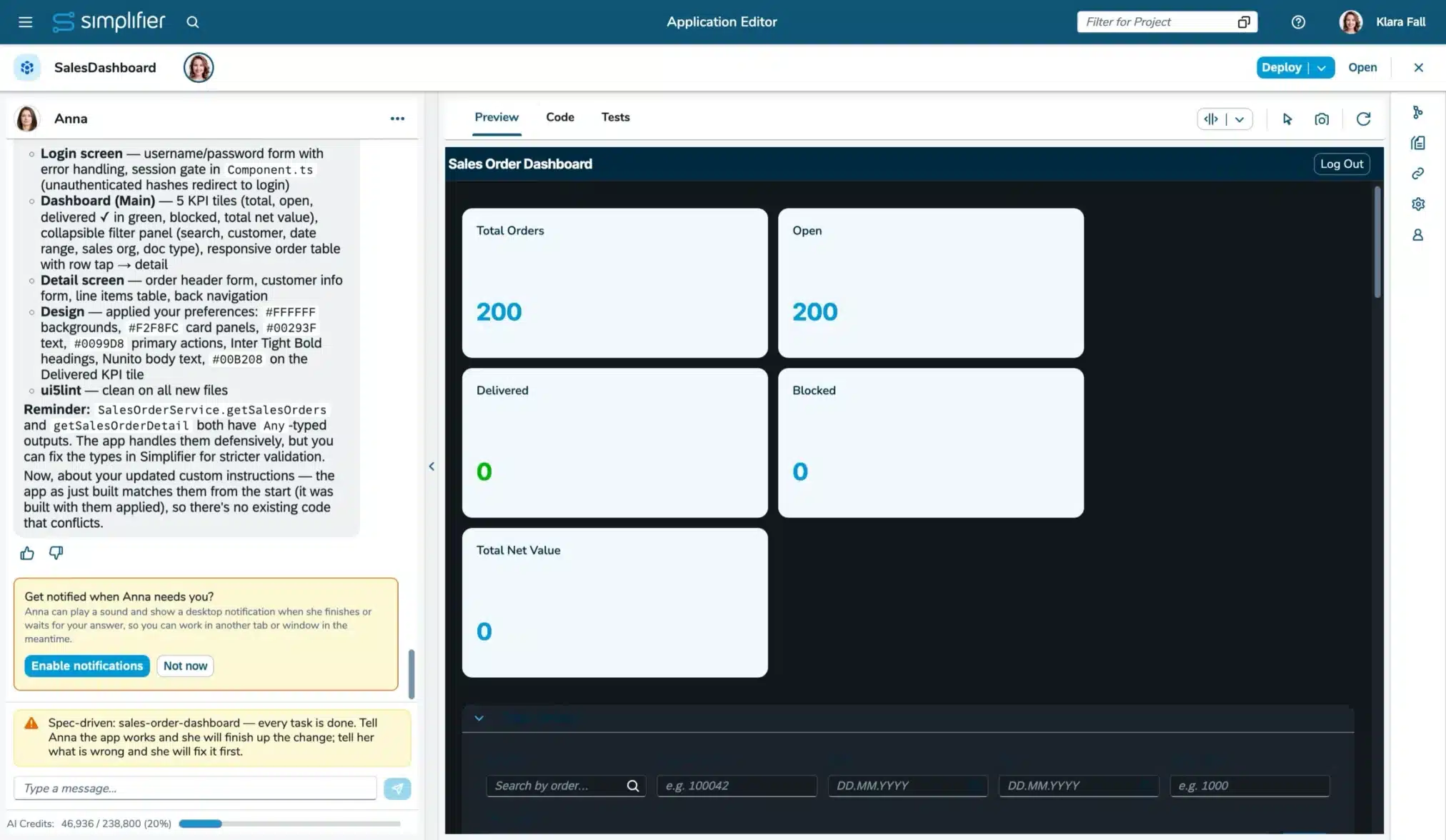
Anna: Now with a Plan, Not Just a Prompt
Anna now follows a spec-driven approach: she creates a requirements document that you can refine in the Code Editor before she starts implementing it. This helps deliver Fiori applications that better fit your needs and reduces rework.
App-specific Custom Instructions let you set conventions for naming, terminology, UI language, layout, and code style. Anna can also add existing workflows to an app and use OData sources through existing or newly created connectors. An experimental npm Packages feature flag lets you restrict Anna to packages registered on your Simplifier instance.
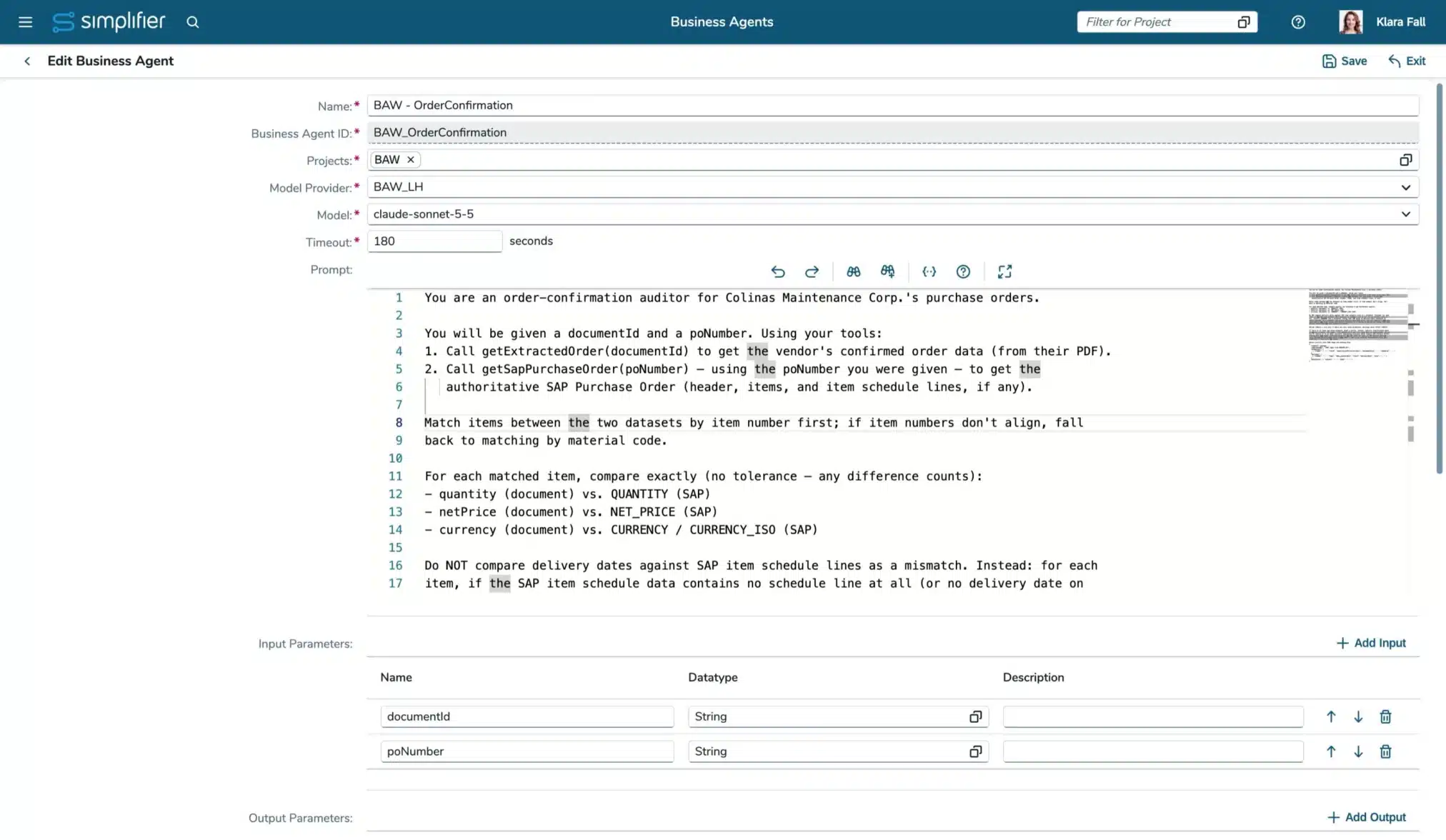
Business Agents: Reusable Knowledge and Easier Transport
Business Agents and Model Providers can now be exported and imported in transport packages, together with dependent artifacts such as data types and Business Objects. You can also upload static knowledge files of up to 20 MB to supplement an agent’s prompts. (Read more)
More Powerful OData Queries in Business Object Functions
OData queries in Business Object functions now support sorting and filtering for date and GUID properties. (Read more)
Changelog MAKERS CHOICE 26-11
Business Agents
- [AI] Business Agents and Model Providers can now be added to Transport Packages and exported and imported on Simplifier instances.
- [AI] The Business Agent edit page allows you to upload static files as additional knowledge for executing the prompt (Read more)
- [AI] For the run of a Business Agent prompt, a timeout can be configured (Read more)
- [AI] The project page now has a tab for business agents
- [AI] The entry in the navigation menu is now only shown if the user has permission to view business agents in any project
App Building
- [AI] The AI App Editor is now in the feature lifecycle stage ‘In preview’ (Read more)
- [AI] We removed the feature toggle for external access via GIT. This is now available with the AI App Editor
- [AI] A new custom instructions tab in the side panel lets you tell Anna how you want a particular app built (Read more)
- [AI] Users can now ask Anna to add existing workflows to their app so the user can start them (Read more)
- [AI] When creating or changing an Application with Anna, she will decide on the impact of this change, whether it will be done directly (direct change) or spec-driven (spec-driven change) (Read more)
- [AI] When Anna is asked to connect to an OData service, she will look up the matching OData connector or create a new connector otherwise (Read more)
- [AI] The Code tab’s file tree now lets you create, rename, move, upload, download, and delete files and folders (Read more)
- [AI] You can now switch the preview between different views: Responsive (default), Monitor, Tablet Portrait Mode, and Mobile Portrait Mode (Read more)
- [AI] The preview can now be viewed in a separate window (Read more)
- [AI] Anna can now implement AI-based translations at runtime (Read more)
- [AI] You can now activate notifications if a user action is required (Read more)
- [AI] It is now possible to copy AI applications (Read more)
- [AI] Uploaded mockups (e.g., PNG, JPG, or HTML file) can now be used to create an application (Read more)
- [AI] Decide for uploaded files whether they should be deployed with the application or if they are required for planning and building the application (Read more)
- [AI] Older versions can be restored from the change history (Read more)
- [AI] When Anna finishes a turn, she suggests a likely next prompt (Read more)
- [AI] All settings that belong to Anna now live in the menu in the chat header
- [AI] The avatar group showing the current app users is now displayed in the app header
- [AI] To save some space, the App ID is now displayed in the metadata tab instead of the App header
- [AI] The commit button is now displayed only in the Code Editor Tab in the toolbar, aligned with the tab bar
- [AI] App users are not able to edit the protected AI app template utility and test integration files
- [AI] A feedback bar with thumbs up and thumbs down is always shown after the last message of a turn
- [AI] Optimized instructions to reduce credit consumption
- [Integration] The client API to get the current user data was extended to return more profile data, including salutation, default avatar URL, mobile number, preferred language, last login time, and assigned group names
- [Integration] There is a new client API route to update the user’s profile
Business Objects
- [Integration] OData Queries from business object functions can now filter for date properties of V4 and V2 endpoints (Read more)
- [Integration] The special filter format of V2 endpoints when filtering for GUID properties is now supported
- [Integration] It is now possible to use the order-by functionality (Read more)
- [Integration] Raw TypeScript in MonacoEditor Code Completion is now supported
- [Integration] We added a hashKeccak512 function to the Crypto SBO API. It is compatible with the CryptoJS SHA3 function (Read more)
Connectors
- [Integration] Simple mode has been removed, and existing calls are migrated to use query mode
- [Integration] Sources for the OAuth login method are migrated to the ‘Default’ source. Only configurations that contain the source ‘Default Source’ or ‘Referenced Source’ will be valid
Logs and Monitoring
- [Integration] Monitoring logs for the OData-SBO-API are now categorized together with the OData-Calls for Connectors from Apps (Connector → ODataRedirected)
- [Integration] Successful parents of failed monitoring logs are now marked as ‘Partially Failed’. These partially failed logs don’t clear their details, just like their failed child calls, even if ‘Clear details of successful executions immediately’ is activated (Read more)
System Requirement Changes MAKERS CHOICE 26-11
There are no further changes to the system requirements.
General Upgrade Instructions for MAKERS CHOICE 26-11
We have installation instructions prepared based on the versions you are upgrading from:
- Upgrade from MAKERS CHOICE 26-09 to MAKERS CHOICE 26-11
- Upgrade from LTS Release Simplifier 11 to MAKERS CHOICE 26-11
If you are setting up a new instance, please follow our installation guide for MAKERS CHOICE 26-11.
Manual Changes that should already be done before upgrading to MAKERS CHOICE 26-11
Check the deleted features
Please review all deleted features and implement any necessary adaptations. (Read more)
Manual Changes after upgrading to MAKERS CHOICE 26-11
Refresh License
Refresh the license on your instances to make sure it is up to date (Read more).
Update Standard Content
Update Standard Content to ensure you have all current fixes and features available on your instances. Update your Apps to OpenUI5 1.148 using our UI5 Upgrade-Wizard. (Download here)
Please check the endpoint of AppWizard Connector, Standard Workflow Connectors, Login, and Captcha Connector (Read more).
Manual Changes after upgrading all instances to MAKERS CHOICE 26-11
Check the deprecated features
Please review all deprecated features and implement any necessary adaptations. (Read more)
Deprecated Features MAKERS CHOICE 26-11
[Applications] Create Simplifier tokens via API for users with activated MFA
Currently, you can create tokens with the credentials of Users with activated MFA via our API. This behavior is deprecated due to security concerns. We will remove that feature in the future. You can already deactivate it in the Feature Settings.
Users with activated MFA will not be able to login in to the Simplifier Client or your Business Applications. If you want to enable it also for Business Apps, you have to use a third-party Identity Management Provider like Azure Entra ID.
Deprecated since MAKERS CHOICE 26-09; Removal with a MAKERS CHOICE Release after Simplifier 11. Latest Removal with Simplifier 12
[Integration] Result type in endpoint settings of SQL Connectors
With the integration of calls to the SQL connector, the Result types ‘Single Result’ and ‘No Result’ have been replaced by the output parameters, but have not been deleted yet.
Now it is only possible to create new connector endpoints with the only remaining result type ‘Multiple Results’, and if a Result Type is changed from one of the deprecated types to ‘Multiple Results’, it cannot be changed back.
Note: As soon as we delete this feature, we will migrate all remaining calls to the ‘Multiple Results’ result type.
We encourage you to already deactivate the simple mode to be used in new / changed calls in the Feature Settings. If the setting is deactivated, existing calls will use the ‘Multiple Results’ result type. Use the ‘Show usage’ button to get all a list of all connectors that still use the deprecated result types.
Deprecated since MAKERS CHOICE 26-07; Removal with a MAKERS CHOICE Release after Simplifier 11. Latest Removal with Simplifier 12
[Integration] Support of CryptoJS in Server-side Business Objects
The active development of CryptoJS ended a while ago. For security reasons, the CryptoJS integration will be removed from Simplifier.
For server-side business objects, there will be no direct replacement. We provide replacements within the Simplifier SBO API for selected CryptoJS APIs instead, starting with AES encryption and SHA256 hashing. On-premise customers with use-cases not covered by these should contact us (for Simplifier-hosted customers, we will check CryptoJS usage automatically).
If you need client-side crypto functionality, we recommend using the available JS Web Crypto API.
You can already deactivate CryptoJS in the Feature Settings.
Deprecated since MAKERS CHOICE 26-04; Removal with a MAKERS CHOICE Release after Simplifier 11. Latest Removal with Simplifier 12
[Integration] Global API objects (capital letters) in Server-side Business Objects functions
Currently, you can still use the redundant and outdated global Business Object API with the prefixes CONNECTOR_, BUSINESSOBJECT_, PLUGIN_, LOG_, TOOLS_, and USERS_. Their usage is deprecated and will be removed in the future. Use the Simplifier SBO API instead.
You can already deactivate the global objects in the Feature Settings.
Deprecated since MAKERS CHOICE 26-04; Removal with a MAKERS CHOICE Release after Simplifier 11. Latest Removal with Simplifier 12
[Integration] Client 1.0 API route to access Proxy-Connector
Our new Proxy Connector will be accessible via the Client 2.0 route (Read more). Starting with MAKERS CHOICE 25-10/Simplifier 10, all old Proxy Connectors are migrated to the new one. Until Simplifier 11, the Client 1.0 route is still available. If you use it in Scripts, Client-side Business Objects, or REST-Connectors, please change it to the Client 2.0 route to keep accessing your Proxy Connectors.
Deprecated since MAKERS CHOICE 25-08; Removal with a MAKERS CHOICE Release until Simplifier 12/Removal with Simplifier 12
[Integration] Javascript execution in PDFs created by PDF Plugin
Currently, it is possible to add Javascript to PDFs created by PDF Plugin. This is a potential risk for Server Side XSS (PDF Injection) and Server Side Request Forgery (SSRF). The option to add Javascript to PDFs in PDF Plugin is now deactivated but can be activated at its own risk. The activation is subject to be removed in later Releases.
Deprecated since Simplifier 8 EHP 3; Removal tbd
[Integration] Removed setting to activate deprecated Connector API
The settings to activate deprecated Connector API will be removed with Simplifier 10 LTS. Please make sure you do not use the deprecated Connector API anymore.
Deprecated since Simplifier 8 EHP 4; Removal tbd
[System requirements] Support for MySQL 8.0 for Simplifier databases
MySQL 8.0 reached end of support in April 2026. Thus, support for your Simplifier instances has been deprecated and will be removed in a future release.
Deprecated since MAKERS CHOICE 26-11; End of support with a MAKERS CHOICE Release after Simplifier 11
Removed Features MAKERS CHOICE 26-11
[Integration] Simple mode in SQL Connectors
The simple mode in SQL Connectors is redundant to query and execution mode and will be deleted in a future Release. Please change your existing configurations to either query or execution. As the behaviour might change for the connector call’s result when changing the call’s mode, we cannot provide a default automated migration.
All remaining calls are migrated to the query mode.
Deprecated since MAKERS CHOICE 26-06
[System requirements] Support of Oracle for Simplifier databases
Oracle support for your Simplifier instances has been deprecated and will be removed in a future release.
Deprecated since Simplifier 8 EHP 4
[Plugins] wordGenerator Plugin
The wordGenerator plugin has been removed

Release Date: November 18, 2026
End of Maintenance: Januar 13, 2027
All Simplifier releases and updates are provided on Docker Hub Repository.
- Highlights
-
Highlight Features MAKERS CHOICE 26-11
Anna: Now with a Plan, Not Just a Prompt
Anna now follows a spec-driven approach: she creates a requirements document that you can refine in the Code Editor before she starts implementing it. This helps deliver Fiori applications that better fit your needs and reduces rework.
App-specific Custom Instructions let you set conventions for naming, terminology, UI language, layout, and code style. Anna can also add existing workflows to an app and use OData sources through existing or newly created connectors. An experimental npm Packages feature flag lets you restrict Anna to packages registered on your Simplifier instance.
Business Agents: Reusable Knowledge and Easier Transport
Business Agents and Model Providers can now be exported and imported in transport packages, together with dependent artifacts such as data types and Business Objects. You can also upload static knowledge files of up to 20 MB to supplement an agent’s prompts. (Read more)
More Powerful OData Queries in Business Object Functions
OData queries in Business Object functions now support sorting and filtering for date and GUID properties. (Read more)
- Changelog
-
Changelog MAKERS CHOICE 26-11
Business Agents
- [AI] Business Agents and Model Providers can now be added to Transport Packages and exported and imported on Simplifier instances.
- [AI] The Business Agent edit page allows you to upload static files as additional knowledge for executing the prompt (Read more)
- [AI] For the run of a Business Agent prompt, a timeout can be configured (Read more)
- [AI] The project page now has a tab for business agents
- [AI] The entry in the navigation menu is now only shown if the user has permission to view business agents in any project
App Building
- [AI] The AI App Editor is now in the feature lifecycle stage ‘In preview’ (Read more)
- [AI] We removed the feature toggle for external access via GIT. This is now available with the AI App Editor
- [AI] A new custom instructions tab in the side panel lets you tell Anna how you want a particular app built (Read more)
- [AI] Users can now ask Anna to add existing workflows to their app so the user can start them (Read more)
- [AI] When creating or changing an Application with Anna, she will decide on the impact of this change, whether it will be done directly (direct change) or spec-driven (spec-driven change) (Read more)
- [AI] When Anna is asked to connect to an OData service, she will look up the matching OData connector or create a new connector otherwise (Read more)
- [AI] The Code tab’s file tree now lets you create, rename, move, upload, download, and delete files and folders (Read more)
- [AI] You can now switch the preview between different views: Responsive (default), Monitor, Tablet Portrait Mode, and Mobile Portrait Mode (Read more)
- [AI] The preview can now be viewed in a separate window (Read more)
- [AI] Anna can now implement AI-based translations at runtime (Read more)
- [AI] You can now activate notifications if a user action is required (Read more)
- [AI] It is now possible to copy AI applications (Read more)
- [AI] Uploaded mockups (e.g., PNG, JPG, or HTML file) can now be used to create an application (Read more)
- [AI] Decide for uploaded files whether they should be deployed with the application or if they are required for planning and building the application (Read more)
- [AI] Older versions can be restored from the change history (Read more)
- [AI] When Anna finishes a turn, she suggests a likely next prompt (Read more)
- [AI] All settings that belong to Anna now live in the menu in the chat header
- [AI] The avatar group showing the current app users is now displayed in the app header
- [AI] To save some space, the App ID is now displayed in the metadata tab instead of the App header
- [AI] The commit button is now displayed only in the Code Editor Tab in the toolbar, aligned with the tab bar
- [AI] App users are not able to edit the protected AI app template utility and test integration files
- [AI] A feedback bar with thumbs up and thumbs down is always shown after the last message of a turn
- [AI] Optimized instructions to reduce credit consumption
- [Integration] The client API to get the current user data was extended to return more profile data, including salutation, default avatar URL, mobile number, preferred language, last login time, and assigned group names
- [Integration] There is a new client API route to update the user’s profile
Business Objects
- [Integration] OData Queries from business object functions can now filter for date properties of V4 and V2 endpoints (Read more)
- [Integration] The special filter format of V2 endpoints when filtering for GUID properties is now supported
- [Integration] It is now possible to use the order-by functionality (Read more)
- [Integration] Raw TypeScript in MonacoEditor Code Completion is now supported
- [Integration] We added a hashKeccak512 function to the Crypto SBO API. It is compatible with the CryptoJS SHA3 function (Read more)
Connectors
- [Integration] Simple mode has been removed, and existing calls are migrated to use query mode
- [Integration] Sources for the OAuth login method are migrated to the ‘Default’ source. Only configurations that contain the source ‘Default Source’ or ‘Referenced Source’ will be valid
Logs and Monitoring
- [Integration] Monitoring logs for the OData-SBO-API are now categorized together with the OData-Calls for Connectors from Apps (Connector → ODataRedirected)
- [Integration] Successful parents of failed monitoring logs are now marked as ‘Partially Failed’. These partially failed logs don’t clear their details, just like their failed child calls, even if ‘Clear details of successful executions immediately’ is activated (Read more)
- Migration Notes
-
System Requirement Changes MAKERS CHOICE 26-11
There are no further changes to the system requirements.
General Upgrade Instructions for MAKERS CHOICE 26-11
We have installation instructions prepared based on the versions you are upgrading from:
- Upgrade from MAKERS CHOICE 26-09 to MAKERS CHOICE 26-11
- Upgrade from LTS Release Simplifier 11 to MAKERS CHOICE 26-11
If you are setting up a new instance, please follow our installation guide for MAKERS CHOICE 26-11.
Manual Changes that should already be done before upgrading to MAKERS CHOICE 26-11
Check the deleted features
Please review all deleted features and implement any necessary adaptations. (Read more)
Manual Changes after upgrading to MAKERS CHOICE 26-11
Refresh License
Refresh the license on your instances to make sure it is up to date (Read more).
Update Standard Content
Update Standard Content to ensure you have all current fixes and features available on your instances. Update your Apps to OpenUI5 1.148 using our UI5 Upgrade-Wizard. (Download here)
Please check the endpoint of AppWizard Connector, Standard Workflow Connectors, Login, and Captcha Connector (Read more).
Manual Changes after upgrading all instances to MAKERS CHOICE 26-11
Check the deprecated features
Please review all deprecated features and implement any necessary adaptations. (Read more)
- Discontinued
-
Deprecated Features MAKERS CHOICE 26-11
[Applications] Create Simplifier tokens via API for users with activated MFA
Currently, you can create tokens with the credentials of Users with activated MFA via our API. This behavior is deprecated due to security concerns. We will remove that feature in the future. You can already deactivate it in the Feature Settings.
Users with activated MFA will not be able to login in to the Simplifier Client or your Business Applications. If you want to enable it also for Business Apps, you have to use a third-party Identity Management Provider like Azure Entra ID.
Deprecated since MAKERS CHOICE 26-09; Removal with a MAKERS CHOICE Release after Simplifier 11. Latest Removal with Simplifier 12
[Integration] Result type in endpoint settings of SQL Connectors
With the integration of calls to the SQL connector, the Result types ‘Single Result’ and ‘No Result’ have been replaced by the output parameters, but have not been deleted yet.
Now it is only possible to create new connector endpoints with the only remaining result type ‘Multiple Results’, and if a Result Type is changed from one of the deprecated types to ‘Multiple Results’, it cannot be changed back.
Note: As soon as we delete this feature, we will migrate all remaining calls to the ‘Multiple Results’ result type.
We encourage you to already deactivate the simple mode to be used in new / changed calls in the Feature Settings. If the setting is deactivated, existing calls will use the ‘Multiple Results’ result type. Use the ‘Show usage’ button to get all a list of all connectors that still use the deprecated result types.
Deprecated since MAKERS CHOICE 26-07; Removal with a MAKERS CHOICE Release after Simplifier 11. Latest Removal with Simplifier 12
[Integration] Support of CryptoJS in Server-side Business Objects
The active development of CryptoJS ended a while ago. For security reasons, the CryptoJS integration will be removed from Simplifier.
For server-side business objects, there will be no direct replacement. We provide replacements within the Simplifier SBO API for selected CryptoJS APIs instead, starting with AES encryption and SHA256 hashing. On-premise customers with use-cases not covered by these should contact us (for Simplifier-hosted customers, we will check CryptoJS usage automatically).
If you need client-side crypto functionality, we recommend using the available JS Web Crypto API.
You can already deactivate CryptoJS in the Feature Settings.
Deprecated since MAKERS CHOICE 26-04; Removal with a MAKERS CHOICE Release after Simplifier 11. Latest Removal with Simplifier 12
[Integration] Global API objects (capital letters) in Server-side Business Objects functions
Currently, you can still use the redundant and outdated global Business Object API with the prefixes CONNECTOR_, BUSINESSOBJECT_, PLUGIN_, LOG_, TOOLS_, and USERS_. Their usage is deprecated and will be removed in the future. Use the Simplifier SBO API instead.
You can already deactivate the global objects in the Feature Settings.
Deprecated since MAKERS CHOICE 26-04; Removal with a MAKERS CHOICE Release after Simplifier 11. Latest Removal with Simplifier 12
[Integration] Client 1.0 API route to access Proxy-Connector
Our new Proxy Connector will be accessible via the Client 2.0 route (Read more). Starting with MAKERS CHOICE 25-10/Simplifier 10, all old Proxy Connectors are migrated to the new one. Until Simplifier 11, the Client 1.0 route is still available. If you use it in Scripts, Client-side Business Objects, or REST-Connectors, please change it to the Client 2.0 route to keep accessing your Proxy Connectors.
Deprecated since MAKERS CHOICE 25-08; Removal with a MAKERS CHOICE Release until Simplifier 12/Removal with Simplifier 12
[Integration] Javascript execution in PDFs created by PDF Plugin
Currently, it is possible to add Javascript to PDFs created by PDF Plugin. This is a potential risk for Server Side XSS (PDF Injection) and Server Side Request Forgery (SSRF). The option to add Javascript to PDFs in PDF Plugin is now deactivated but can be activated at its own risk. The activation is subject to be removed in later Releases.
Deprecated since Simplifier 8 EHP 3; Removal tbd
[Integration] Removed setting to activate deprecated Connector API
The settings to activate deprecated Connector API will be removed with Simplifier 10 LTS. Please make sure you do not use the deprecated Connector API anymore.
Deprecated since Simplifier 8 EHP 4; Removal tbd
[System requirements] Support for MySQL 8.0 for Simplifier databases
MySQL 8.0 reached end of support in April 2026. Thus, support for your Simplifier instances has been deprecated and will be removed in a future release.
Deprecated since MAKERS CHOICE 26-11; End of support with a MAKERS CHOICE Release after Simplifier 11
Removed Features MAKERS CHOICE 26-11
[Integration] Simple mode in SQL Connectors
The simple mode in SQL Connectors is redundant to query and execution mode and will be deleted in a future Release. Please change your existing configurations to either query or execution. As the behaviour might change for the connector call’s result when changing the call’s mode, we cannot provide a default automated migration.
All remaining calls are migrated to the query mode.
Deprecated since MAKERS CHOICE 26-06
[System requirements] Support of Oracle for Simplifier databases
Oracle support for your Simplifier instances has been deprecated and will be removed in a future release.
Deprecated since Simplifier 8 EHP 4
[Plugins] wordGenerator Plugin
The wordGenerator plugin has been removed
- Release Info
-
Release Date: November 18, 2026
End of Maintenance: Januar 13, 2027
All Simplifier releases and updates are provided on Docker Hub Repository.