Highlight Features Simplifier 11 LTS
Released with MAKERS CHOICE 26-09

Work with Anna inside of Simplifier
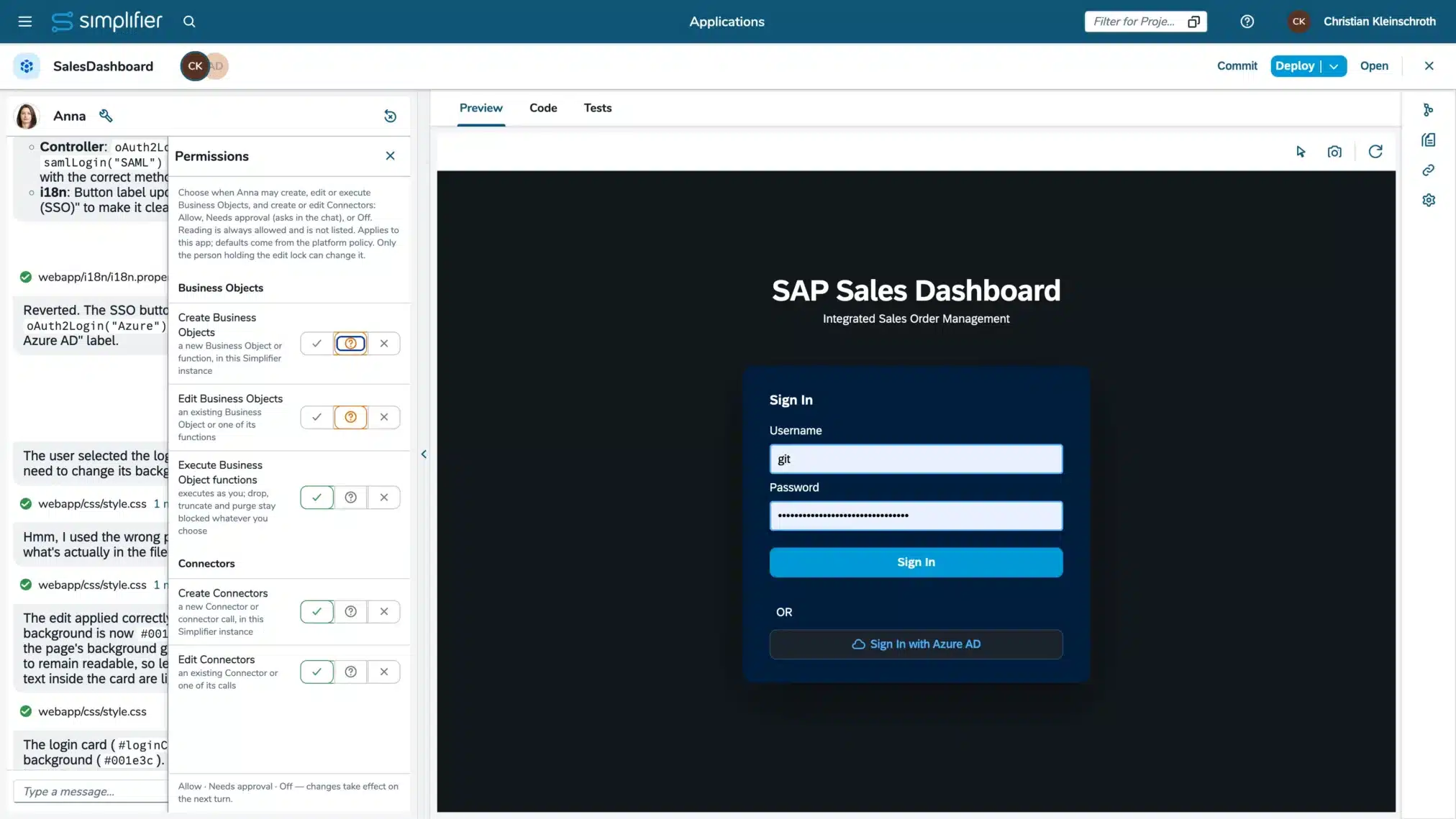
As you know Claude, Cursor, Codex, and many other tools interact with you through text input-prompts. That’s fine for text-based work and pure coding, but Anna’s job is to create Fiori applications with a great user experience. Thus we’ve dramatically improved your development experience – making it visual, with real-time previews, and interactive for beginners and experts alike. Activate the experimental integration of Anna now and develop apps faster than ever. (Read more)
Boost your business by integrating your AI agents
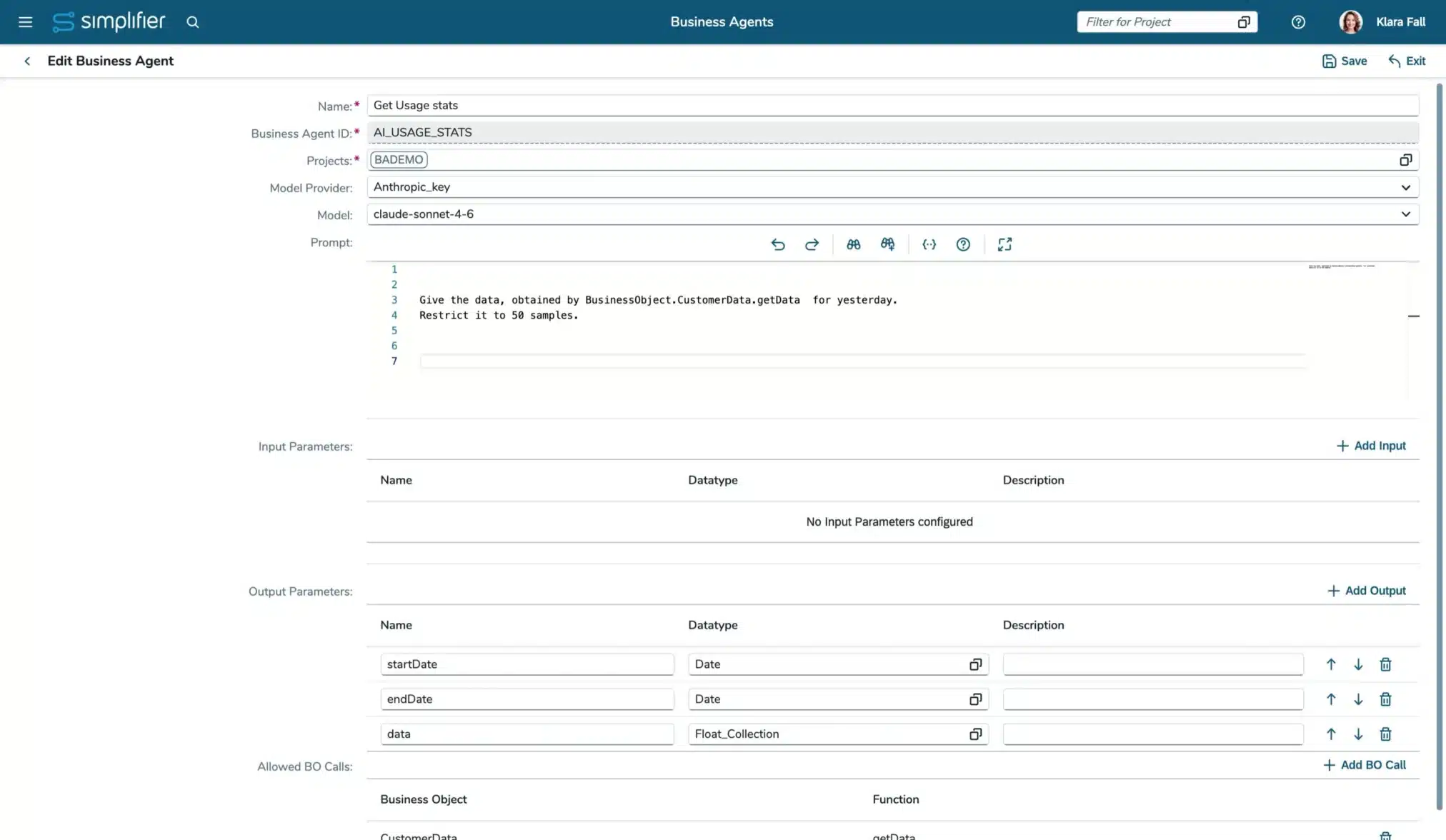
The AI Business Agents have entered Simplifier. Configure your own agents to become available in your processes. Container, sandbox, separated file systems, tool policy and a domain allow-list, working together: Business agents run controlled, isolated, and true to your integrations. Do not hesitate and try our new experimental AI Business Agents! You can already integrate them in your Business Objects. (Read more)
Released with MAKERS CHOICE 26-07
Find required artifacts in seconds
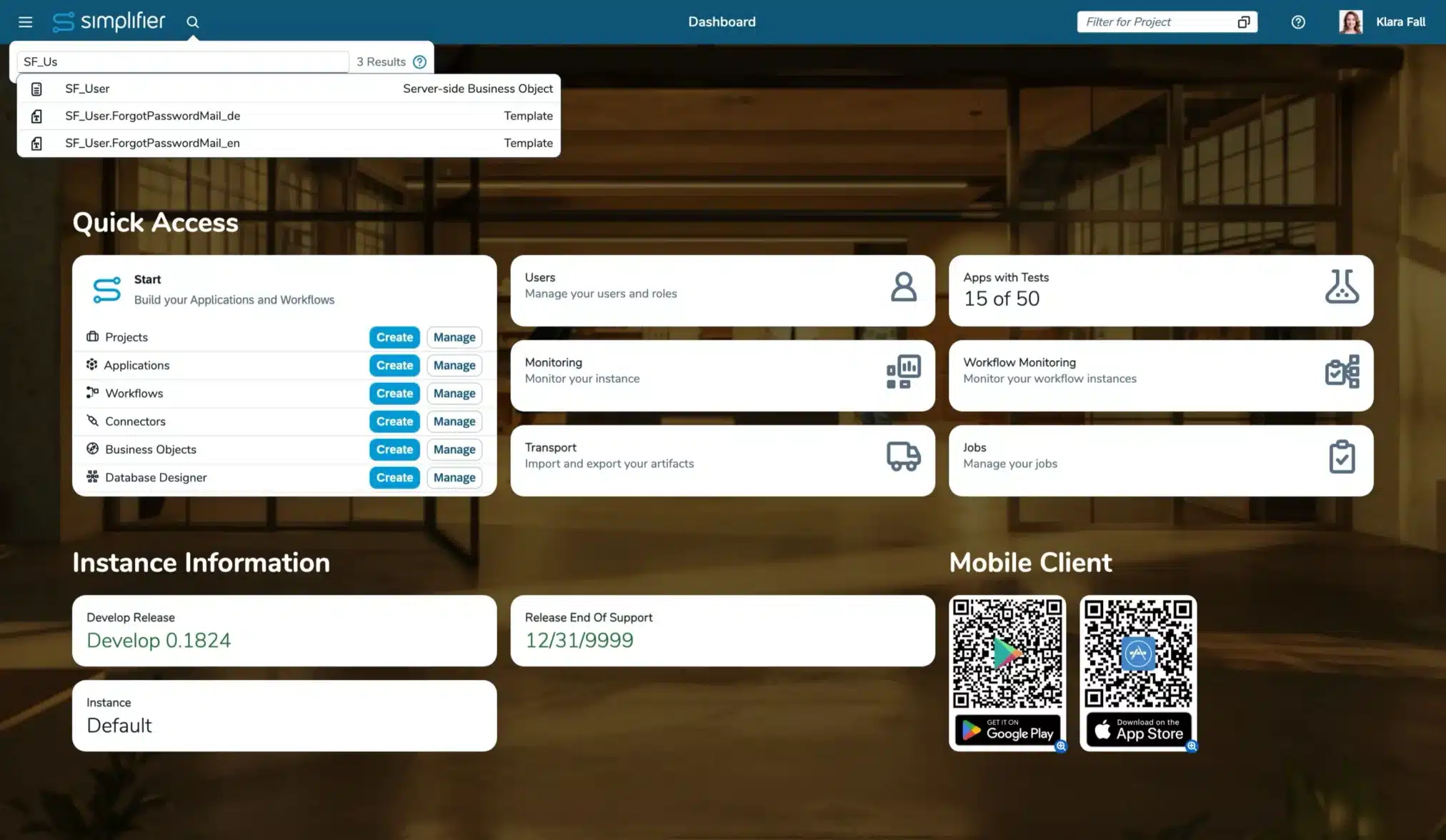
With the new Global Search, you can find almost any artifact directly from the header. Instead of navigating through menus, simply search for apps, workflows, connectors, and more. The search supports filters, exact matches, and automatically respects your access permissions. (Read more)
Increase the quality of your applications
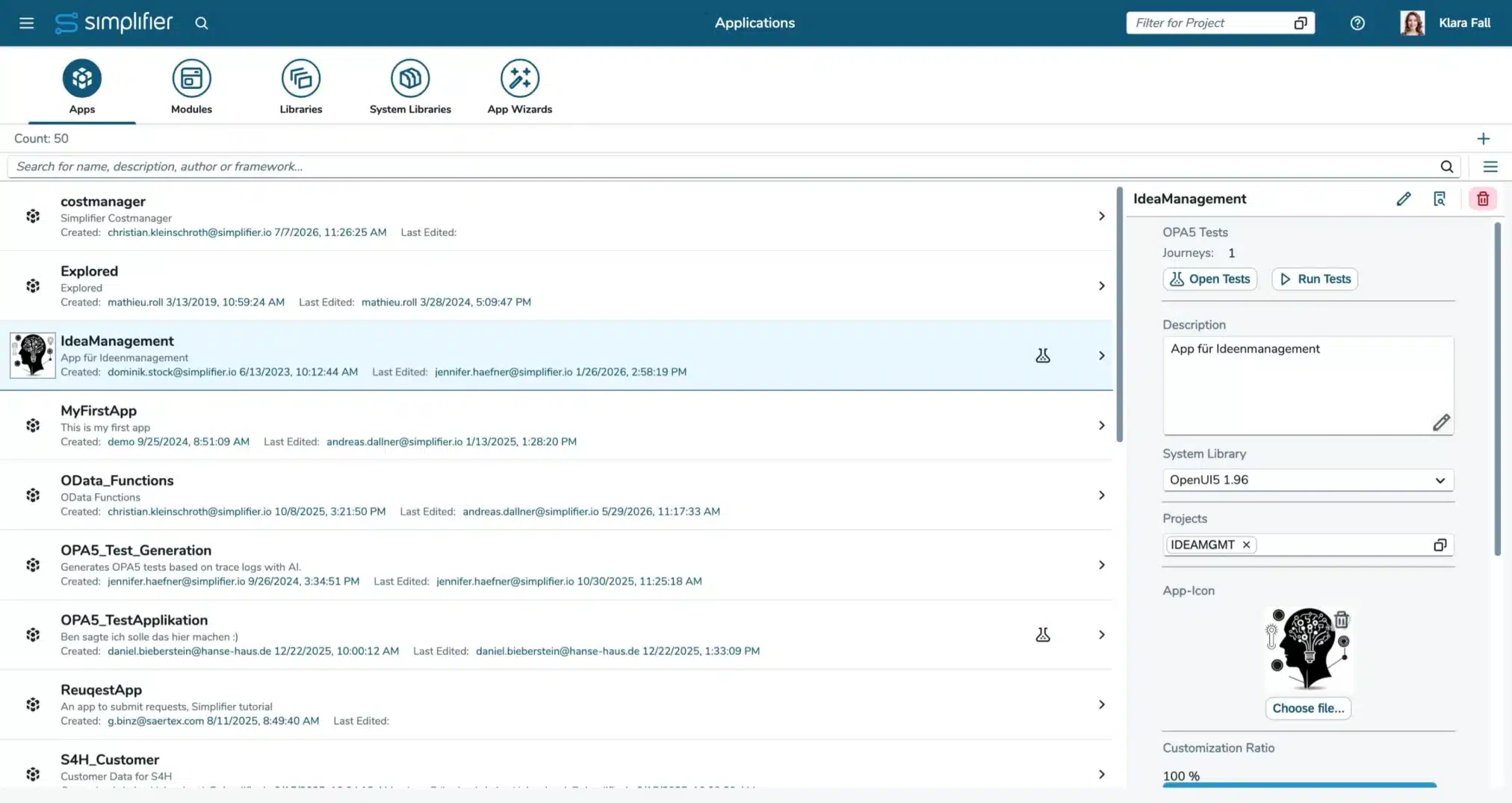
We have made it much easier for you to identify applications without test to boost reaching your required quality and governance level.
Apps without automated tests are now brought to app builders attention in several places, and are now highlighted throughout Simplifier. (Read more)
The dashboard shows how many apps are covered, the app overview displays test details and executions, and a warning appears before deployment of applications when tests are missing. (Read more)
Use UTCP for faster AI Tool Calls
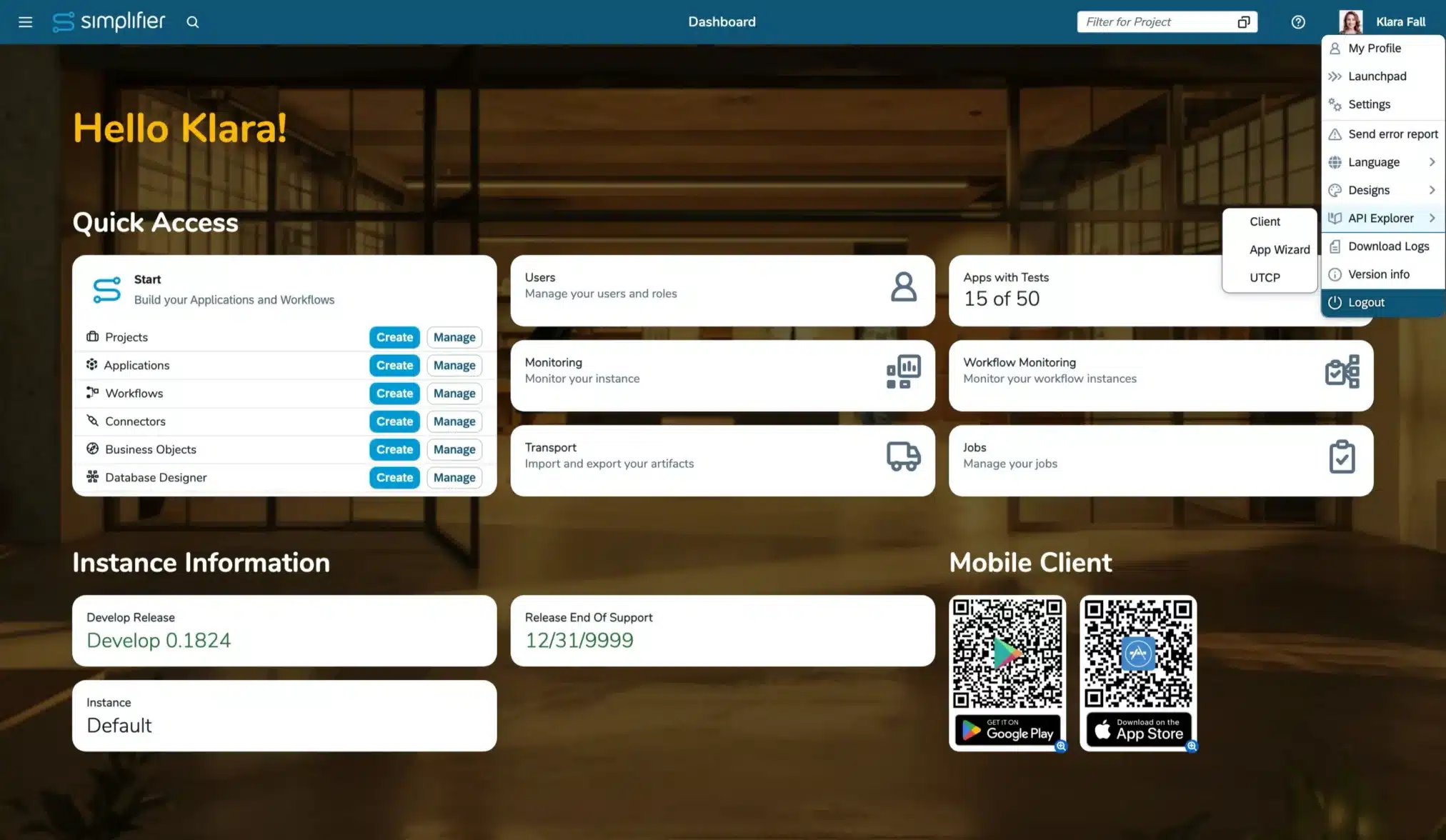
The new UTCP support enables AI agents to access existing APIs and tools directly through their native protocols—without requiring dedicated wrapper servers. (Read more)
Compared with MCP, this reduces infrastructure complexity, avoids additional communication layers, and makes existing enterprise and shop-floor integrations easier to reuse in agentic workflows.
Speed up analyzing issues, reproducing behavior, and testing integrations
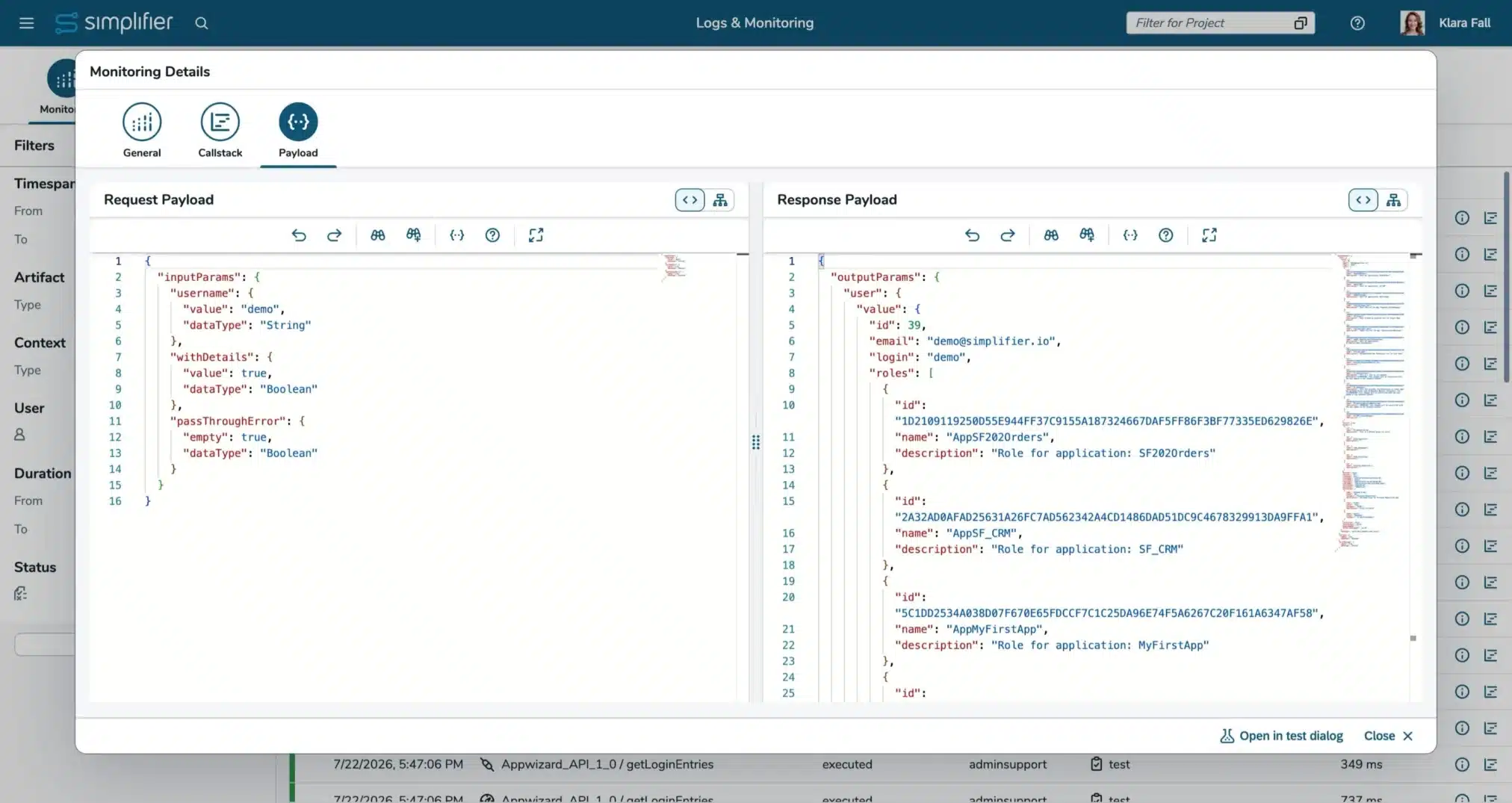
You can now recall integrations directly from Monitoring. Connector calls and Business Object function executions can be reopened with their original parameters, making it easier to analyze issues, reproduce behavior, and test integrations without rebuilding the request manually. (Read more)
Also this enables you to rebook data into system of records in case the system was not available before.
Released with MAKERS CHOICE 26-06
Revolutionizing App Building begins now
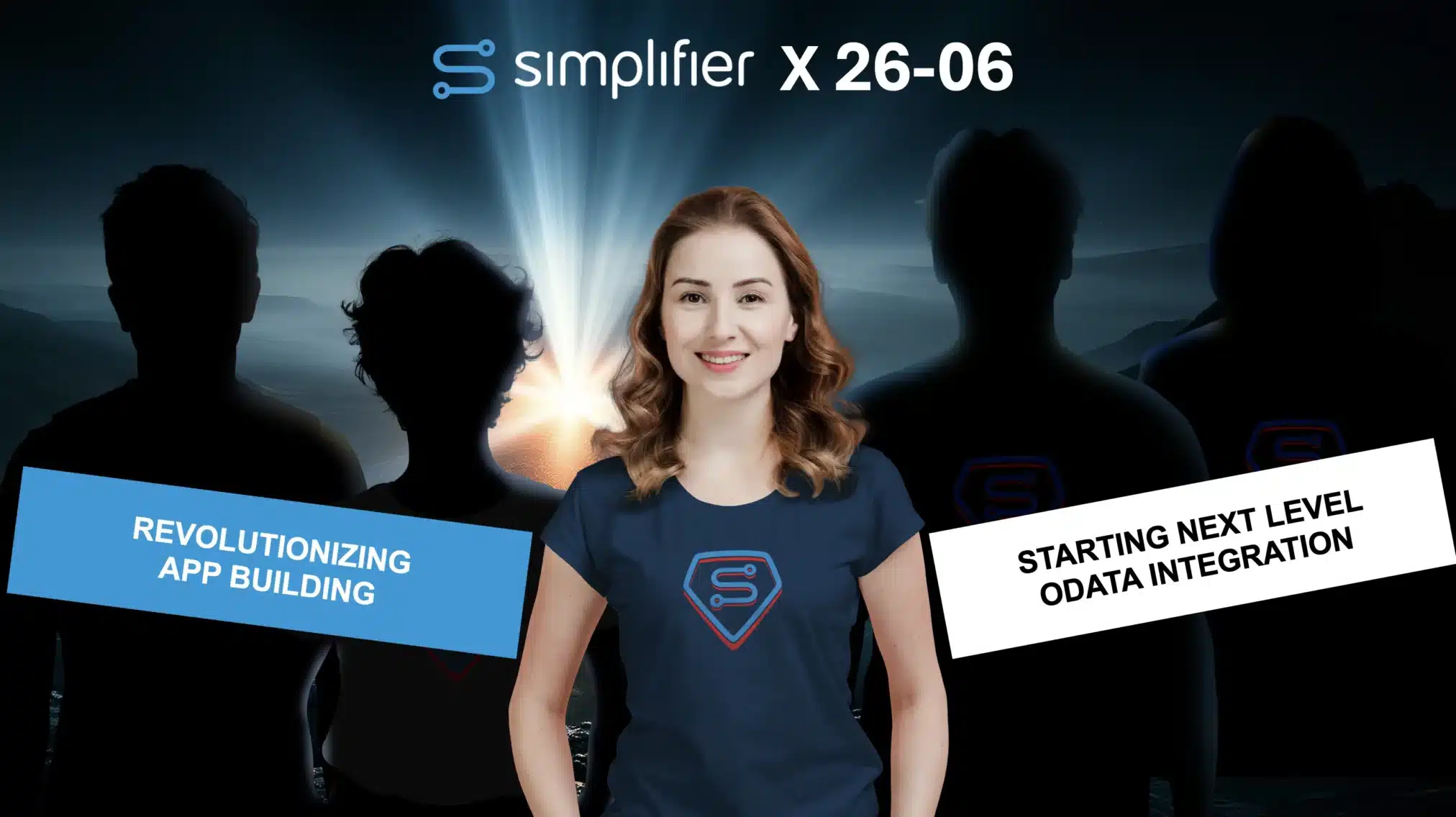
Finally, meet our first experimental version of our new App Editor. With the first step, we focused on moving the App Building based on a GIT integration. This empowers you first-hand to use your AI models to create Simplifier Applications, keeping all the other Simplifier governance, runtime, and integration capabilities! (Read more)
In parallel, we are already working on introducing Anna, our new App Building AI Agent, who will take over simplifying your App Creation within Simplifier. Meet us at the MakersXchange to get first insights and be curious about the next MAKERS CHOICE releases!

Starting next level OData integration
Thanks to the automatic generation of data types, OData services can be integrated into apps and processes faster and with greater reliability. The new OData features make integrations simpler, faster, and more versatile. Filtered entity sets in the Process Designer help drive processes with exactly the data that matters. In the App Editor, OData functions and actions can now also be used as data sources, enabling integration of not only data retrieval but also business logic and operations directly into apps.
The experimental use of the OData Connector in server-side business objects also opens up new possibilities for embedding external data and logic even more directly into backend processes. (Read more)

Released with MAKERS CHOICE 26-04
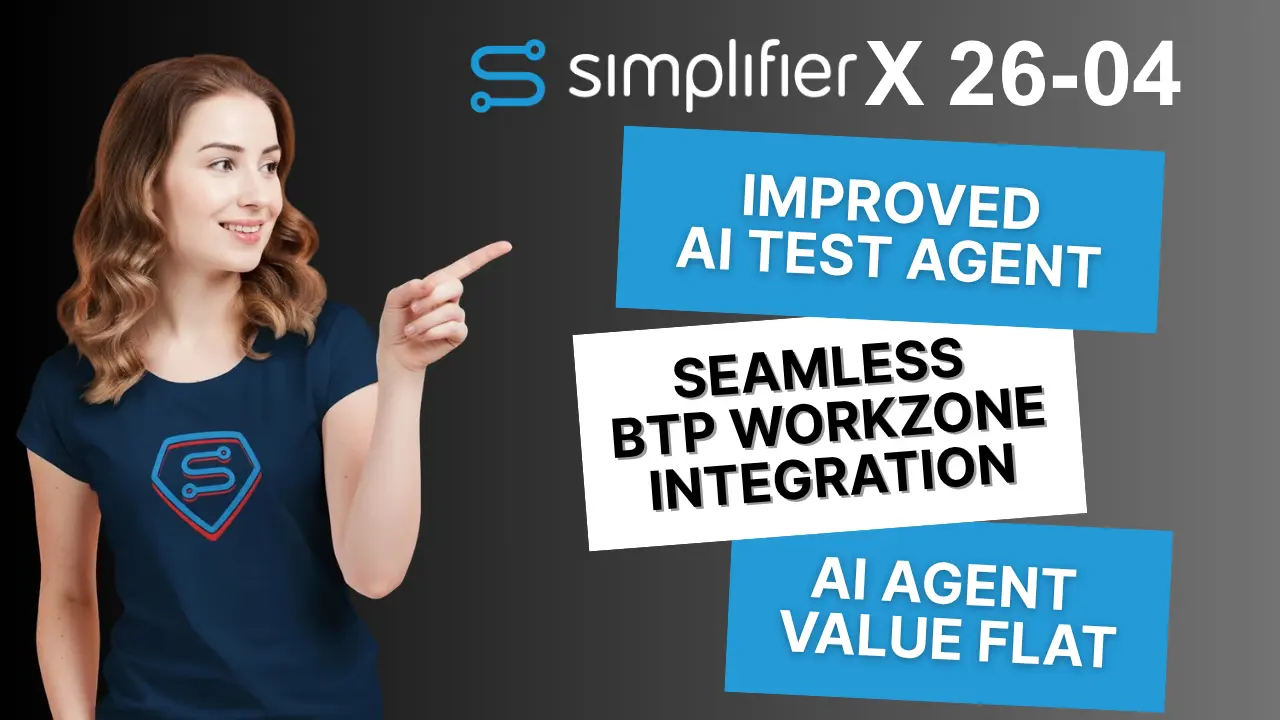
Test agent to generate OPA5 tests
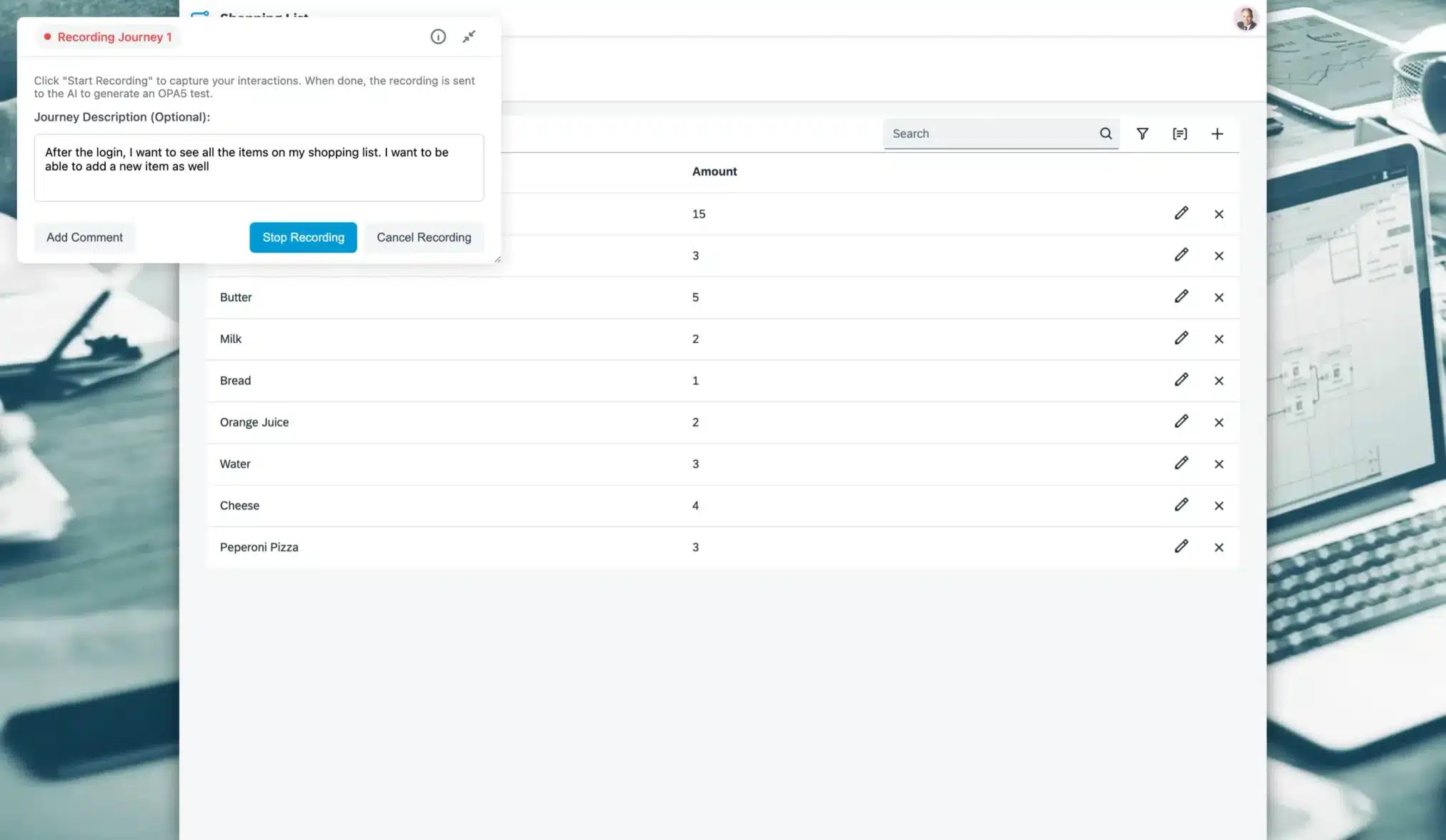
We have improved and released our AI-Agent-powered test generation in Simplifier! With the new recording overlay, you can now record multiple journeys sequentially and add comments and context used by our Test agent to create better tests and assertions.
Empower your business users & testers and free up your experts for high-value tasks with up to 90% faster test creation! (Read more)
New AI subscription with the Simplifier Value Flatrate
A common challenge with AI adoption is cost control. Many solutions rely on usage-based pricing, which can become difficult to predict as adoption grows. With the Simplifier Value Flatrate, our AI agents are available at a fixed monthly price. You can think of it like adding a new team member with a monthly salary, but at only around 5% of the cost.
This gives organizations predictable budgeting, avoids uncontrolled cost growth, and makes AI usage easier to scale across teams and use cases. Instead of tracking token-based pricing or worrying about fluctuating costs, companies can focus on value, productivity, and practical outcomes. (Read more)
Seamless integration into SAP Build Work Zone
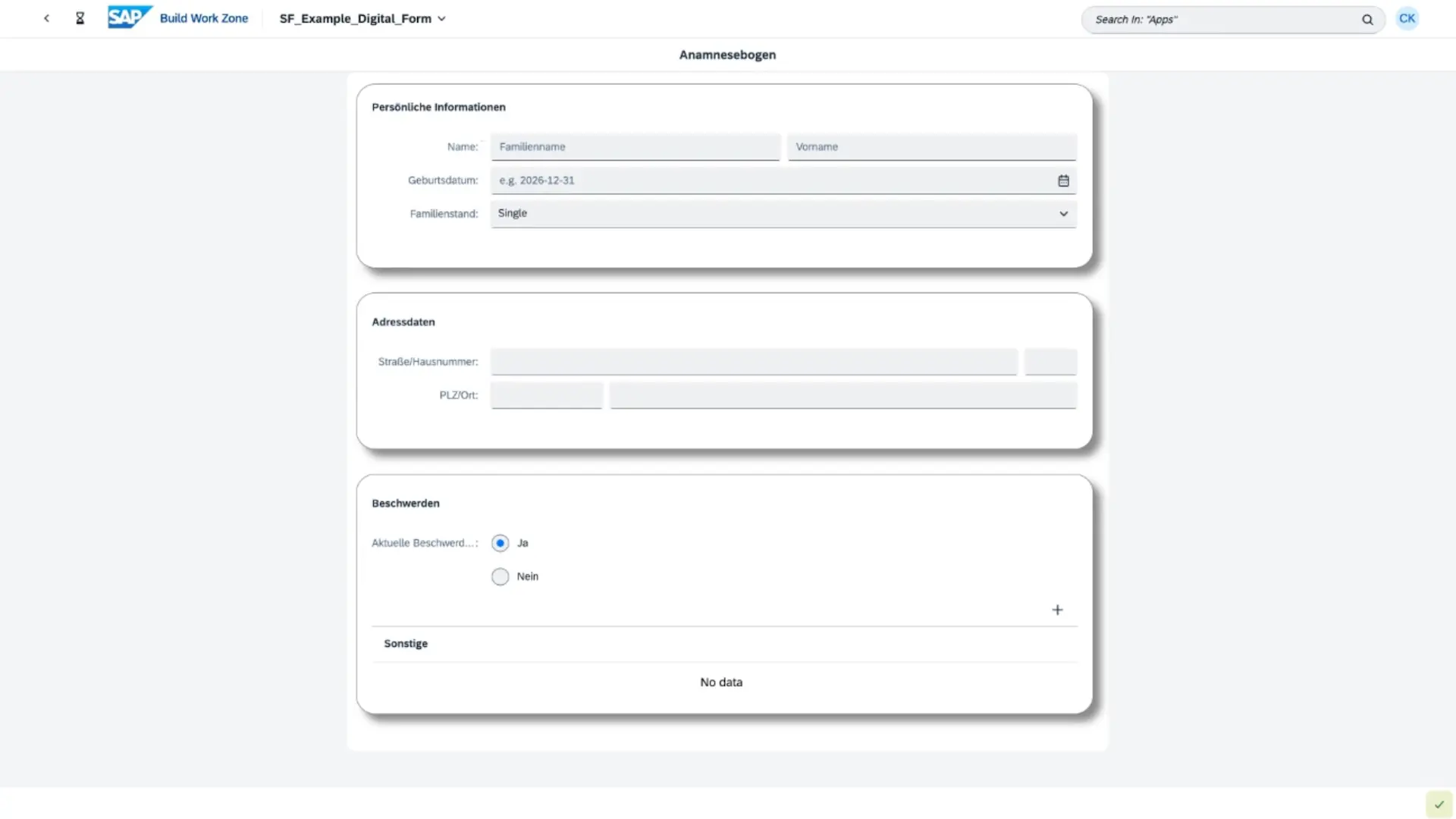
With the new experimental content provider capability, Simplifier applications can now be integrated more smoothly into the SAP Build Work Zone environment. This allows organizations to provide Simplifier apps directly within their central digital workplace, improving accessibility and creating a more connected user experience across SAP-based landscapes.
A key advantage is that these apps do not need to be deployed separately to the SAP BTP runtime. That means no additional deployment effort, no delays when rolling out updates, and no extra runtime-related costs showing up on the SAP BTP bill.
For customers, this results in a much leaner operating model: easier integration, faster updates, and lower overhead when delivering applications through the SAP Build Work Zone. (Read more)
Released with MAKERS CHOICE 26-02

AI-driven test automation
With AI-powered test generation in Simplifier, you no longer have to write OPA5 test code by hand.
Just deploy your app, start an AI Journey, and record a normal user flow by clicking through the application.
In the background, the AI analyzes everything you do and automatically creates the corresponding Journeys and Page Objects as fully executable tests. This means you can turn real user scenarios into reliable automated tests in a fraction of the time—without any coding at all.
And when your app changes, you can simply re-record or extend a journey. The AI updates your tests for you, so you don’t have to start from scratch. (Read more)
Our AI-powered testing is currently an experimental first version. We’re releasing it early so you can already benefit from it, gather your feedback, and continuously improve accuracy, flexibility, and integration in the upcoming Simplifier releases.
AI-driven test automation in Simplifier enables faster releases with more test coverage. A much lower entry barrier for people without coding skills. Less repetitive test maintenance. And more time for your experts to focus on architecture, quality, and innovation. In short: you turn real user journeys into automated tests — in a fraction of the time.
Released with MAKERS CHOICE 25-12

MCP Everywhere – Connect to (Almost) Anything
We’ve added MCP support for REST, SQL, RFC, and SOAP connectors, all with guided prompts and AI-powered testing. Security is built in with OAuth, Basic Auth, Token, and SAP SSO support. Database integration is seamless with automatic schema exploration. (Read more)
SAP users get full RFC connector capabilities with function browsing. Legacy SOAP systems are fully supported with WSDL integration.
And it’s all available as a Docker image, listed in official MCP registries including Model Context Protocol, Glama.AI, and MCP.so. Deploy anywhere, connect to anything.

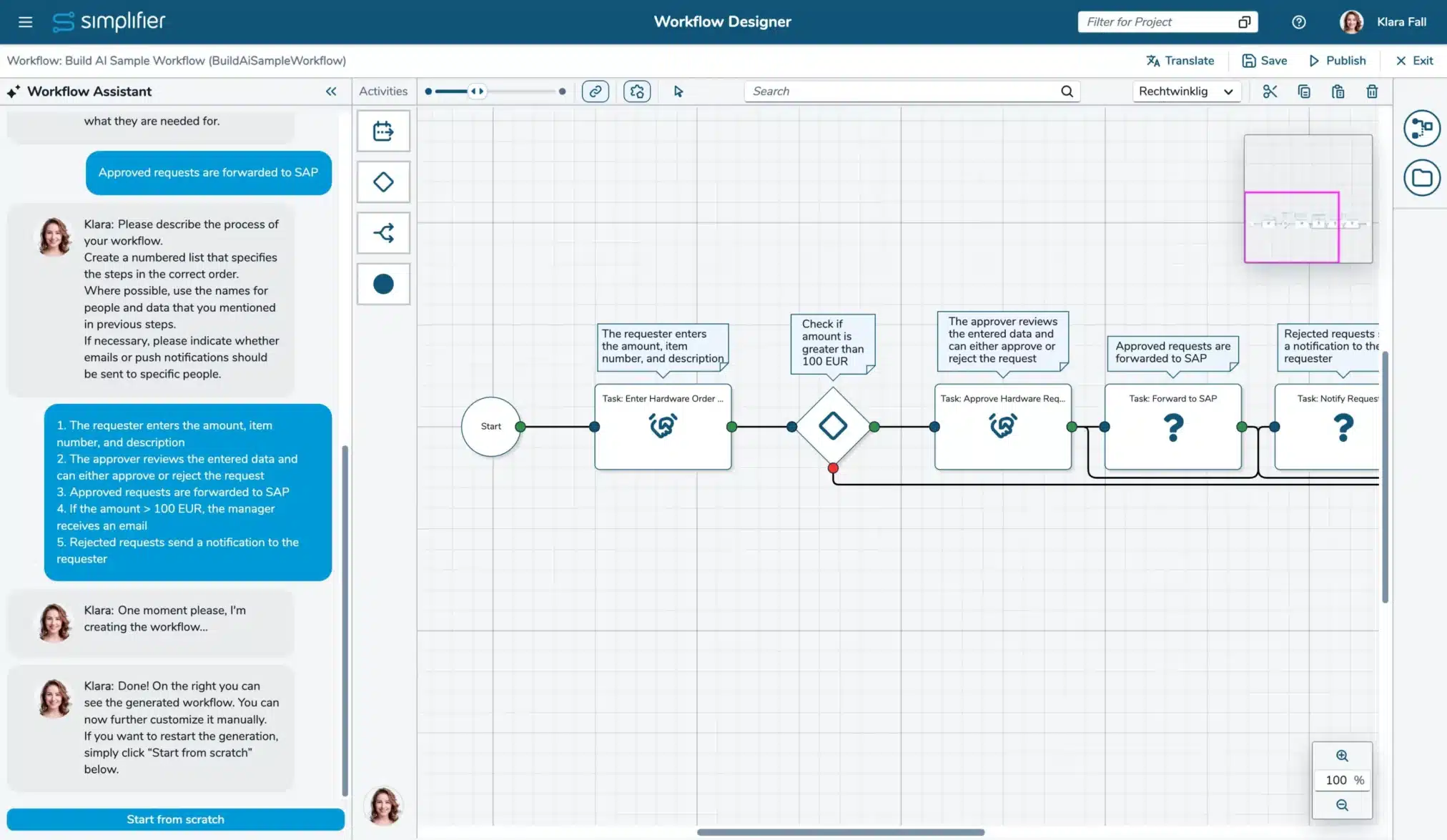
The Workflow Build AI just got significantly smarter
When generating workflows, it now automatically creates and manages variables. It recognizes when automation is needed and creates automated tasks for you. Plus, it builds proper decision logic by creating outcomes and conditions using variables, autofields, and constants – delivering truly intelligent, branching workflows. (Read more)
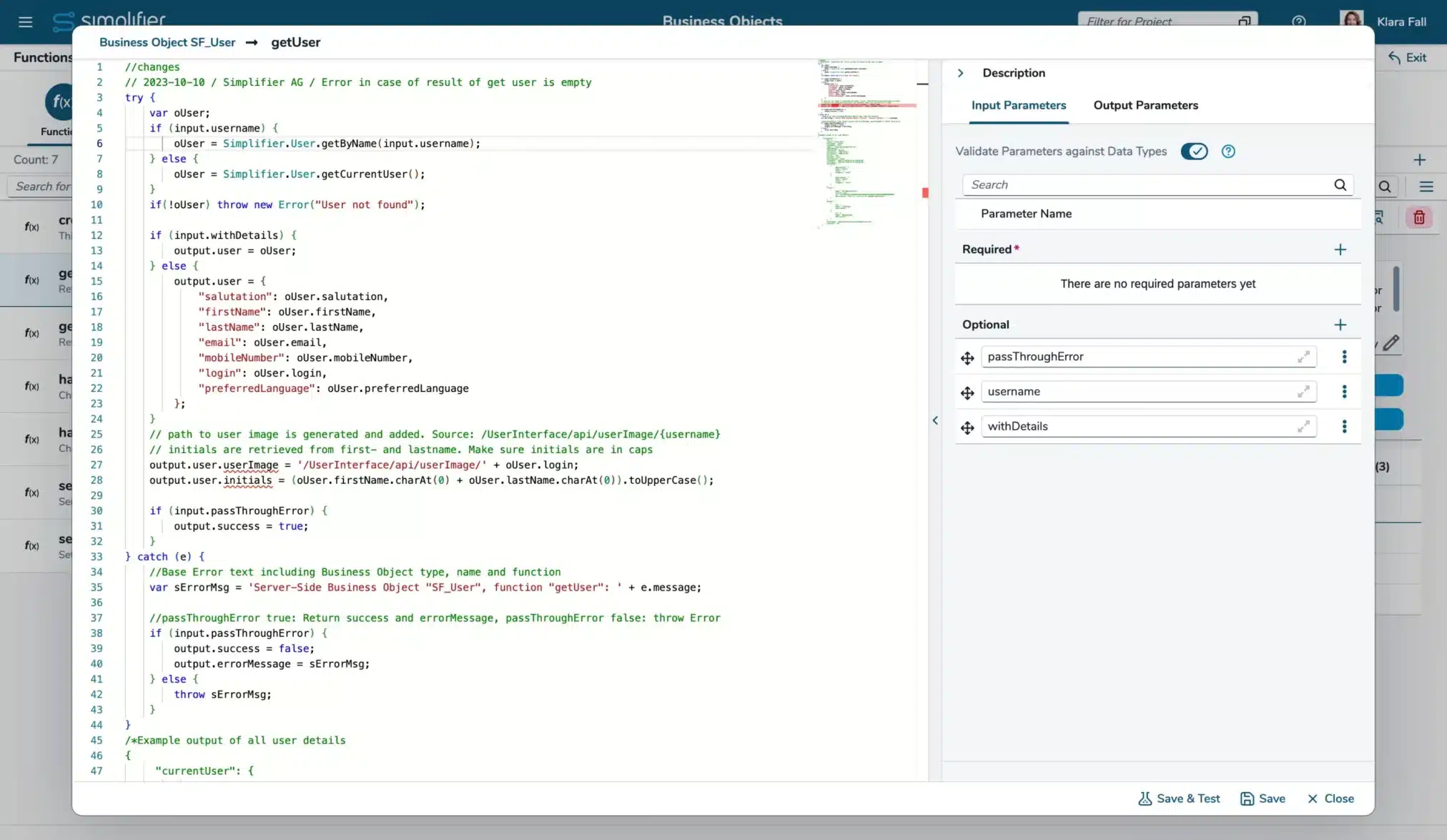
VS Code Monaco Editor for Developers (experimental)
We’re starting to introduce the VS Code Monaco Editor, which brings full ECMA 2022 support. Business Object functions, SQL Connectors, and Templates can now be edited with modern syntax highlighting, intelligent auto-complete for Simplifier APIs, parameter hints, and all the power of a professional code editor right in your workflow. (For details, see our documentation of Business Object functions, SQL Connector calls, and Templates)
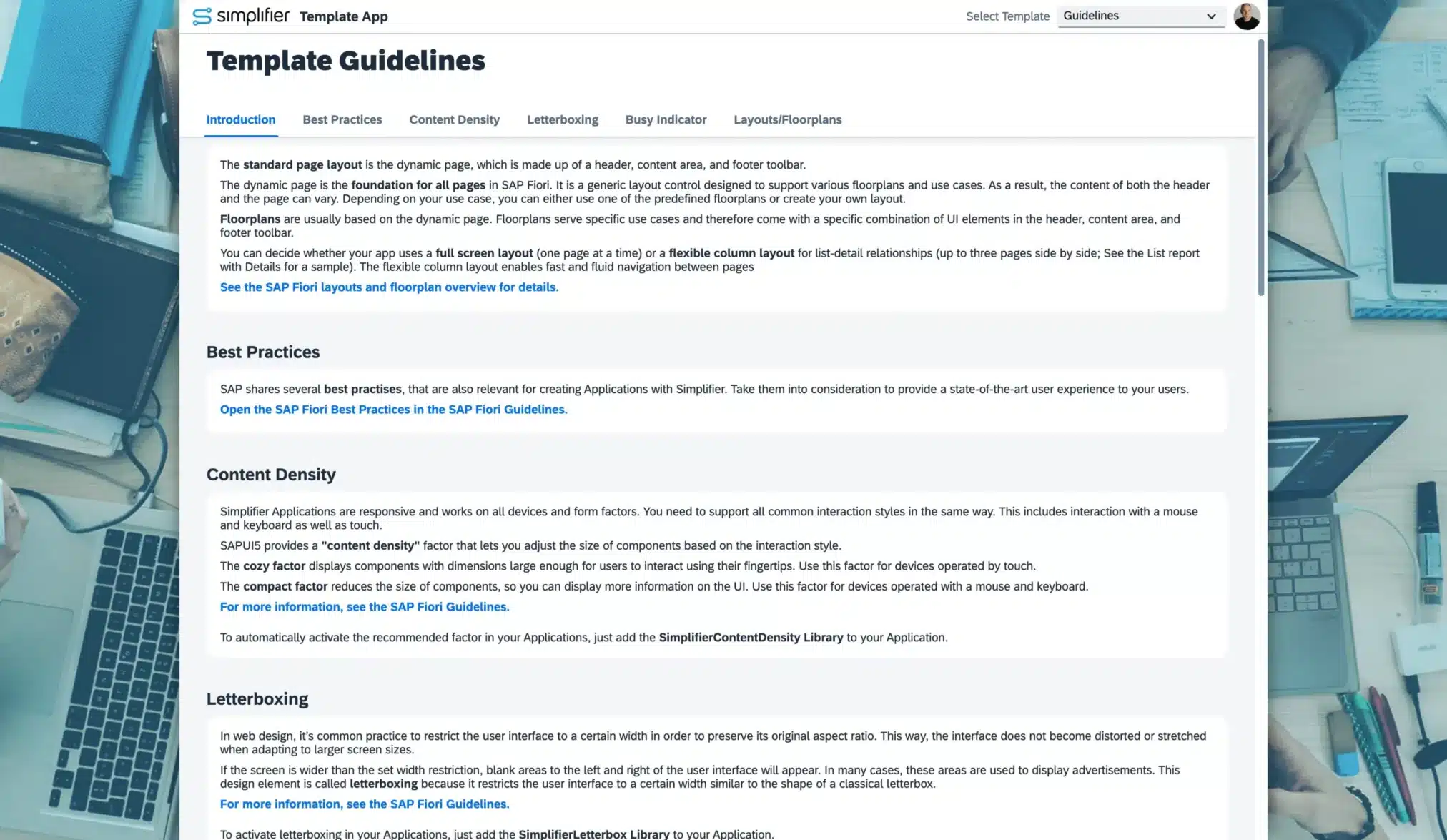
Simplifier Guidelines and Best Practices
With the new version of our Template App, you get built‑in UX guidance matched to creating Applications with Simplifier.
The updated app now includes clear layout and navigation recommendations and best practices for SAP Fiori–aligned user experiences like content density, letterboxing, busy indicators, and more.
Changelog Simplifier 11
MCP/UTCP
- [AI] We exposed a UTCP API documentation for most endpoints. The documentation is exposed here: <<your instance uri>>/.well-known/utcp (Read more)
- [AI] Copy a prompt for your AI agent to use the UTCP documentation inside the user menu’s option ‘API Explorer’ (Read more)
- [AI] You can now also create, read and update OData connectors via MCP (Read more)
- [AI] Use OData connectors in Server Side Business Objects via MCP (Read more)
- [AI] The Simplifier MCP Server Docker container is now also available for ARM based platforms
- [AI] The Simplifier MCP Server now also supports creating and testing SOAP, RFC, and SQL Connectors and Calls, and has moved to life cycle stage ‘Released’ (Read more)
- [AI] The Simplifier MCP server now supports assigning login methods to connectors and creating OAuth, Basic Auth (Username/Password), Token, and SAP SSO login methods (Read more)
- [AI] The Simplifier MCP server can now be used as a container, available as ‘simplifierag/simplifier-mcp’ at https://hub.docker.com/r/simplifierag/simplifier-mcp
- [AI] The Simplifier MCP server is now also listed on modelcontextprotocol.io, Glama.AI, MCP.so, and Docker MCP Registry (approval pending)
- [AI] New read-only tools added to improve support of OpenCode, Cursor, Cline, Continue, and Windsurf
- [AI] A new version is now created on updating a Business Object’s function via MCP
App Building
- [AI] Our AI Agent Anna is now integrated within Simplifier (experimental) (Read more)
- [AI] Build Apps using your AI models via the new GIT integration (in Preview) (Read more)
- [AI] New AI agent Theo (Test Engineer) for OPA5 test generation (Read more)
- [Applications] Further performance and reliability improvements to the app editor’s WYSIWYG preview
- [Integration] Deactivating the input validation of Server-side Business Objects called from scripts by setting the API’s parameter ‘parametrized’ to false has been removed (Read more)
- [Applications] Circular dependencies of data types are now supported
- [Applications] Simplifier can now be used as a content provider for the SAP BTP Workzone (experimental) (Read more)
- [Applications] The initial value for a DataWorkbench-Variable can now be up to 4 GB large
- [Applications] The default value for searching in all user stories in the Process Designer is now set to ‘All Activities and Mappings’ instead of ‘Stories’
- [Applications] Regex for custom data types can now be configured to be case-insensitive (Read more)
- [Applications] The VS Code Monaco Editor replaced the existing editor
- [Applications] Standard Data Types for Collections based on Base Types are now available
- [Applications] New Theme Designer as a service and open source on Github (Read more)
- [Applications] Improved Variable References Dialog
- [Applications] Improved detail view for struct datatypes
- [Applications] The list of entity sets in OData Shapes is now sorted alphabetically and case-insensitively
- [Integration] OData functions and actions can now be used as a data source in the App UI Designer
- [Integration] The OData service shape’s function ‘load dataset’ now supports filtering by entity property values (Read more)
- [Integration] OData list bindings are now loaded exactly when defined in the Process Designer
- [Integration] Automatically generated data types for OData connectors can now also be used for parameter mappings in the app editor
- [Applications] The widget’s ID can now my used as source parameter in input mappings
- [Integration] The error dialog for the Data Service shape, when an OData data type could not be loaded from the database, was improved to hint that the types may need to be regenerated
Workflows
- [AI] The Workflow Build AI Agent Klara to create Workflows now also supports creating and using Variables, Outcomes, Conditions, as well as adding shapes for automated tasks (configuration has to be done manually) (Read more)
- [AI] The AI Agent Klara (Workflow Builder) is moved to the life cycle stage ‘permanent’. The feature cannot be deactivated in the ‘New Features’ settings anymore
- [AI] Improved Workflow Designer and chat user experience with AI Workflow Builder Agent Klara
- [AI] Enhanced Error Handling and Logging of the AI Agent Klara feature
- [AI] The prompt for generating workflows with AI Agent Klara has been improved to prevent vertical overlapping of the generated shapes
- [AI] There are now games integrated in the busy dialogs while waiting for the AI Agent’s result. A finished generation request is indicated in the dialog’s title, and the close button is enabled
- [Workflows] You can now step back to the last manual task in your Workflow instance from the Workflow Monitoring and via Workflow Client API (Read more)
- [Workflows] Added a comment feature to your Task Modules via the new comment endpoints in the Workflow client API (Read more)
- [Integration] The Swagger documentation of the Workflow API is now grouped as Workflow only
Business Objects
- [Integration] We have enhanced the connector SBO API to support using OData connectors in server-side business objects as an experimental feature (Read more)
- [Integration] CryptoJS is deprecated and can be deactivated in the Feature settings (Read more)
- [Integration] The global Business Object API objects CONNECTOR_, BUSINESSOBJECT_, PLUGIN_, LOG_, TOOLS_, and USERS_ are deprecated and can be deactivated in the Feature settings (Read more)
- [Integration] The SBO API was enhanced to cover the most used crypto functions encryptAES, decryptAES, hashSHA256, and hashMD5 (Read more)
- [Integration] Deactivating the input validation of Server-side Business Objects called from Client-side Business Objects by setting the API’s parameter ‘parametrized’ to false has been removed (Read more)
- [Integration] The VS Code Monaco Editor replaced the existing editor
- [Integration] Due to changes in the browser engines, SSO Debugging is not working anymore. The feature setting will be removed in a later release
Connectors
- [Integration] We have deprecated the result types in SQL connectors. You can list all SQL Connector calls still using the deprecated result types in the ‘New features’ settings (Read more)
- [Integration] We have deprecated the simple mode in SQL connectors. Deactivate the feature flag in the feature settings to ensure that the simple mode cannot be set on new calls/edits. You can list all SQL Connector calls still using the simple mode in the ‘New features’ settings
- [Integration] Removed the ‘Edit calls’ button from the overview details of OData and Proxy connectors
- [Integration] Data types for OData connectors are now created automatically and can be manually regenerated (Read more)
- [Integration] The VS Code Monaco Editor replaced the existing editor
- [Integration] In SOAP Connectors, you can now configure a separate login method for the WSDL download (Read more)
- [Integration] REST connector now always escapes space as %20, never as +
- [Integration] The new SOAP Connector is now in the lifecycle stage ‘permanent’ and cannot be deactivated anymore
- [Integration] The improved REST Response Processing feature lifecycle stage is now ‘released’ and activated by default
- [Integration] The RFC Connector Wizard now supports updating existing calls (Read more)
- [Integration] The MQTT connector now supports connections via TLS and websockets (Read more)
- [Integration] We have added a value help to the scope field in the configuration of the OAuth 2 (Microsoft EntraID / OAuth Client Credentials Flow) Login Method (Read more)
- [Integration] External references in WSDL declarations can now be enabled in the security settings (Read more)
- [Integration] The client secret of OAuth 2 (Microsoft EntraID / OAuth Client Credentials Flow) Login Methods is now obfuscated
- [Integration] SAP RFC Connectors and SAP Systems can now only be created if licensed (License option ‘Advanced SAP Integration’)
- [Integration] There is now a better error message when the broker name configured in the Connector Endpoint does not match the one in the connector call
- [Integration] When there is an error while subscribing to a topic via MQTT-Connector, now a proper error dialog will be displayed to the user instead of silently omitting the error
Database Designer
- [Integration] The database canvas now persists the table’s coordinates on saving or deploying the schema
- [Integration] For Microsoft SQL Server, new String-Based columns will now be handled as NVARCHAR(MAX), instead of the NTEXT, Columns that are present in the database as NTEXT will stay so and not change
- [Integration] We introduced a new data type “Big Integer” to fully support 64-bit-sized integers (Read more)
- [Integration] Data types for database schemas are now created automatically
- [Integration] EntitySet and EntityType names are validated so they do not start with a digit. Invalid EntityType and EntitySet names are automatically fixed by adding an underscore in front if the table name is updated or a schema is imported
Jobs
- [Integration] When viewing monitoring logs of a job, the entries are displayed newest to oldest and the job duration calculation was improved
Users and Permissions
- [Applications] Removed the ‘active’ flag from Global roles and the corresponding APIs
- [Applications] User and Group lists are now sorted alphabetically and case-insensitively
- [Applications] Creating Simplifier tokens via API for users with activated MFA is now deprecated (Read more)
Transports
- [Workflows] The timeout for fetching workflow export items has been increased from 1 minute per item to 5 minutes per item
Logs and Monitoring
- [Integration] You can now recall Server-side Business Object functions and Connector calls from the monitoring (Read more)
- [Integration] Failed Connector Calls and Business Object functions are no longer logged in the audit log, since all information logged is already present in the monitoring
- [Integration] VS Code Monaco Editor is now available in the log details view
- [Integration] Optimized handling of large JSON payloads. Handling is now more efficient. Reduced logged payloads are now marked with a parameter ‘wasShortened’ in the monitoring details
- [Integration] In the monitoring, there was a confusion with the old label (“message sent”) for websocket-based subscription connectors when a message is sent by the websocket to the client. This label has been adjusted for better clarification
Settings
- [Integration] The fields “Sender Email” and “Sender” have been consolidated into one field in the SMTP Settings (Read more)
- [Integration] The client secret of OAuth authentication methods is now obfuscated
- [Integration] The client secret of OAutch client flow login in the SMTP settings is now obfuscated
- [Integration] The VS Code Monaco Editor is now available in the SSO Authentication test view and the SAP Authentication (secret extraction)
Standard Content
- [Applications] The standard content’s widgets are now also available for the OpenUI5 version 1.148. This version is also set as default for new Apps and Moduls. Default Theme is set to Horizon
- [Applications] The widgets TableEnhanced and Input now support OData v2 and OData v4
- [Applications] The PDFViewer_PDFJS Widget (OpenUI5 1.96) was completely rebuilt to support the viewing of more PDFs and update the used library
- [Applications] Added new library SimplifierContentDensity to automatically set the application’s content density based on the Fiori Guidelines (Read more)
- [Applications] Added new library SimplifierFontFix to set the SAP default font also in Popovers, like a select list. This library is automatically added to all new apps
- [Applications] Added new WidgetGroups SuccessMessage, InformationDialog, and ConfirmationDialog
- [Applications] Added new Client-side Business Object SF_Navigation to provide a dynamic possibility to navigate to screens or to pages within a NavContainer
- [Applications] Added the library SimplifierTokenValidation from the marketplace to the standard content
Miscellaneous
- New experimental global search letting you find most artifact types in a second (Read more)
- The Dashboard and Menu entries for Workflows and Workflow Monitoring are now marked if these features are not available on the instance
- The routes for creating and viewing artifacts have been harmonized
- Send emails via Simplifier does not block the thread pool handling https requests anymore
System Requirement Changes Simplifier 11
There are no further changes to the system requirements yet.
General Upgrade Instructions for Simplifier 11
We have installation instructions prepared based on the versions you are upgrading from:
If you are setting up a new instance, please follow our installation guide for Simplifier 11.
Manual Changes that should already be done before upgrading to Simplifier 11
Allow *.simplifier.cloud in firewall
Simplifier requires access to *.simplifier.cloud domains to make all features available. Please allow access to *.simplifier.cloud in your firewall settings. (Read more)
Manual Changes to be done after upgrading to Simplifier 11
Replace OData V2 Connectors with new OData Connectors
Activate the OData V2 Connectors in the Feature Settings if it is deactivated and replace your legacy OData V2 Connectors with our new OData Connector and switch to the Data Service Shape in your Applications/Modules (Read more).
The legacy OData V2 Connector will be removed with Simplifier 11/MAKERS CHOICE 25-12. Thus, you should first complete the upgrade on all instances and then replace them with a new OData Connector. For more details, please see the Discontinued Tab (Read more).
This migration note was already published with Simplifier 10.
Replace the CBO function SF_File / convertFileToDataURL if used with Base64 files
The input parameter isBase64 is deprecated and will be removed in a future release. Please use the CBO function SF_File / convertFileToObjectURL instead. Find the places by using the Business Object usage feature.
This migration note was already published with Simplifier 10.
Switch to Client 2.0 Route for accessing Proxy Connectors within Scripts/Client-side Business Objects/REST API
Customers hosted in our Simplifier Cloud will get all occurrences listed upon your Upgrade Request. For on-premise instances, please contact our Customer Success Team. They let you know how to identify the places that have to be changed.
The client 1.0 route for Proxy Connectors will be removed with Simplifier 11. Thus, you should first complete the upgrade on all instances and then modify the Scripts/Business Objects as necessary before replacing the route. For more details, please see the Discontinued Tab (Read more).
This migration note was already published with Simplifier 10.
Removed Parameter ‘parametrized’ on calling Business Objects within Scripts and Client-Side Business Objects
We removed the parameter ‘parametrized’on calling Business Objects within Scripts and Client-Side Business Objects. You need to adapt your Applications and Business-Objects if you are using that option, to avoid unforeseen behavior of your Applications
Deprecated since MAKERS CHOICE 25-07
Refresh License
Refresh the license on your instances to benefit from our new AI Cloud services (Read more).
Update Standard Content
Update Standard Content to ensure you have all current fixes and features available on your instances. Update your Apps to OpenUI5 1.148 using our UI5 Upgrade-Wizard. (Download here)
Please check the endpoint of AppWizard Connector, Standard Workflow Connectors, Login, and Captcha Connector. (Read more)
Deactivate the simple-mode of SQL Connectors
The feature got deprecated. Existing calls with simple-mode will still work. For more details see our discontinued section (Read more).
Manual Changes to be done after upgrading to Simplifier 11 and before upgrading to Simplifier 12
Check the deprecated features
Please review all deprecated features and implement any necessary adaptations. (Read more)
Deprecated Features Simplifier 11
[Applications] Create Simplifier tokens via API for users with activated MFA
Currently, you can create tokens with the credentials of Users with activated MFA via our API. This behavior is deprecated due to security concerns. We will remove that feature in the future. You can already deactivate it in the Feature Settings.
Users with activated MFA will not be able to login in to the Simplifier Client or your Business Applications. If you want to enable it also for Business Apps, you have to use a third-party Identity Management Provider like Azure Entra ID.
Deprecated since MAKERS CHOICE 26-09; Removal with a MAKERS CHOICE Release after Simplifier 11. Latest Removal with Simplifier 12
[Integration] Result type in endpoint settings of SQL Connectors
With the integration of calls to the SQL connector, the Result types ‘Single Result’ and ‘No Result’ have been replaced by the output parameters, but have not been deleted yet.
Now it is only possible to create new connector endpoints with the only remaining result type ‘Multiple Results’, and if a Result Type is changed from one of the deprecated types to ‘Multiple Results’, it cannot be changed back.
Note: As soon as we delete this feature, we will migrate all remaining calls to the ‘Multiple Results’ result type.
We encourage you to already deactivate the simple mode to be used in new / changed calls in the Feature Settings. If the setting is deactivated, existing calls will use the ‘Multiple Results’ result type. Use the ‘Show usage’ button to get all a list of all connectors that still use the deprecated result types.
Deprecated since MAKERS CHOICE 26-07; Removal with a MAKERS CHOICE Release after Simplifier 11. Latest Removal with Simplifier 12
[Integration] Simple mode in SQL Connectors
The simple mode in SQL Connectors is redundant to query and execution mode and will be deleted in a future Release. Please change your existing configurations to either query or execution. As the behaviour might change for the connector call’s result when changing the call’s mode, we cannot provide a default automated migration.
Note: As soon as we delete this feature, we will migrate all remaining calls to the query mode.
We encourage you to already deactivate the simple mode to be used in new / changed calls in the Feature Settings. If the setting is deactivated, existing calls with simple mode can still be used. Use the ‘Show usage’ button to get all a list of all calls that still use the simple mode.
Deprecated since MAKERS CHOICE 26-06; Removal with a MAKERS CHOICE Release after Simplifier 11. Latest Removal with Simplifier 12
[Integration] Support of CryptoJS in Server-side Business Objects
The active development of CryptoJS ended a while ago. For security reasons, the CryptoJS integration will be removed from Simplifier.
For server-side business objects, there will be no direct replacement. We provide replacements within the Simplifier SBO API for selected CryptoJS APIs instead, starting with AES encryption and SHA256 hashing. On-premise customers with use-cases not covered by these should contact us (for Simplifier-hosted customers, we will check CryptoJS usage automatically).
If you need client-side crypto functionality, we recommend using the available JS Web Crypto API.
You can already deactivate CryptoJS in the Feature Settings.
Deprecated since MAKERS CHOICE 26-04; Removal with a MAKERS CHOICE Release after Simplifier 11. Latest Removal with Simplifier 12
[Integration] Global API objects (capital letters) in Server-side Business Objects functions
Currently, you can still use the redundant and outdated global Business Object API with the prefixes CONNECTOR_, BUSINESSOBJECT_, PLUGIN_, LOG_, TOOLS_, and USERS_. Their usage is deprecated and will be removed in the future. Use the Simplifier SBO API instead.
You can already deactivate the global objects in the Feature Settings.
Deprecated since MAKERS CHOICE 26-04; Removal with a MAKERS CHOICE Release after Simplifier 11. Latest Removal with Simplifier 12
[System requirements] Support of Oracle for Simplifier databases
Oracle support for your Simplifier instances has been deprecated and will be removed in a future release.
Deprecated since Simplifier 8 EHP 4; End of support with a MAKERS CHOICE Release after Simplifier 11. Latest end of Support with Simplifier 12
[Integration] Javascript execution in PDFs created by PDF Plugin
Currently, it is possible to add Javascript to PDFs created by PDF Plugin. This is a potential risk for Server Side XSS (PDF Injection) and Server Side Request Forgery (SSRF). The option to add Javascript to PDFs in PDF Plugin is now deactivated but can be activated at its own risk. The activation is subject to be removed in later Releases.
Deprecated since Simplifier 8 EHP 3; Removal tbd
[Integration] Removed setting to activate deprecated Connector API
The settings to activate the deprecated Connector API will be removed with Simplifier 10 LTS. Please make sure you do not use the deprecated Connector API anymore.
Deprecated since Simplifier 8 EHP 4; Removal tbd
Removed Features Simplifier 11
[Integration] Debugging of Server-side Business Objects
Do to changes in the browser engines, the experimental feature of debugging Server-side Business Objects is not working anymore. The feature setting will be removed in a later release.
Removed with MAKERS CHOICE 26-07
[Integration] ‘Active’ flag in global roles
The ‘active ‘ flag in global roles was not used anywhere within Simplifier. Thus we deleted the feature and its usage in the SBO API. If you do not need a role, you should delete it.
Removed with MAKERS CHOICE 26-07
[Integration] OData V2 Connector
With the release of our new OData Connector, our legacy OData V2 Connector has been deprecated. Please create new OData Connectors and integrate them into your Applications and Modules
Deprecated since MAKERS CHOICE 25-08; Removed with MAKERS CHOICE 26-02
[Integration] Client 1.0 API route to access Proxy-Connector
Our new Proxy Connector will be accessible via the Client 2.0 route (Read more). Starting with MAKERS CHOICE 25-10/Simplifier 10, all old Proxy Connectors are migrated to the new one. Until Simplifier 11, the Client 1.0 route is still available. If you use it in Scripts, Client-side Business Objects, or REST-Connectors, please change it to the Client 2.0 route to keep accessing your Proxy Connectors.
Deprecated since MAKERS CHOICE 25-08; Removal with Simplifier 11/MAKERS CHOICE 26-04
[Integration] Parameter ‘parametrized’ on calling Business Objects within Scripts and Client-Side Business Objects
When calling Server-Side Business Objects within Scripts or Client-Side Business Objects, the developer was able to deactivate the input validation by setting the API’s parameter ‘parametrized’ to false. This parameter is now deprecated. You can already deactivate the parameter in the Feature Settings.
Deprecated since MAKERS CHOICE 25-07; Removed with MAKERS CHOICE 26-04
[Integration] Captcha Plugin
Our Captcha Plugin won’t be updated anymore and was removed from the plugin list in our default installation/upgrade guides. It can still be added by hand (for details check the environmental variables list in the upgrade guides).
See our Knowledge Base article on ‘How to use Google reCAPTCHA v3 Essentials’ for an alternative solution.
Deprecated since MAKERS CHOICE 25-01; Final removal with Simplifier 11
Release Date: September 23, 2026
End of Maintenance: Long-term support until 3 months after the release of Simplifier 12
All Simplifier releases and updates are provided on Docker Hub Repository.
- Highlights
-
Highlight Features Simplifier 11 LTS
Released with MAKERS CHOICE 26-09
Work with Anna inside of Simplifier
As you know Claude, Cursor, Codex, and many other tools interact with you through text input-prompts. That’s fine for text-based work and pure coding, but Anna’s job is to create Fiori applications with a great user experience. Thus we’ve dramatically improved your development experience – making it visual, with real-time previews, and interactive for beginners and experts alike. Activate the experimental integration of Anna now and develop apps faster than ever. (Read more)
Boost your business by integrating your AI agents
The AI Business Agents have entered Simplifier. Configure your own agents to become available in your processes. Container, sandbox, separated file systems, tool policy and a domain allow-list, working together: Business agents run controlled, isolated, and true to your integrations. Do not hesitate and try our new experimental AI Business Agents! You can already integrate them in your Business Objects. (Read more)
Released with MAKERS CHOICE 26-07
Find required artifacts in seconds
With the new Global Search, you can find almost any artifact directly from the header. Instead of navigating through menus, simply search for apps, workflows, connectors, and more. The search supports filters, exact matches, and automatically respects your access permissions. (Read more)
Increase the quality of your applications
We have made it much easier for you to identify applications without test to boost reaching your required quality and governance level.
Apps without automated tests are now brought to app builders attention in several places, and are now highlighted throughout Simplifier. (Read more)
The dashboard shows how many apps are covered, the app overview displays test details and executions, and a warning appears before deployment of applications when tests are missing. (Read more)
Use UTCP for faster AI Tool Calls
The new UTCP support enables AI agents to access existing APIs and tools directly through their native protocols—without requiring dedicated wrapper servers. (Read more)
Compared with MCP, this reduces infrastructure complexity, avoids additional communication layers, and makes existing enterprise and shop-floor integrations easier to reuse in agentic workflows.
Speed up analyzing issues, reproducing behavior, and testing integrations
You can now recall integrations directly from Monitoring. Connector calls and Business Object function executions can be reopened with their original parameters, making it easier to analyze issues, reproduce behavior, and test integrations without rebuilding the request manually. (Read more)
Also this enables you to rebook data into system of records in case the system was not available before.
Released with MAKERS CHOICE 26-06
Revolutionizing App Building begins now
Finally, meet our first experimental version of our new App Editor. With the first step, we focused on moving the App Building based on a GIT integration. This empowers you first-hand to use your AI models to create Simplifier Applications, keeping all the other Simplifier governance, runtime, and integration capabilities! (Read more)
In parallel, we are already working on introducing Anna, our new App Building AI Agent, who will take over simplifying your App Creation within Simplifier. Meet us at the MakersXchange to get first insights and be curious about the next MAKERS CHOICE releases!
Starting next level OData integration
Thanks to the automatic generation of data types, OData services can be integrated into apps and processes faster and with greater reliability. The new OData features make integrations simpler, faster, and more versatile. Filtered entity sets in the Process Designer help drive processes with exactly the data that matters. In the App Editor, OData functions and actions can now also be used as data sources, enabling integration of not only data retrieval but also business logic and operations directly into apps.
The experimental use of the OData Connector in server-side business objects also opens up new possibilities for embedding external data and logic even more directly into backend processes. (Read more)
Released with MAKERS CHOICE 26-04
Test agent to generate OPA5 tests
We have improved and released our AI-Agent-powered test generation in Simplifier! With the new recording overlay, you can now record multiple journeys sequentially and add comments and context used by our Test agent to create better tests and assertions.
Empower your business users & testers and free up your experts for high-value tasks with up to 90% faster test creation! (Read more)
New AI subscription with the Simplifier Value Flatrate
A common challenge with AI adoption is cost control. Many solutions rely on usage-based pricing, which can become difficult to predict as adoption grows. With the Simplifier Value Flatrate, our AI agents are available at a fixed monthly price. You can think of it like adding a new team member with a monthly salary, but at only around 5% of the cost.
This gives organizations predictable budgeting, avoids uncontrolled cost growth, and makes AI usage easier to scale across teams and use cases. Instead of tracking token-based pricing or worrying about fluctuating costs, companies can focus on value, productivity, and practical outcomes. (Read more)
Seamless integration into SAP Build Work Zone
With the new experimental content provider capability, Simplifier applications can now be integrated more smoothly into the SAP Build Work Zone environment. This allows organizations to provide Simplifier apps directly within their central digital workplace, improving accessibility and creating a more connected user experience across SAP-based landscapes.
A key advantage is that these apps do not need to be deployed separately to the SAP BTP runtime. That means no additional deployment effort, no delays when rolling out updates, and no extra runtime-related costs showing up on the SAP BTP bill.
For customers, this results in a much leaner operating model: easier integration, faster updates, and lower overhead when delivering applications through the SAP Build Work Zone. (Read more)
Released with MAKERS CHOICE 26-02
AI-driven test automation
With AI-powered test generation in Simplifier, you no longer have to write OPA5 test code by hand.
Just deploy your app, start an AI Journey, and record a normal user flow by clicking through the application.In the background, the AI analyzes everything you do and automatically creates the corresponding Journeys and Page Objects as fully executable tests. This means you can turn real user scenarios into reliable automated tests in a fraction of the time—without any coding at all.
And when your app changes, you can simply re-record or extend a journey. The AI updates your tests for you, so you don’t have to start from scratch. (Read more)
Our AI-powered testing is currently an experimental first version. We’re releasing it early so you can already benefit from it, gather your feedback, and continuously improve accuracy, flexibility, and integration in the upcoming Simplifier releases.
AI-driven test automation in Simplifier enables faster releases with more test coverage. A much lower entry barrier for people without coding skills. Less repetitive test maintenance. And more time for your experts to focus on architecture, quality, and innovation. In short: you turn real user journeys into automated tests — in a fraction of the time.
Released with MAKERS CHOICE 25-12
MCP Everywhere – Connect to (Almost) Anything
We’ve added MCP support for REST, SQL, RFC, and SOAP connectors, all with guided prompts and AI-powered testing. Security is built in with OAuth, Basic Auth, Token, and SAP SSO support. Database integration is seamless with automatic schema exploration. (Read more)
SAP users get full RFC connector capabilities with function browsing. Legacy SOAP systems are fully supported with WSDL integration.
And it’s all available as a Docker image, listed in official MCP registries including Model Context Protocol, Glama.AI, and MCP.so. Deploy anywhere, connect to anything.
The Workflow Build AI just got significantly smarter
When generating workflows, it now automatically creates and manages variables. It recognizes when automation is needed and creates automated tasks for you. Plus, it builds proper decision logic by creating outcomes and conditions using variables, autofields, and constants – delivering truly intelligent, branching workflows. (Read more)
VS Code Monaco Editor for Developers (experimental)
We’re starting to introduce the VS Code Monaco Editor, which brings full ECMA 2022 support. Business Object functions, SQL Connectors, and Templates can now be edited with modern syntax highlighting, intelligent auto-complete for Simplifier APIs, parameter hints, and all the power of a professional code editor right in your workflow. (For details, see our documentation of Business Object functions, SQL Connector calls, and Templates)
Simplifier Guidelines and Best Practices
With the new version of our Template App, you get built‑in UX guidance matched to creating Applications with Simplifier.
The updated app now includes clear layout and navigation recommendations and best practices for SAP Fiori–aligned user experiences like content density, letterboxing, busy indicators, and more.
Use the template as a ready‑to-run reference to create consistent, intuitive, and professional Applications faster—without having to look up standards in separate documentation. (Read more)
- Changelog
-
Changelog Simplifier 11
MCP/UTCP
- [AI] We exposed a UTCP API documentation for most endpoints. The documentation is exposed here: <<your instance uri>>/.well-known/utcp (Read more)
- [AI] Copy a prompt for your AI agent to use the UTCP documentation inside the user menu’s option ‘API Explorer’ (Read more)
- [AI] You can now also create, read and update OData connectors via MCP (Read more)
- [AI] Use OData connectors in Server Side Business Objects via MCP (Read more)
- [AI] The Simplifier MCP Server Docker container is now also available for ARM based platforms
- [AI] The Simplifier MCP Server now also supports creating and testing SOAP, RFC, and SQL Connectors and Calls, and has moved to life cycle stage ‘Released’ (Read more)
- [AI] The Simplifier MCP server now supports assigning login methods to connectors and creating OAuth, Basic Auth (Username/Password), Token, and SAP SSO login methods (Read more)
- [AI] The Simplifier MCP server can now be used as a container, available as ‘simplifierag/simplifier-mcp’ at https://hub.docker.com/r/simplifierag/simplifier-mcp
- [AI] The Simplifier MCP server is now also listed on modelcontextprotocol.io, Glama.AI, MCP.so, and Docker MCP Registry (approval pending)
- [AI] New read-only tools added to improve support of OpenCode, Cursor, Cline, Continue, and Windsurf
- [AI] A new version is now created on updating a Business Object’s function via MCP
App Building
- [AI] Our AI Agent Anna is now integrated within Simplifier (experimental) (Read more)
- [AI] Build Apps using your AI models via the new GIT integration (in Preview) (Read more)
- [AI] New AI agent Theo (Test Engineer) for OPA5 test generation (Read more)
- [Applications] Further performance and reliability improvements to the app editor’s WYSIWYG preview
- [Integration] Deactivating the input validation of Server-side Business Objects called from scripts by setting the API’s parameter ‘parametrized’ to false has been removed (Read more)
- [Applications] Circular dependencies of data types are now supported
- [Applications] Simplifier can now be used as a content provider for the SAP BTP Workzone (experimental) (Read more)
- [Applications] The initial value for a DataWorkbench-Variable can now be up to 4 GB large
- [Applications] The default value for searching in all user stories in the Process Designer is now set to ‘All Activities and Mappings’ instead of ‘Stories’
- [Applications] Regex for custom data types can now be configured to be case-insensitive (Read more)
- [Applications] The VS Code Monaco Editor replaced the existing editor
- [Applications] Standard Data Types for Collections based on Base Types are now available
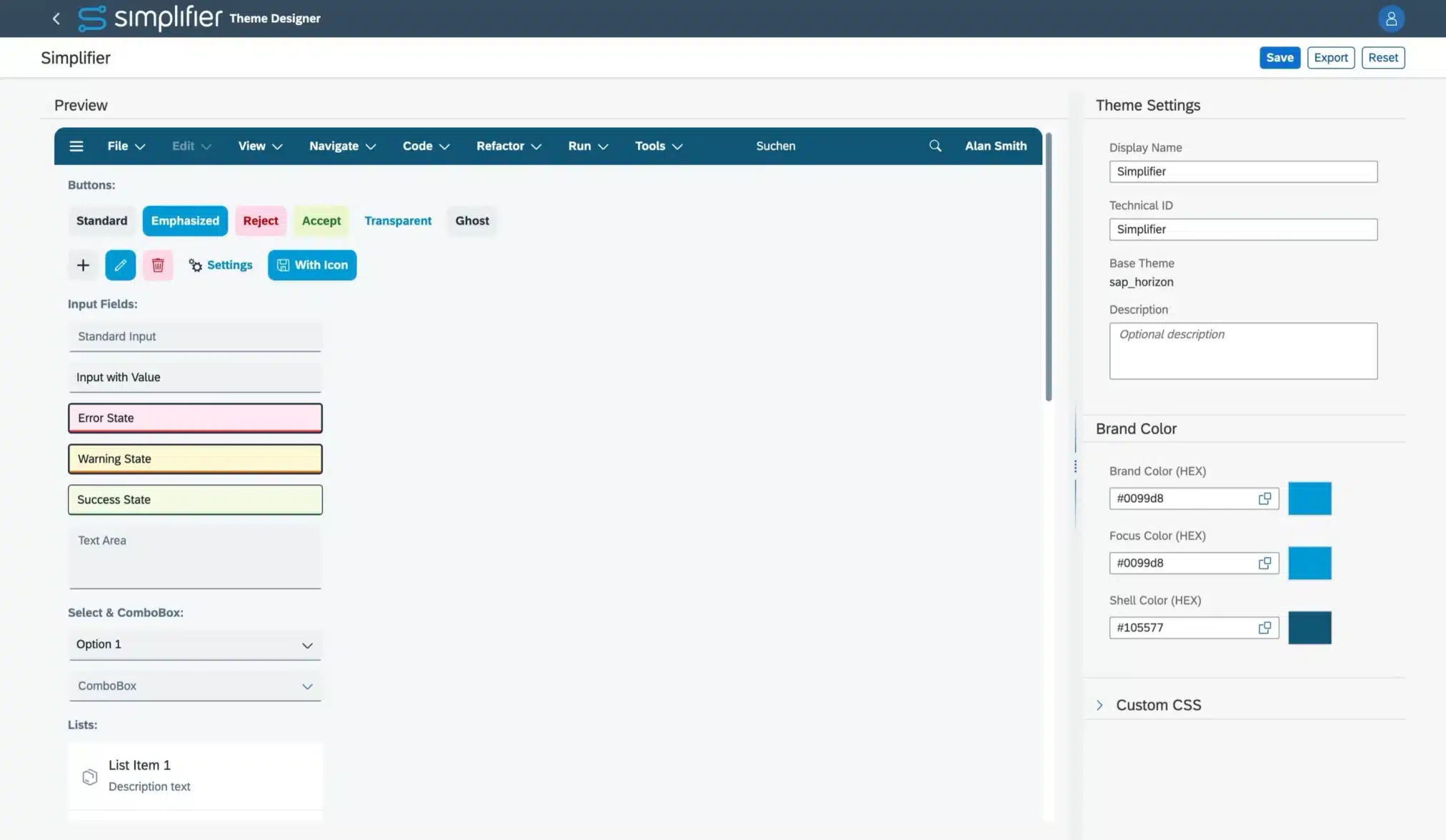
- [Applications] New Theme Designer as a service and open source on Github (Read more)
- [Applications] Improved Variable References Dialog
- [Applications] Improved detail view for struct datatypes
- [Applications] The list of entity sets in OData Shapes is now sorted alphabetically and case-insensitively
- [Integration] OData functions and actions can now be used as a data source in the App UI Designer
- [Integration] The OData service shape’s function ‘load dataset’ now supports filtering by entity property values (Read more)
- [Integration] OData list bindings are now loaded exactly when defined in the Process Designer
- [Integration] Automatically generated data types for OData connectors can now also be used for parameter mappings in the app editor
- [Applications] The widget’s ID can now my used as source parameter in input mappings
- [Integration] The error dialog for the Data Service shape, when an OData data type could not be loaded from the database, was improved to hint that the types may need to be regenerated
Workflows
- [AI] The Workflow Build AI Agent Klara to create Workflows now also supports creating and using Variables, Outcomes, Conditions, as well as adding shapes for automated tasks (configuration has to be done manually) (Read more)
- [AI] The AI Agent Klara (Workflow Builder) is moved to the life cycle stage ‘permanent’. The feature cannot be deactivated in the ‘New Features’ settings anymore
- [AI] Improved Workflow Designer and chat user experience with AI Workflow Builder Agent Klara
- [AI] Enhanced Error Handling and Logging of the AI Agent Klara feature
- [AI] The prompt for generating workflows with AI Agent Klara has been improved to prevent vertical overlapping of the generated shapes
- [AI] There are now games integrated in the busy dialogs while waiting for the AI Agent’s result. A finished generation request is indicated in the dialog’s title, and the close button is enabled
- [Workflows] You can now step back to the last manual task in your Workflow instance from the Workflow Monitoring and via Workflow Client API (Read more)
- [Workflows] Added a comment feature to your Task Modules via the new comment endpoints in the Workflow client API (Read more)
- [Integration] The Swagger documentation of the Workflow API is now grouped as Workflow only
Business Objects
- [Integration] We have enhanced the connector SBO API to support using OData connectors in server-side business objects as an experimental feature (Read more)
- [Integration] CryptoJS is deprecated and can be deactivated in the Feature settings (Read more)
- [Integration] The global Business Object API objects CONNECTOR_, BUSINESSOBJECT_, PLUGIN_, LOG_, TOOLS_, and USERS_ are deprecated and can be deactivated in the Feature settings (Read more)
- [Integration] The SBO API was enhanced to cover the most used crypto functions encryptAES, decryptAES, hashSHA256, and hashMD5 (Read more)
- [Integration] Deactivating the input validation of Server-side Business Objects called from Client-side Business Objects by setting the API’s parameter ‘parametrized’ to false has been removed (Read more)
- [Integration] The VS Code Monaco Editor replaced the existing editor
- [Integration] Due to changes in the browser engines, SSO Debugging is not working anymore. The feature setting will be removed in a later release
Connectors
- [Integration] We have deprecated the result types in SQL connectors. You can list all SQL Connector calls still using the deprecated result types in the ‘New features’ settings (Read more)
- [Integration] We have deprecated the simple mode in SQL connectors. Deactivate the feature flag in the feature settings to ensure that the simple mode cannot be set on new calls/edits. You can list all SQL Connector calls still using the simple mode in the ‘New features’ settings
- [Integration] Removed the ‘Edit calls’ button from the overview details of OData and Proxy connectors
- [Integration] Data types for OData connectors are now created automatically and can be manually regenerated (Read more)
- [Integration] The VS Code Monaco Editor replaced the existing editor
- [Integration] In SOAP Connectors, you can now configure a separate login method for the WSDL download (Read more)
- [Integration] REST connector now always escapes space as %20, never as +
- [Integration] The new SOAP Connector is now in the lifecycle stage ‘permanent’ and cannot be deactivated anymore
- [Integration] The improved REST Response Processing feature lifecycle stage is now ‘released’ and activated by default
- [Integration] The RFC Connector Wizard now supports updating existing calls (Read more)
- [Integration] The MQTT connector now supports connections via TLS and websockets (Read more)
- [Integration] We have added a value help to the scope field in the configuration of the OAuth 2 (Microsoft EntraID / OAuth Client Credentials Flow) Login Method (Read more)
- [Integration] External references in WSDL declarations can now be enabled in the security settings (Read more)
- [Integration] The client secret of OAuth 2 (Microsoft EntraID / OAuth Client Credentials Flow) Login Methods is now obfuscated
- [Integration] SAP RFC Connectors and SAP Systems can now only be created if licensed (License option ‘Advanced SAP Integration’)
- [Integration] There is now a better error message when the broker name configured in the Connector Endpoint does not match the one in the connector call
- [Integration] When there is an error while subscribing to a topic via MQTT-Connector, now a proper error dialog will be displayed to the user instead of silently omitting the error
Database Designer
- [Integration] The database canvas now persists the table’s coordinates on saving or deploying the schema
- [Integration] For Microsoft SQL Server, new String-Based columns will now be handled as NVARCHAR(MAX), instead of the NTEXT, Columns that are present in the database as NTEXT will stay so and not change
- [Integration] We introduced a new data type “Big Integer” to fully support 64-bit-sized integers (Read more)
- [Integration] Data types for database schemas are now created automatically
- [Integration] EntitySet and EntityType names are validated so they do not start with a digit. Invalid EntityType and EntitySet names are automatically fixed by adding an underscore in front if the table name is updated or a schema is imported
Jobs
- [Integration] When viewing monitoring logs of a job, the entries are displayed newest to oldest and the job duration calculation was improved
Users and Permissions
- [Applications] Removed the ‘active’ flag from Global roles and the corresponding APIs
- [Applications] User and Group lists are now sorted alphabetically and case-insensitively
- [Applications] Creating Simplifier tokens via API for users with activated MFA is now deprecated (Read more)
Transports
- [Workflows] The timeout for fetching workflow export items has been increased from 1 minute per item to 5 minutes per item
Logs and Monitoring
- [Integration] You can now recall Server-side Business Object functions and Connector calls from the monitoring (Read more)
- [Integration] Failed Connector Calls and Business Object functions are no longer logged in the audit log, since all information logged is already present in the monitoring
- [Integration] VS Code Monaco Editor is now available in the log details view
- [Integration] Optimized handling of large JSON payloads. Handling is now more efficient. Reduced logged payloads are now marked with a parameter ‘wasShortened’ in the monitoring details
- [Integration] In the monitoring, there was a confusion with the old label (“message sent”) for websocket-based subscription connectors when a message is sent by the websocket to the client. This label has been adjusted for better clarification
Settings
- [Integration] The fields “Sender Email” and “Sender” have been consolidated into one field in the SMTP Settings (Read more)
- [Integration] The client secret of OAuth authentication methods is now obfuscated
- [Integration] The client secret of OAutch client flow login in the SMTP settings is now obfuscated
- [Integration] The VS Code Monaco Editor is now available in the SSO Authentication test view and the SAP Authentication (secret extraction)
Standard Content
- [Applications] The standard content’s widgets are now also available for the OpenUI5 version 1.148. This version is also set as default for new Apps and Moduls. Default Theme is set to Horizon
- [Applications] The widgets TableEnhanced and Input now support OData v2 and OData v4
- [Applications] The PDFViewer_PDFJS Widget (OpenUI5 1.96) was completely rebuilt to support the viewing of more PDFs and update the used library
- [Applications] Added new library SimplifierContentDensity to automatically set the application’s content density based on the Fiori Guidelines (Read more)
- [Applications] Added new library SimplifierFontFix to set the SAP default font also in Popovers, like a select list. This library is automatically added to all new apps
- [Applications] Added new WidgetGroups SuccessMessage, InformationDialog, and ConfirmationDialog
- [Applications] Added new Client-side Business Object SF_Navigation to provide a dynamic possibility to navigate to screens or to pages within a NavContainer
- [Applications] Added the library SimplifierTokenValidation from the marketplace to the standard content
Miscellaneous
- New experimental global search letting you find most artifact types in a second (Read more)
- The Dashboard and Menu entries for Workflows and Workflow Monitoring are now marked if these features are not available on the instance
- The routes for creating and viewing artifacts have been harmonized
- Send emails via Simplifier does not block the thread pool handling https requests anymore
- Migration Notes
-
System Requirement Changes Simplifier 11
There are no further changes to the system requirements yet.
General Upgrade Instructions for Simplifier 11
We have installation instructions prepared based on the versions you are upgrading from:
If you are setting up a new instance, please follow our installation guide for Simplifier 11.
Manual Changes that should already be done before upgrading to Simplifier 11
Allow *.simplifier.cloud in firewall
Simplifier requires access to *.simplifier.cloud domains to make all features available. Please allow access to *.simplifier.cloud in your firewall settings. (Read more)
Manual Changes to be done after upgrading to Simplifier 11
Replace OData V2 Connectors with new OData Connectors
Activate the OData V2 Connectors in the Feature Settings if it is deactivated and replace your legacy OData V2 Connectors with our new OData Connector and switch to the Data Service Shape in your Applications/Modules (Read more).
The legacy OData V2 Connector will be removed with Simplifier 11/MAKERS CHOICE 25-12. Thus, you should first complete the upgrade on all instances and then replace them with a new OData Connector. For more details, please see the Discontinued Tab (Read more).
This migration note was already published with Simplifier 10.
Replace the CBO function SF_File / convertFileToDataURL if used with Base64 files
The input parameter isBase64 is deprecated and will be removed in a future release. Please use the CBO function SF_File / convertFileToObjectURL instead. Find the places by using the Business Object usage feature.
This migration note was already published with Simplifier 10.
Switch to Client 2.0 Route for accessing Proxy Connectors within Scripts/Client-side Business Objects/REST API
Customers hosted in our Simplifier Cloud will get all occurrences listed upon your Upgrade Request. For on-premise instances, please contact our Customer Success Team. They let you know how to identify the places that have to be changed.
The client 1.0 route for Proxy Connectors will be removed with Simplifier 11. Thus, you should first complete the upgrade on all instances and then modify the Scripts/Business Objects as necessary before replacing the route. For more details, please see the Discontinued Tab (Read more).
This migration note was already published with Simplifier 10.
Removed Parameter ‘parametrized’ on calling Business Objects within Scripts and Client-Side Business Objects
We removed the parameter ‘parametrized’on calling Business Objects within Scripts and Client-Side Business Objects. You need to adapt your Applications and Business-Objects if you are using that option, to avoid unforeseen behavior of your Applications
Deprecated since MAKERS CHOICE 25-07
Refresh License
Refresh the license on your instances to benefit from our new AI Cloud services (Read more).
Update Standard Content
Update Standard Content to ensure you have all current fixes and features available on your instances. Update your Apps to OpenUI5 1.148 using our UI5 Upgrade-Wizard. (Download here)
Please check the endpoint of AppWizard Connector, Standard Workflow Connectors, Login, and Captcha Connector. (Read more)
Deactivate the simple-mode of SQL Connectors
The feature got deprecated. Existing calls with simple-mode will still work. For more details see our discontinued section (Read more).
Manual Changes to be done after upgrading to Simplifier 11 and before upgrading to Simplifier 12
Check the deprecated features
Please review all deprecated features and implement any necessary adaptations. (Read more)
- Discontinued
-
Deprecated Features Simplifier 11
[Applications] Create Simplifier tokens via API for users with activated MFA
Currently, you can create tokens with the credentials of Users with activated MFA via our API. This behavior is deprecated due to security concerns. We will remove that feature in the future. You can already deactivate it in the Feature Settings.
Users with activated MFA will not be able to login in to the Simplifier Client or your Business Applications. If you want to enable it also for Business Apps, you have to use a third-party Identity Management Provider like Azure Entra ID.
Deprecated since MAKERS CHOICE 26-09; Removal with a MAKERS CHOICE Release after Simplifier 11. Latest Removal with Simplifier 12
[Integration] Result type in endpoint settings of SQL Connectors
With the integration of calls to the SQL connector, the Result types ‘Single Result’ and ‘No Result’ have been replaced by the output parameters, but have not been deleted yet.
Now it is only possible to create new connector endpoints with the only remaining result type ‘Multiple Results’, and if a Result Type is changed from one of the deprecated types to ‘Multiple Results’, it cannot be changed back.
Note: As soon as we delete this feature, we will migrate all remaining calls to the ‘Multiple Results’ result type.
We encourage you to already deactivate the simple mode to be used in new / changed calls in the Feature Settings. If the setting is deactivated, existing calls will use the ‘Multiple Results’ result type. Use the ‘Show usage’ button to get all a list of all connectors that still use the deprecated result types.
Deprecated since MAKERS CHOICE 26-07; Removal with a MAKERS CHOICE Release after Simplifier 11. Latest Removal with Simplifier 12
[Integration] Simple mode in SQL Connectors
The simple mode in SQL Connectors is redundant to query and execution mode and will be deleted in a future Release. Please change your existing configurations to either query or execution. As the behaviour might change for the connector call’s result when changing the call’s mode, we cannot provide a default automated migration.
Note: As soon as we delete this feature, we will migrate all remaining calls to the query mode.
We encourage you to already deactivate the simple mode to be used in new / changed calls in the Feature Settings. If the setting is deactivated, existing calls with simple mode can still be used. Use the ‘Show usage’ button to get all a list of all calls that still use the simple mode.
Deprecated since MAKERS CHOICE 26-06; Removal with a MAKERS CHOICE Release after Simplifier 11. Latest Removal with Simplifier 12
[Integration] Support of CryptoJS in Server-side Business Objects
The active development of CryptoJS ended a while ago. For security reasons, the CryptoJS integration will be removed from Simplifier.
For server-side business objects, there will be no direct replacement. We provide replacements within the Simplifier SBO API for selected CryptoJS APIs instead, starting with AES encryption and SHA256 hashing. On-premise customers with use-cases not covered by these should contact us (for Simplifier-hosted customers, we will check CryptoJS usage automatically).
If you need client-side crypto functionality, we recommend using the available JS Web Crypto API.
You can already deactivate CryptoJS in the Feature Settings.
Deprecated since MAKERS CHOICE 26-04; Removal with a MAKERS CHOICE Release after Simplifier 11. Latest Removal with Simplifier 12
[Integration] Global API objects (capital letters) in Server-side Business Objects functions
Currently, you can still use the redundant and outdated global Business Object API with the prefixes CONNECTOR_, BUSINESSOBJECT_, PLUGIN_, LOG_, TOOLS_, and USERS_. Their usage is deprecated and will be removed in the future. Use the Simplifier SBO API instead.
You can already deactivate the global objects in the Feature Settings.
Deprecated since MAKERS CHOICE 26-04; Removal with a MAKERS CHOICE Release after Simplifier 11. Latest Removal with Simplifier 12
[System requirements] Support of Oracle for Simplifier databases
Oracle support for your Simplifier instances has been deprecated and will be removed in a future release.
Deprecated since Simplifier 8 EHP 4; End of support with a MAKERS CHOICE Release after Simplifier 11. Latest end of Support with Simplifier 12
[Integration] Javascript execution in PDFs created by PDF Plugin
Currently, it is possible to add Javascript to PDFs created by PDF Plugin. This is a potential risk for Server Side XSS (PDF Injection) and Server Side Request Forgery (SSRF). The option to add Javascript to PDFs in PDF Plugin is now deactivated but can be activated at its own risk. The activation is subject to be removed in later Releases.
Deprecated since Simplifier 8 EHP 3; Removal tbd
[Integration] Removed setting to activate deprecated Connector API
The settings to activate the deprecated Connector API will be removed with Simplifier 10 LTS. Please make sure you do not use the deprecated Connector API anymore.
Deprecated since Simplifier 8 EHP 4; Removal tbd
Removed Features Simplifier 11
[Integration] Debugging of Server-side Business Objects
Do to changes in the browser engines, the experimental feature of debugging Server-side Business Objects is not working anymore. The feature setting will be removed in a later release.
Removed with MAKERS CHOICE 26-07
[Integration] ‘Active’ flag in global roles
The ‘active ‘ flag in global roles was not used anywhere within Simplifier. Thus we deleted the feature and its usage in the SBO API. If you do not need a role, you should delete it.
Removed with MAKERS CHOICE 26-07
[Integration] OData V2 Connector
With the release of our new OData Connector, our legacy OData V2 Connector has been deprecated. Please create new OData Connectors and integrate them into your Applications and Modules
Deprecated since MAKERS CHOICE 25-08; Removed with MAKERS CHOICE 26-02
[Integration] Client 1.0 API route to access Proxy-Connector
Our new Proxy Connector will be accessible via the Client 2.0 route (Read more). Starting with MAKERS CHOICE 25-10/Simplifier 10, all old Proxy Connectors are migrated to the new one. Until Simplifier 11, the Client 1.0 route is still available. If you use it in Scripts, Client-side Business Objects, or REST-Connectors, please change it to the Client 2.0 route to keep accessing your Proxy Connectors.
Deprecated since MAKERS CHOICE 25-08; Removal with Simplifier 11/MAKERS CHOICE 26-04
[Integration] Parameter ‘parametrized’ on calling Business Objects within Scripts and Client-Side Business Objects
When calling Server-Side Business Objects within Scripts or Client-Side Business Objects, the developer was able to deactivate the input validation by setting the API’s parameter ‘parametrized’ to false. This parameter is now deprecated. You can already deactivate the parameter in the Feature Settings.
Deprecated since MAKERS CHOICE 25-07; Removed with MAKERS CHOICE 26-04
[Integration] Captcha Plugin
Our Captcha Plugin won’t be updated anymore and was removed from the plugin list in our default installation/upgrade guides. It can still be added by hand (for details check the environmental variables list in the upgrade guides).
See our Knowledge Base article on ‘How to use Google reCAPTCHA v3 Essentials’ for an alternative solution.
Deprecated since MAKERS CHOICE 25-01; Final removal with Simplifier 11
- Release Info
-
Release Date: September 23, 2026
End of Maintenance: Long-term support until 3 months after the release of Simplifier 12
All Simplifier releases and updates are provided on Docker Hub Repository.