Highlight Features MAKERS CHOICE 26-07

Find required artifacts in seconds
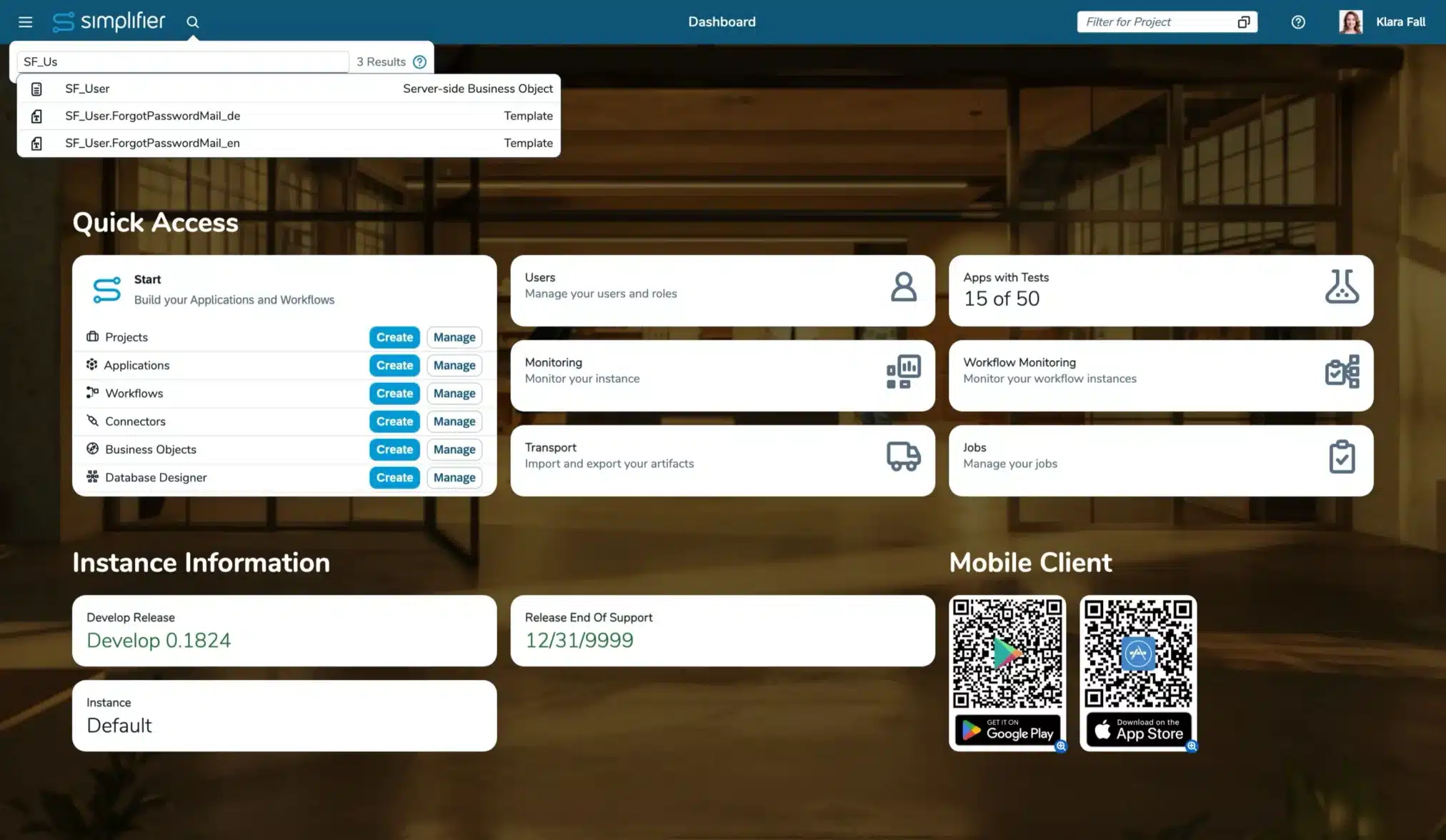
With the new Global Search, you can find almost any artifact directly from the header. Instead of navigating through menus, simply search for apps, workflows, connectors, and more. The search supports filters, exact matches, and automatically respects your access permissions. (Read more)
Increase the quality of your applications
We have made it much easier for you to identify applications without test to boost reaching your required quality and governance level.
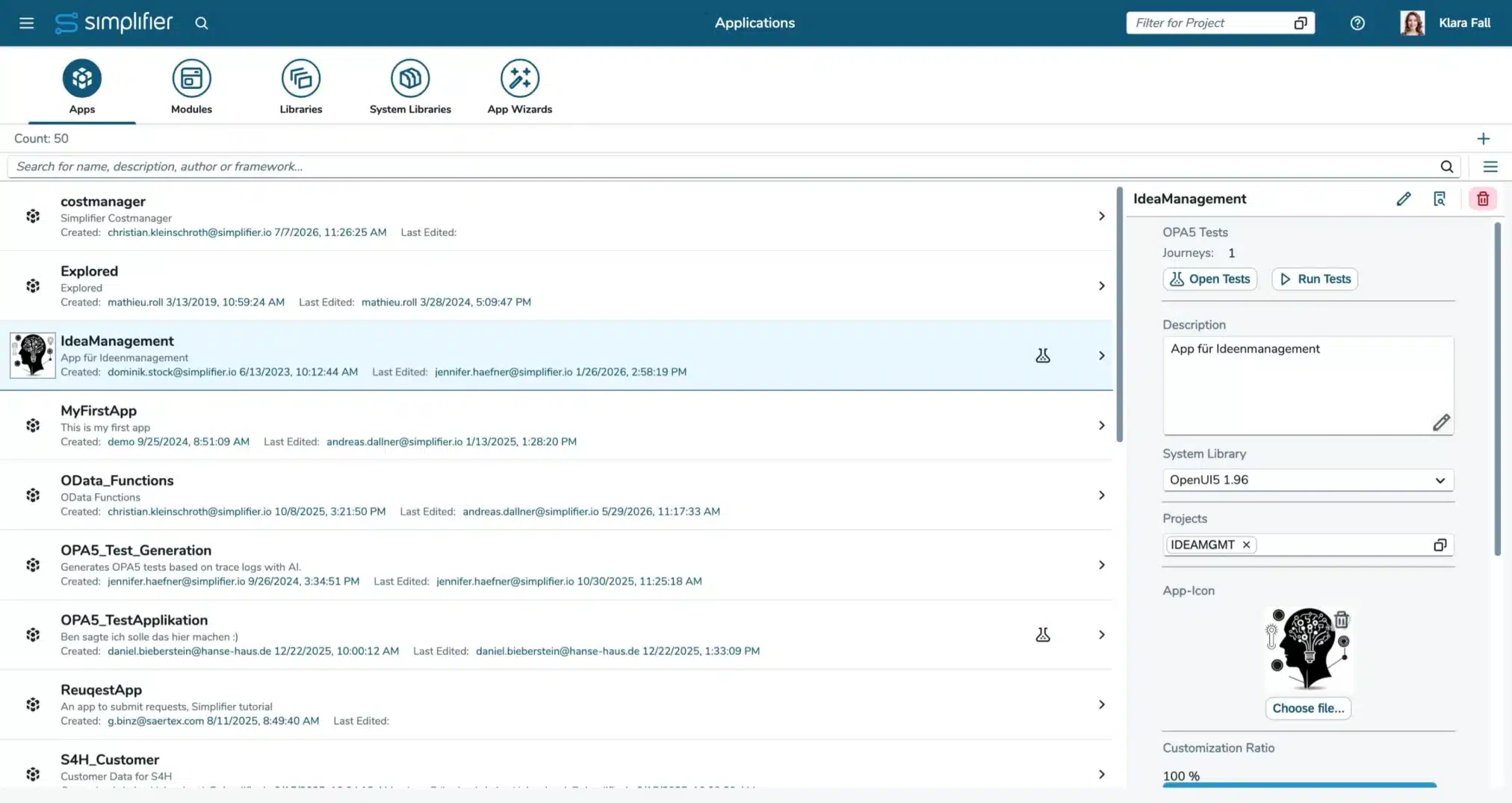
Apps without automated tests are now brought to app builders attention in several places, and are now highlighted throughout Simplifier. (Read more)
The dashboard shows how many apps are covered, the app overview displays test details and executions, and a warning appears before deployment of applications when tests are missing. (Read more)
Use UTCP for faster AI Tool Calls
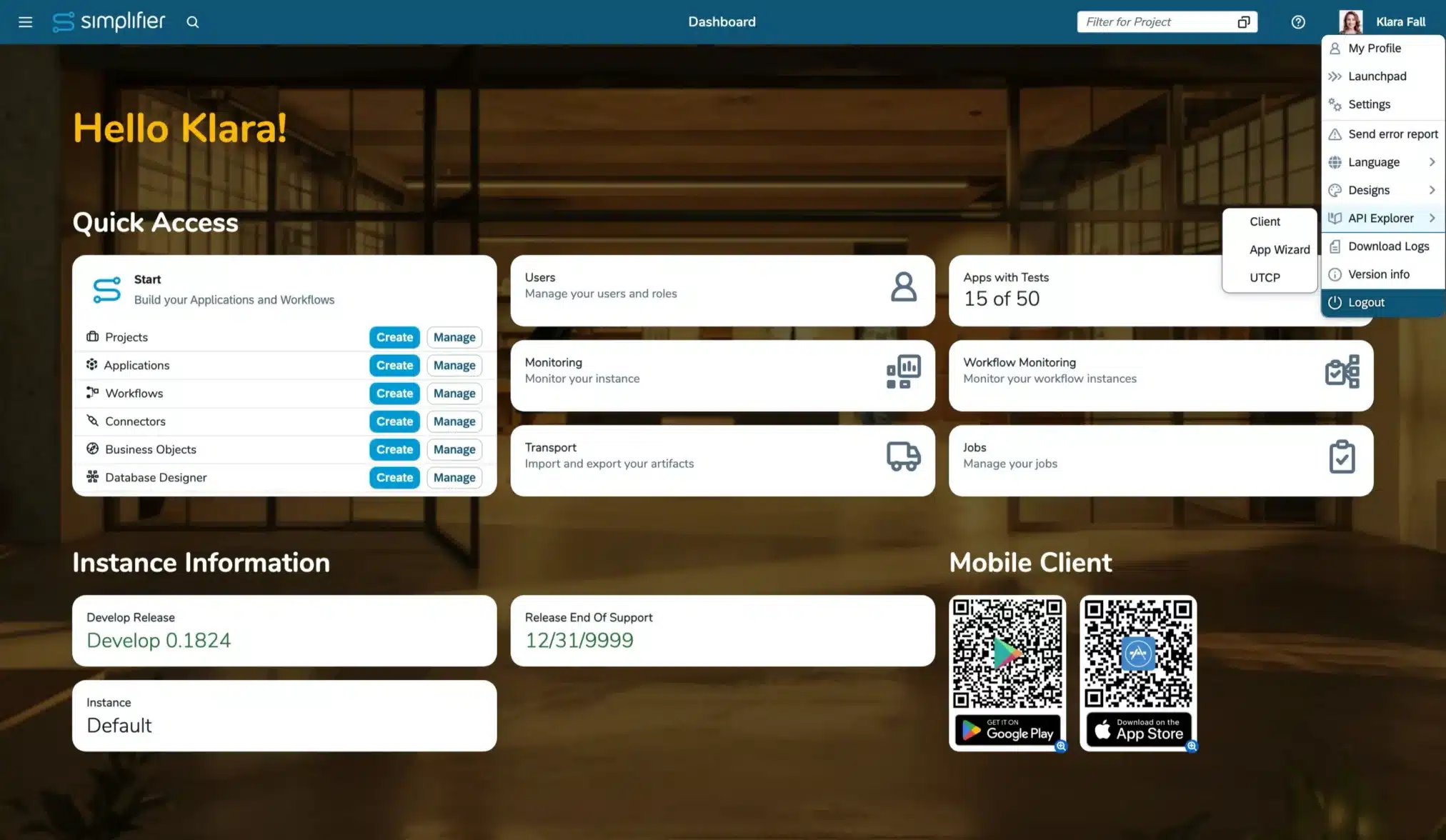
The new UTCP support enables AI agents to access existing APIs and tools directly through their native protocols—without requiring dedicated wrapper servers. (Read more)
Compared with MCP, this reduces infrastructure complexity, avoids additional communication layers, and makes existing enterprise and shop-floor integrations easier to reuse in agentic workflows.
Speed up analyzing issues, reproducing behavior, and testing integrations
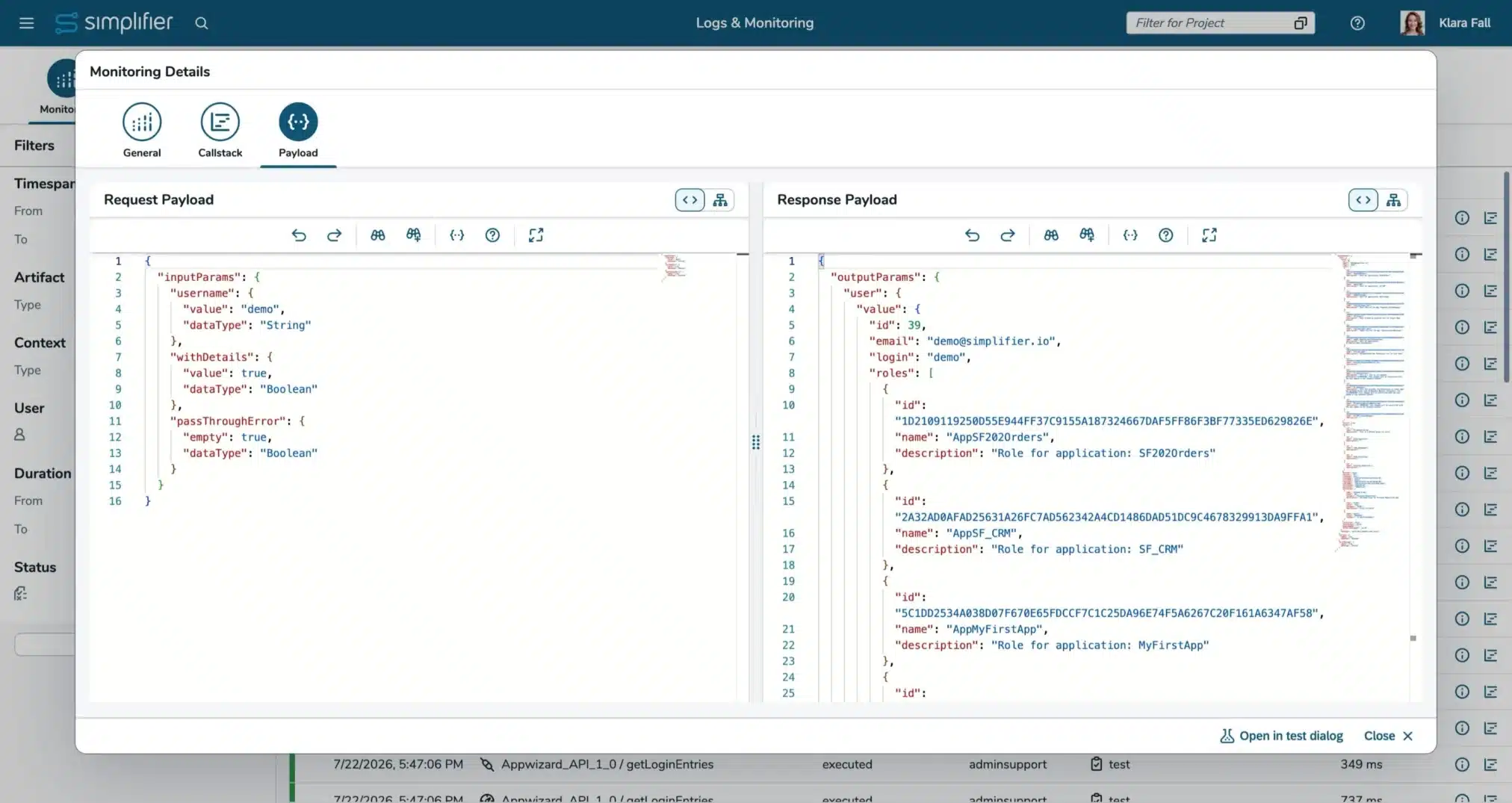
You can now recall integrations directly from Monitoring. Connector calls and Business Object function executions can be reopened with their original parameters, making it easier to analyze issues, reproduce behavior, and test integrations without rebuilding the request manually. (Read more)
Also this enables you to rebook data into system of records in case the system was not available before.
Changelog MAKERS CHOICE 26-07
AI Agent Ingo (Integration Specialist)
App Building
- [AI] AI Agent Theo (Test Engineer) is now a permanent feature. The feature cannot be deactivated anymore in the ‘New Features’ settings
- [Applications] The widget’s ID can now my used as source parameter in input mappings
- [Applications] The launchpad tile on the Admin UI Dashboard has been replaced by a tile that shows a Apps with tests KPI to increase your governance
- [Applications] The last test result is now displayed in the details section for each app in the applications overview (Read more)
- [Applications] You can now directly open the test page from the details section in the applications overview (Read more)
- [Applications] There is a warning on deploying apps without tests. The warning can be disabled for the current login session
- [Applications] The last test result is now displayed the test section within the application (Read more)
- [Applications] We optimized and reduced the amount of required logs for Theo to create generic assertions
Workflows
- [AI] AI Agent Klara (Workflow Builder) is now a permanent feature. The feature cannot be deactivated anymore in the ‘New Features’ settings
- [Workflows] You can now step back to the last manual task in your Workflow instance from the Workflow Monitoring and via Workflow Client API (Read more)
- [Workflows] Added a comment feature to your Task Modules via the new comment endpoints in the Workflow client API (Read more)
Business Objects
- [Integration] Deleting datasets is now supported by the OData SBO API (Read more)
- [Integration] Performing query and updates via the OData SBO API now return an JSON object matching the officially documented format (Read more)
- [Integration] You can now pass your updates in a separat parameter executing an update call on a OData service vie the OData SBO API (Read more)
- [Integration] Due to changes in the browser engines, SSO Debugging is not working anymore. The feature setting will be removed in a later release
Connectors
- [Integration] You can now list all SQL Connector calls still using the deprecated simple mode in the ‘New features’ settings
- [Integration] We have deprecated the result types in SQL connectors. Deactivate the feature flag in the feature settings to ensure that the simple mode cannot be set on new calls/edits. You can list all SQL Connector calls still using the deprecated result types in the ‘New features’ settings (Read more)
- [Integration] Removed the ‘Edit calls’ button from the overview details of OData and Proxy connectors
- [Integration] SAP RFC Connectors and SAP Systems can now only be created if licensed (License option ‘Advanced SAP Integration’)
Database Designer
- [Integration] For Microsoft SQL Server, new String-Based columns will now be handled as NVARCHAR(MAX), instead of the NTEXT, Columns that are present in the database as NTEXT will stay so and not change
Jobs
- [Integration] When viewing monitoring logs of a job, the entries are displayed newest to oldest and the job duration calculation was improved
Users and Permissions
- [Applications] Removed the ‘active’ flag from Global roles and the corresponding APIs
Logs and Monitoring
- [Integration] You can now recall Server-side Business Object functions and Connector calls from the monitoring (Read more)
Standard Content
- [Applications] The standard content’s widgets are now also available for the OpenUI5 version 1.148. This version is also set as default for new Apps and Moduls. Default Theme is set to Horizon
Miscellaneous
- New experimental global search letting you find most artifact types in a second (Read more)
- The routes for creating and viewing artifacts have been harmonized
System Requirement Changes MAKERS CHOICE 26-07
There are no further changes to the system requirements.
General Upgrade Instructions for MAKERS CHOICE 26-07
We have installation instructions prepared based on the versions you are upgrading from:
- Upgrade from MAKERS CHOICE 26-06 to MAKERS CHOICE 26-07
- Upgrade from LTS Release Simplifier 10 to MAKERS CHOICE 26-07
If you are setting up a new instance, please follow our installation guide for MAKERS CHOICE 26-07.
Manual Changes that should already be done before upgrading to MAKERS CHOICE 26-07
There are now manual changes that needs to be done before the upgrade
Manual Changes after upgrading to MAKERS CHOICE 26-07
Refresh License
Refresh the license on your instances to make sure it is up to date (Read more).
Update Standard Content
Update Standard Content to ensure you have all current fixes and features available on your instances. (Download here)
Please check the endpoint of AppWizard Connector, Standard Workflow Connectors, Login, and Captcha Connector (Read more).
Clear browser cache, if something is not loading
In our final test, some views did not load after upgrading in some cases. If you face the same issue, clearing the cache fixes it and lets you load the all views again.
To clear the cache, you can open the Dev-Tools of you browser, go to the network-tab, and disable caching. Then reload Simplifier and enable caching again.

Manual Changes after upgrading all instances to MAKERS CHOICE 26-07
Check the deprecated features
Please review all deprecated features and implement any necessary adaptations. (Read more)
Deprecated Features MAKERS CHOICE 26-07
[Integration] Result type in endpoint settings of SQL Connectors
With the integration of calls to the SQL connector, the Result types ‘Single Result’ and ‘No Result’ have been replaced by the output parameters, but have not been deleted yet.
Now it is only possible to create new connector endpoints with the only remaining result type ‘Multiple Results’, and if a Result Type is changed from one of the deprecated types to ‘Multiple Results’, it cannot be changed back.
Note: As soon as we delete this feature, we will migrate all remaining calls to the ‘Multiple Results’ result type.
We encourage you to already deactivate the simple mode to be used in new / changed calls in the Feature Settings. If the setting is deactivated, existing calls will use the ‘Multiple Results’ result type. Use the ‘Show usage’ button to get all a list of all connectors that still use the deprecated result types.
Deprecated since MAKERS CHOICE 26-07; Removal with a MAKERS CHOICE Release after Simplifier 11. Latest Removal with Simplifier 12
[Integration] Simple mode in SQL Connectors
The simple mode in SQL Connectors is redundant to query and execution mode and will be deleted in a future Release. Please change your existing configurations to either query or execution. As the behaviour might change for the connector call’s result when changing the call’s mode, we cannot provide a default automated migration.
Note: As soon as we delete this feature, we will migrate all remaining calls to the query mode.
We encourage you to already deactivate the simple mode to be used in new / changed calls in the Feature Settings. If the setting is deactivated, existing calls with simple mode can still be used. Use the ‘Show usage’ button to get all a list of all calls that still use the simple mode.
Deprecated since MAKERS CHOICE 26-06; Removal with a MAKERS CHOICE Release after Simplifier 11. Latest Removal with Simplifier 12
[Integration] Support of CryptoJS in Server-side Business Objects
The active development of CryptoJS ended a while ago. For security reasons, the CryptoJS integration will be removed from Simplifier.
For server-side business objects, there will be no direct replacement. We provide replacements within the Simplifier SBO API for selected CryptoJS APIs instead, starting with AES encryption and SHA256 hashing. On-premise customers with use-cases not covered by these should contact us (for Simplifier-hosted customers, we will check CryptoJS usage automatically).
If you need client-side crypto functionality, we recommend using the available JS Web Crypto API.
You can already deactivate CryptoJS in the Feature Settings.
Deprecated since MAKERS CHOICE 26-04; Removal with a MAKERS CHOICE Release after Simplifier 11. Latest Removal with Simplifier 12
[Integration] Global API objects (capital letters) in Server-side Business Objects functions
Currently, you can still use the redundant and outdated global Business Object API with the prefixes CONNECTOR_, BUSINESSOBJECT_, PLUGIN_, LOG_, TOOLS_, and USERS_. Their usage is deprecated and will be removed in the future. Use the Simplifier SBO API instead.
You can already deactivate the global objects in the Feature Settings.
Deprecated since MAKERS CHOICE 26-04; Removal with a MAKERS CHOICE Release after Simplifier 11. Latest Removal with Simplifier 12
[System requirements] Support of Oracle for Simplifier databases
Oracle support for your Simplifier instances has been deprecated and will be removed in a future release.
Deprecated since Simplifier 8 EHP 4; End of support with a MAKERS CHOICE Release after Simplifier 11. Latest end of Support with Simplifier 12
[Integration] Result type in SQL Connector endpoints
Currently, you can set a result type in SQL Connectors. As the result types are call-specific and not connector-specific, we will remove this field in a later version
Deprecated since MAKERS CHOICE 25-12; Removal tbd
[Integration] Client 1.0 API route to access Proxy-Connector
Our new Proxy Connector will be accessible via the Client 2.0 route (Read more). Starting with MAKERS CHOICE 25-10/Simplifier 10, all old Proxy Connectors are migrated to the new one. Until Simplifier 11, the Client 1.0 route is still available. If you use it in Scripts, Client-side Business Objects, or REST-Connectors, please change it to the Client 2.0 route to keep accessing your Proxy Connectors.
Deprecated since MAKERS CHOICE 25-08; Removal with a MAKERS CHOICE Release until Simplifier 11/Removal with Simplifier 11
[Integration] Javascript execution in PDFs created by PDF Plugin
Currently, it is possible to add Javascript to PDFs created by PDF Plugin. This is a potential risk for Server Side XSS (PDF Injection) and Server Side Request Forgery (SSRF). The option to add Javascript to PDFs in PDF Plugin is now deactivated but can be activated at its own risk. The activation is subject to be removed in later Releases.
Deprecated since Simplifier 8 EHP 3; Removal tbd
[Integration] Removed setting to activate deprecated Connector API
The settings to activate deprecated Connector API will be removed with Simplifier 10 LTS. Please make sure you do not use the deprecated Connector API anymore.
Deprecated since Simplifier 8 EHP 4; Removal tbd
[Integration] Captcha Plugin
Our Captcha Plugin won’t be updated anymore and was removed from the plugin list in our default installation/upgrade guides.
See our Knowledge Base article on ‘How to use Google reCAPTCHA v3 Essentials‘ for an alternative solution.
Deprecated since MAKERS CHOICE 25-01; Removed from installation guide with MAKERS CHOICE 25-10; Final removal with Simplifier 11
Removed Features MAKERS CHOICE 26-07
[Integration] Debugging of Server-side Business Objects
Do to changes in the browser engines, the experimental feature of debugging Server-side Business Objects is not working anymore. The feature setting will be removed in a later release.
[Integration] ‘Active’ flag in global roles
The ‘active ‘ flag in global roles was not used anywhere within Simplifier. Thus we deleted the feature and its usage in the SBO API. If you do not need a role, you should delete it.

Release Date: July 29, 2026
End of Maintenance: September 23, 2026
All Simplifier releases and updates are provided on Docker Hub Repository.
- Highlights
-
Highlight Features MAKERS CHOICE 26-07
Find required artifacts in seconds
With the new Global Search, you can find almost any artifact directly from the header. Instead of navigating through menus, simply search for apps, workflows, connectors, and more. The search supports filters, exact matches, and automatically respects your access permissions. (Read more)
Increase the quality of your applications
We have made it much easier for you to identify applications without test to boost reaching your required quality and governance level.
Apps without automated tests are now brought to app builders attention in several places, and are now highlighted throughout Simplifier. (Read more)
The dashboard shows how many apps are covered, the app overview displays test details and executions, and a warning appears before deployment of applications when tests are missing. (Read more)
Use UTCP for faster AI Tool Calls
The new UTCP support enables AI agents to access existing APIs and tools directly through their native protocols—without requiring dedicated wrapper servers. (Read more)
Compared with MCP, this reduces infrastructure complexity, avoids additional communication layers, and makes existing enterprise and shop-floor integrations easier to reuse in agentic workflows.
Speed up analyzing issues, reproducing behavior, and testing integrations
You can now recall integrations directly from Monitoring. Connector calls and Business Object function executions can be reopened with their original parameters, making it easier to analyze issues, reproduce behavior, and test integrations without rebuilding the request manually. (Read more)
Also this enables you to rebook data into system of records in case the system was not available before.
- Changelog
-
Changelog MAKERS CHOICE 26-07
AI Agent Ingo (Integration Specialist)
App Building
- [AI] AI Agent Theo (Test Engineer) is now a permanent feature. The feature cannot be deactivated anymore in the ‘New Features’ settings
- [Applications] The widget’s ID can now my used as source parameter in input mappings
- [Applications] The launchpad tile on the Admin UI Dashboard has been replaced by a tile that shows a Apps with tests KPI to increase your governance
- [Applications] The last test result is now displayed in the details section for each app in the applications overview (Read more)
- [Applications] You can now directly open the test page from the details section in the applications overview (Read more)
- [Applications] There is a warning on deploying apps without tests. The warning can be disabled for the current login session
- [Applications] The last test result is now displayed the test section within the application (Read more)
- [Applications] We optimized and reduced the amount of required logs for Theo to create generic assertions
Workflows
- [AI] AI Agent Klara (Workflow Builder) is now a permanent feature. The feature cannot be deactivated anymore in the ‘New Features’ settings
- [Workflows] You can now step back to the last manual task in your Workflow instance from the Workflow Monitoring and via Workflow Client API (Read more)
- [Workflows] Added a comment feature to your Task Modules via the new comment endpoints in the Workflow client API (Read more)
Business Objects
- [Integration] Deleting datasets is now supported by the OData SBO API (Read more)
- [Integration] Performing query and updates via the OData SBO API now return an JSON object matching the officially documented format (Read more)
- [Integration] You can now pass your updates in a separat parameter executing an update call on a OData service vie the OData SBO API (Read more)
- [Integration] Due to changes in the browser engines, SSO Debugging is not working anymore. The feature setting will be removed in a later release
Connectors
- [Integration] You can now list all SQL Connector calls still using the deprecated simple mode in the ‘New features’ settings
- [Integration] We have deprecated the result types in SQL connectors. Deactivate the feature flag in the feature settings to ensure that the simple mode cannot be set on new calls/edits. You can list all SQL Connector calls still using the deprecated result types in the ‘New features’ settings (Read more)
- [Integration] Removed the ‘Edit calls’ button from the overview details of OData and Proxy connectors
- [Integration] SAP RFC Connectors and SAP Systems can now only be created if licensed (License option ‘Advanced SAP Integration’)
Database Designer
- [Integration] For Microsoft SQL Server, new String-Based columns will now be handled as NVARCHAR(MAX), instead of the NTEXT, Columns that are present in the database as NTEXT will stay so and not change
Jobs
- [Integration] When viewing monitoring logs of a job, the entries are displayed newest to oldest and the job duration calculation was improved
Users and Permissions
- [Applications] Removed the ‘active’ flag from Global roles and the corresponding APIs
Logs and Monitoring
- [Integration] You can now recall Server-side Business Object functions and Connector calls from the monitoring (Read more)
Standard Content
- [Applications] The standard content’s widgets are now also available for the OpenUI5 version 1.148. This version is also set as default for new Apps and Moduls. Default Theme is set to Horizon
Miscellaneous
- New experimental global search letting you find most artifact types in a second (Read more)
- The routes for creating and viewing artifacts have been harmonized
- Migration Notes
-
System Requirement Changes MAKERS CHOICE 26-07
There are no further changes to the system requirements.
General Upgrade Instructions for MAKERS CHOICE 26-07
We have installation instructions prepared based on the versions you are upgrading from:
- Upgrade from MAKERS CHOICE 26-06 to MAKERS CHOICE 26-07
- Upgrade from LTS Release Simplifier 10 to MAKERS CHOICE 26-07
If you are setting up a new instance, please follow our installation guide for MAKERS CHOICE 26-07.
Manual Changes that should already be done before upgrading to MAKERS CHOICE 26-07
There are now manual changes that needs to be done before the upgrade
Manual Changes after upgrading to MAKERS CHOICE 26-07
Refresh License
Refresh the license on your instances to make sure it is up to date (Read more).
Update Standard Content
Update Standard Content to ensure you have all current fixes and features available on your instances. (Download here)
Please check the endpoint of AppWizard Connector, Standard Workflow Connectors, Login, and Captcha Connector (Read more).
Clear browser cache, if something is not loading
In our final test, some views did not load after upgrading in some cases. If you face the same issue, clearing the cache fixes it and lets you load the all views again.
To clear the cache, you can open the Dev-Tools of you browser, go to the network-tab, and disable caching. Then reload Simplifier and enable caching again.
Manual Changes after upgrading all instances to MAKERS CHOICE 26-07
Check the deprecated features
Please review all deprecated features and implement any necessary adaptations. (Read more)
- Discontinued
-
Deprecated Features MAKERS CHOICE 26-07
[Integration] Result type in endpoint settings of SQL Connectors
With the integration of calls to the SQL connector, the Result types ‘Single Result’ and ‘No Result’ have been replaced by the output parameters, but have not been deleted yet.
Now it is only possible to create new connector endpoints with the only remaining result type ‘Multiple Results’, and if a Result Type is changed from one of the deprecated types to ‘Multiple Results’, it cannot be changed back.
Note: As soon as we delete this feature, we will migrate all remaining calls to the ‘Multiple Results’ result type.
We encourage you to already deactivate the simple mode to be used in new / changed calls in the Feature Settings. If the setting is deactivated, existing calls will use the ‘Multiple Results’ result type. Use the ‘Show usage’ button to get all a list of all connectors that still use the deprecated result types.
Deprecated since MAKERS CHOICE 26-07; Removal with a MAKERS CHOICE Release after Simplifier 11. Latest Removal with Simplifier 12
[Integration] Simple mode in SQL Connectors
The simple mode in SQL Connectors is redundant to query and execution mode and will be deleted in a future Release. Please change your existing configurations to either query or execution. As the behaviour might change for the connector call’s result when changing the call’s mode, we cannot provide a default automated migration.
Note: As soon as we delete this feature, we will migrate all remaining calls to the query mode.
We encourage you to already deactivate the simple mode to be used in new / changed calls in the Feature Settings. If the setting is deactivated, existing calls with simple mode can still be used. Use the ‘Show usage’ button to get all a list of all calls that still use the simple mode.
Deprecated since MAKERS CHOICE 26-06; Removal with a MAKERS CHOICE Release after Simplifier 11. Latest Removal with Simplifier 12
[Integration] Support of CryptoJS in Server-side Business Objects
The active development of CryptoJS ended a while ago. For security reasons, the CryptoJS integration will be removed from Simplifier.
For server-side business objects, there will be no direct replacement. We provide replacements within the Simplifier SBO API for selected CryptoJS APIs instead, starting with AES encryption and SHA256 hashing. On-premise customers with use-cases not covered by these should contact us (for Simplifier-hosted customers, we will check CryptoJS usage automatically).
If you need client-side crypto functionality, we recommend using the available JS Web Crypto API.
You can already deactivate CryptoJS in the Feature Settings.
Deprecated since MAKERS CHOICE 26-04; Removal with a MAKERS CHOICE Release after Simplifier 11. Latest Removal with Simplifier 12
[Integration] Global API objects (capital letters) in Server-side Business Objects functions
Currently, you can still use the redundant and outdated global Business Object API with the prefixes CONNECTOR_, BUSINESSOBJECT_, PLUGIN_, LOG_, TOOLS_, and USERS_. Their usage is deprecated and will be removed in the future. Use the Simplifier SBO API instead.
You can already deactivate the global objects in the Feature Settings.
Deprecated since MAKERS CHOICE 26-04; Removal with a MAKERS CHOICE Release after Simplifier 11. Latest Removal with Simplifier 12
[System requirements] Support of Oracle for Simplifier databases
Oracle support for your Simplifier instances has been deprecated and will be removed in a future release.
Deprecated since Simplifier 8 EHP 4; End of support with a MAKERS CHOICE Release after Simplifier 11. Latest end of Support with Simplifier 12
[Integration] Result type in SQL Connector endpoints
Currently, you can set a result type in SQL Connectors. As the result types are call-specific and not connector-specific, we will remove this field in a later version
Deprecated since MAKERS CHOICE 25-12; Removal tbd
[Integration] Client 1.0 API route to access Proxy-Connector
Our new Proxy Connector will be accessible via the Client 2.0 route (Read more). Starting with MAKERS CHOICE 25-10/Simplifier 10, all old Proxy Connectors are migrated to the new one. Until Simplifier 11, the Client 1.0 route is still available. If you use it in Scripts, Client-side Business Objects, or REST-Connectors, please change it to the Client 2.0 route to keep accessing your Proxy Connectors.
Deprecated since MAKERS CHOICE 25-08; Removal with a MAKERS CHOICE Release until Simplifier 11/Removal with Simplifier 11
[Integration] Javascript execution in PDFs created by PDF Plugin
Currently, it is possible to add Javascript to PDFs created by PDF Plugin. This is a potential risk for Server Side XSS (PDF Injection) and Server Side Request Forgery (SSRF). The option to add Javascript to PDFs in PDF Plugin is now deactivated but can be activated at its own risk. The activation is subject to be removed in later Releases.
Deprecated since Simplifier 8 EHP 3; Removal tbd
[Integration] Removed setting to activate deprecated Connector API
The settings to activate deprecated Connector API will be removed with Simplifier 10 LTS. Please make sure you do not use the deprecated Connector API anymore.
Deprecated since Simplifier 8 EHP 4; Removal tbd
[Integration] Captcha Plugin
Our Captcha Plugin won’t be updated anymore and was removed from the plugin list in our default installation/upgrade guides.
See our Knowledge Base article on ‘How to use Google reCAPTCHA v3 Essentials‘ for an alternative solution.
Deprecated since MAKERS CHOICE 25-01; Removed from installation guide with MAKERS CHOICE 25-10; Final removal with Simplifier 11
Removed Features MAKERS CHOICE 26-07
[Integration] Debugging of Server-side Business Objects
Do to changes in the browser engines, the experimental feature of debugging Server-side Business Objects is not working anymore. The feature setting will be removed in a later release.
[Integration] ‘Active’ flag in global roles
The ‘active ‘ flag in global roles was not used anywhere within Simplifier. Thus we deleted the feature and its usage in the SBO API. If you do not need a role, you should delete it.
- Release Info
-
Release Date: July 29, 2026
End of Maintenance: September 23, 2026
All Simplifier releases and updates are provided on Docker Hub Repository.