Highlight Features Simplifier 11 LTS
Released with MAKERS CHOICE 25-12

MCP Everywhere – Connect to (Almost) Anything
We’ve added MCP support for REST, SQL, RFC, and SOAP connectors, all with guided prompts and AI-powered testing. Security is built in with OAuth, Basic Auth, Token, and SAP SSO support. Database integration is seamless with automatic schema exploration. (Read more)
SAP users get full RFC connector capabilities with function browsing. Legacy SOAP systems are fully supported with WSDL integration.
And it’s all available as a Docker image, listed in official MCP registries including Model Context Protocol, Glama.AI, and MCP.so. Deploy anywhere, connect to anything.

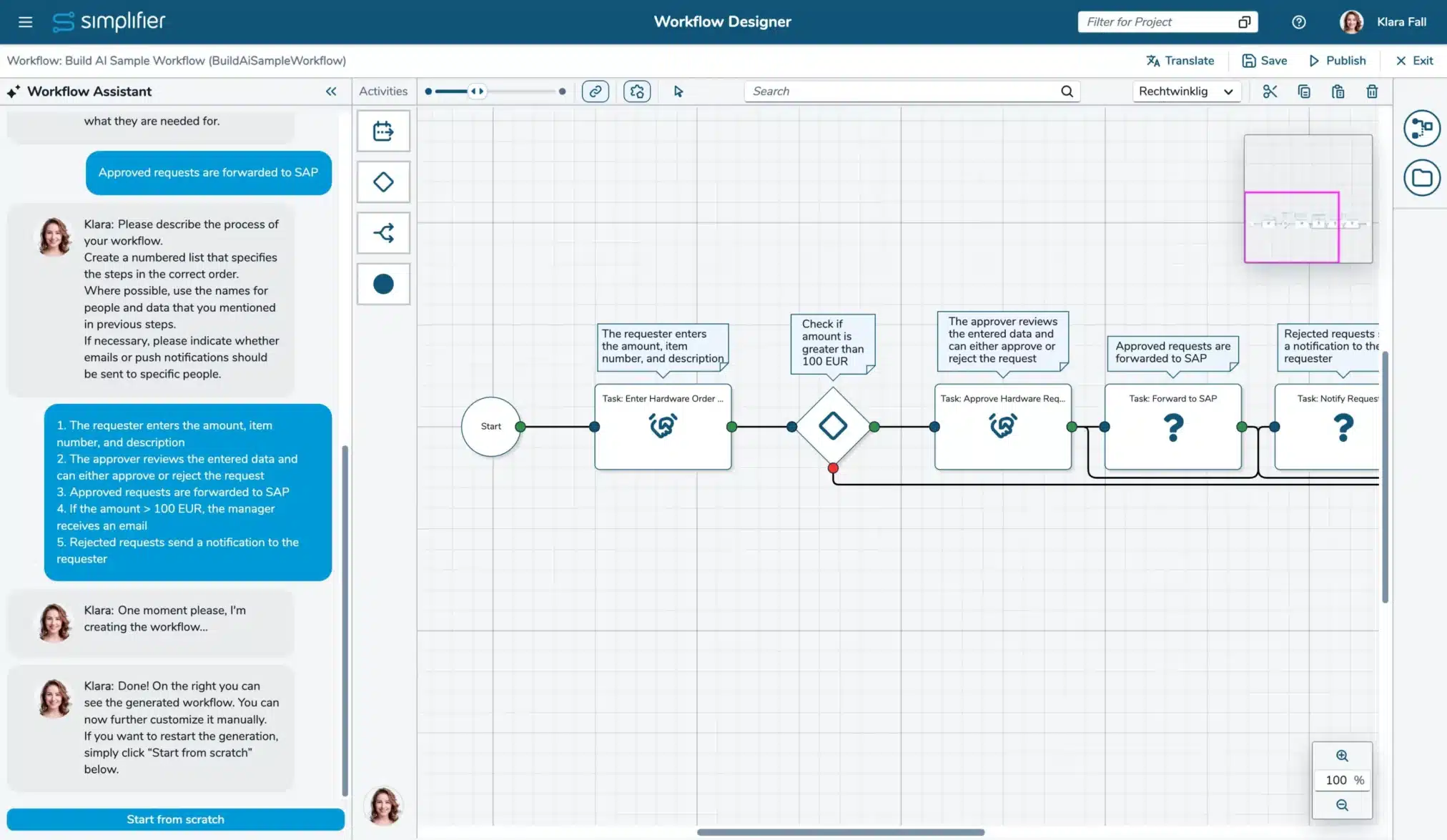
The Workflow Build AI just got significantly smarter
When generating workflows, it now automatically creates and manages variables. It recognizes when automation is needed and creates automated tasks for you. Plus, it builds proper decision logic by creating outcomes and conditions using variables, autofields, and constants – delivering truly intelligent, branching workflows. (Read more)
VS Code Monaco Editor for Developers (experimental)
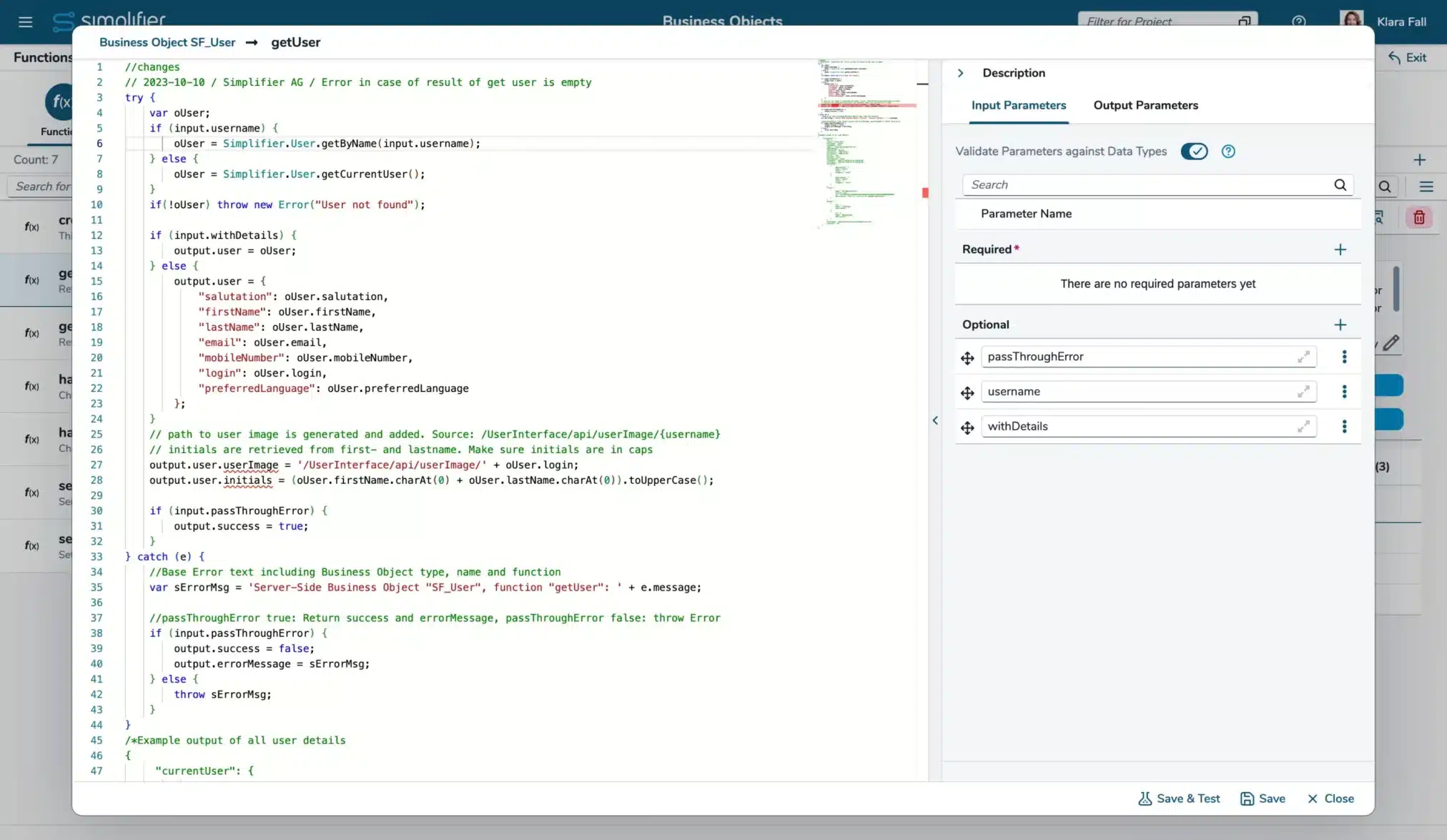
We’re starting to introduce the VS Code Monaco Editor, which brings full ECMA 2022 support. Business Object functions, SQL Connectors, and Templates can now be edited with modern syntax highlighting, intelligent auto-complete for Simplifier APIs, parameter hints, and all the power of a professional code editor right in your workflow. (For details, see our documentation of Business Object functions, SQL Connector calls, and Templates)
Simplifier Guidelines and Best Practices
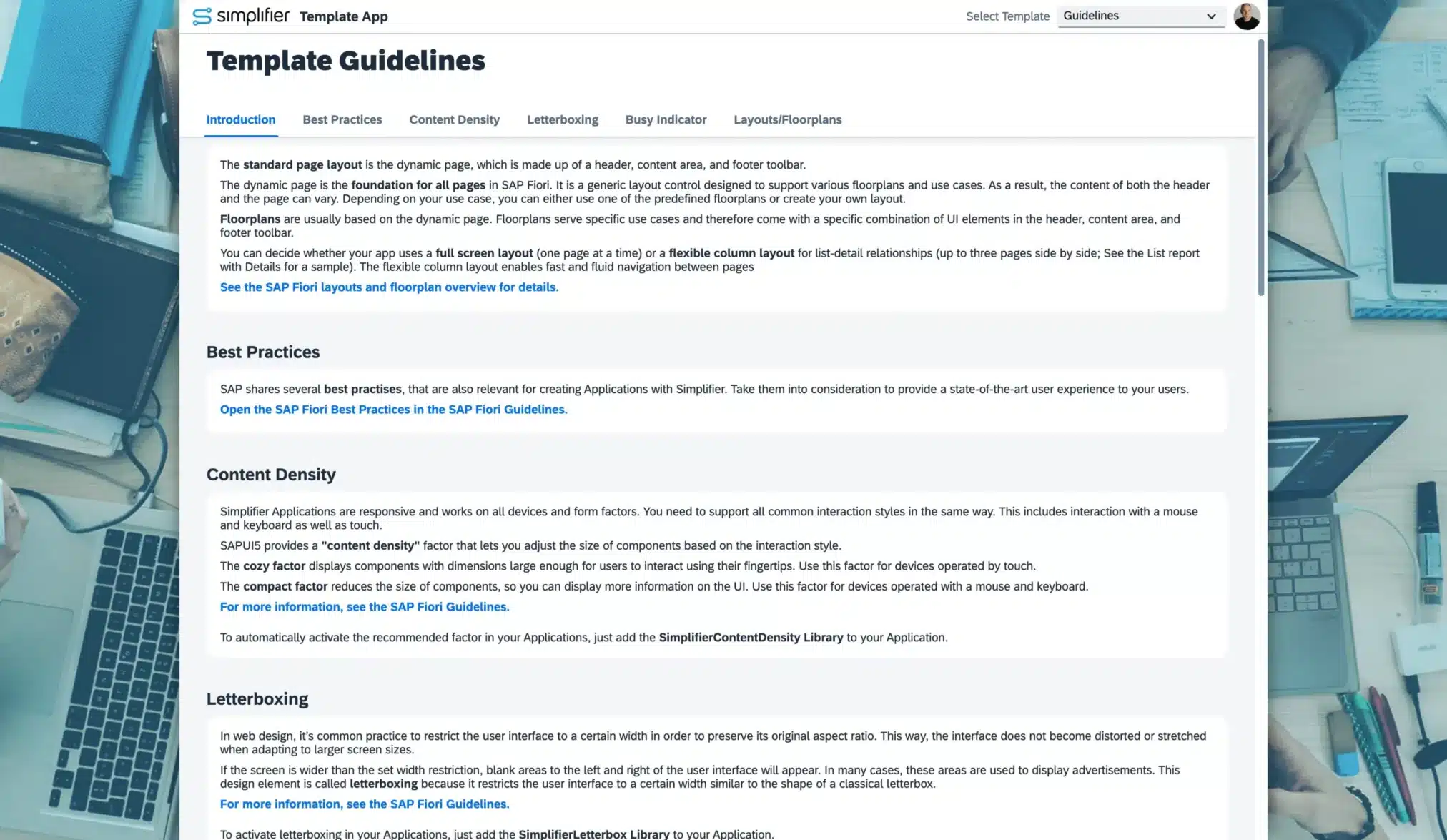
With the new version of our Template App, you get built‑in UX guidance matched to creating Applications with Simplifier.
The updated app now includes clear layout and navigation recommendations and best practices for SAP Fiori–aligned user experiences like content density, letterboxing, busy indicators, and more.
Changelog Simplifier 11
MCP Server
- [AI] The Simplifier MCP Server now also supports creating and testing SOAP, RFC, and SQL Connectors and Calls, and has moved to life cycle stage ‘Released’ (Read more)
- [AI] The Simplifier MCP server now supports assigning login methods to connectors and creating OAuth, Basic Auth (Username/Password), Token, and SAP SSO login methods (Read more)
- [AI] The Simplifier MCP server can now be used as a container, available as ‘simplifierag/simplifier-mcp’ at https://hub.docker.com/r/simplifierag/simplifier-mcp
- [AI] The Simplifier MCP server is now also listed on modelcontextprotocol.io, Glama.AI, MCP.so, and Docker MCP Registry (approval pending)
User Interface
- [Workflows] The Dashboard and Menu entries for Workflows and Workflow Monitoring are now marked if these features are not available on the instance
App Building
- [AI] New experimental OPA5 Test Generator (Read more)
- [Applications] Regex for custom data types can now be configured to be case-insensitive (Read more)
- [Applications] The VS Code Monaco Editor is now available as an experimental feature for Templates and Business Objects. (For details, see our documentation of Business Object functions and Templates)
- [Applications] Standard Data Types for Collections based on Base Types are now available
Workflows
- [AI] The Build AI feature to create Workflows now also supports creating and using Variables, Outcomes, Conditions, as well as adding shapes for automated tasks (configuration has to be done manually) (Read more)
- [AI] The Workflow Build AI is moved to the life cycle stage ‘Preview’
- [AI] Improved Workflow Designer and AI chat user experience
- [AI] Enhanced Error Handling and Logging of the Build AI Workflow creation feature
Connectors
- [Applications] The VS Code Monaco Editor is now available as an experimental feature for editing SQL statements (Read more)
- [Integration] In SOAP Connectors, you can now configure a separate login method for the WSDL download (Read more)
- [Integration] REST connector now always escapes space as %20, never as +
Settings
- [Integration] The fields “Sender Email” and “Sender” have been consolidated into one field in the SMTP Settings (Read more)
Standard Content
- [Applications] The widgets TableEnhanced and Input now support OData v2 and OData v4
- [Applications] The PDFViewer_PDFJS Widget (OpenUI5 1.96) was completely rebuilt to support the viewing of more PDFs and update the used library
- [Applications] Added new library SimplifierContentDensity to automatically set the application’s content density based on the Fiori Guidelines (Read more)
- [Applications] Added new library SimplifierFontFix to set the SAP default font also in Popovers, like a select list. This library is automatically added to all new apps.
- [Applications] Added new WidgetGroups SuccessMessage, InformationDialog, and ConfirmationDialog
- [Applications] Added new Client-side Business Object SF_Navigation to provide a dynamic possibility to navigate to screens or to pages within a NavContainer
- [Applications] Added the library SimplifierTokenValidation from the marketplace to the standard content
System Requirement Changes Simplifier 11
Currently, there are no new system requirements.
General Upgrade Instructions for Simplifier 11
The installation and upgrade guides will be published with Simplifier 11.
Manual Changes that should already be done before upgrading to Simplifier 11
Allow *.simplifier.cloud in firewall
Simplifier requires access to *.simplifier.cloud domains to make all features available. Please allow access to *.simplifier.cloud in your firewall settings. (Read more)
Manual Changes to be done after upgrading to Simplifier 11
Replace OData V2 Connectors with new OData Connectors
Activate the OData V2 Connectors in the Feature Settings if it is deactivated and replace your legacy OData V2 Connectors with our new OData Connector and switch to the Data Service Shape in your Applications/Modules (Read more).
The legacy OData V2 Connector will be removed with Simplifier 11/MAKERS CHOICE 25-12. Thus, you should first complete the upgrade on all instances and then replace them with a new OData Connector. For more details, please see the Discontinued Tab (Read more).
This migration note was already published with Simplifier 10.
Replace the CBO function SF_File / convertFileToDataURL if used with Base64 files
The input parameter isBase64 is deprecated and will be removed in a future release. Please use the CBO function SF_File / convertFileToObjectURL instead. Find the places by using the Business Object usage feature.
This migration note was already published with Simplifier 10.
Switch to Client 2.0 Route for accessing Proxy Connectors within Scripts/Client-side Business Objects/REST API
Customers hosted in our Simplifier Cloud will get all occurrences listed upon your Upgrade Request. For on-premise instances, please contact our Customer Success Team. They let you know how to identify the places that have to be changed.
The client 1.0 route for Proxy Connectors will be removed with Simplifier 11. Thus, you should first complete the upgrade on all instances and then modify the Scripts/Business Objects as necessary before replacing the route. For more details, please see the Discontinued Tab (Read more).
This migration note was already published with Simplifier 10.
Refresh License
Refresh the license on your instances to benefit from our new AI Cloud services (Read more).
Update Standard Content
Update Standard Content to ensure you have all current fixes and features available on your instances.
Please check the endpoint of AppWizard Connector, Standard Workflow Connectors, Login, and Captcha Connector. (Read more)
Manual Changes to be done after upgrading to Simplifier 11 and before upgrading to Simplifier 12
–
Deprecated Features Simplifier 11
[Integration] Result type in SQL Connector endpoints
Currently, you can set a result type in SQL Connectors. As the result types are call-specific and not connector-specific, we will remove this field in a later version
Deprecated since MAKERS CHOICE 25-12; Removal tbd
[Integration] Javascript execution in PDFs created by PDF Plugin
Currently, it is possible to add Javascript to PDFs created by PDF Plugin. This is a potential risk for Server Side XSS (PDF Injection) and Server Side Request Forgery (SSRF). The option to add Javascript to PDFs in PDF Plugin is now deactivated but can be activated at its own risk. The activation is subject to be removed in later Releases.
Deprecated since Simplifier 8 EHP 3; Removal tbd
[System requirements] Support of Oracle for Simplifier databases
Oracle support for your Simplifier instances has been deprecated and will be removed in a future release.
Deprecated since Simplifier 8 EHP 4; Removal tbd
[Integration] Removed setting to activate deprecated Connector API
The settings to activate the deprecated Connector API will be removed with Simplifier 10 LTS. Please make sure you do not use the deprecated Connector API anymore.
Deprecated since Simplifier 8 EHP 4; Removal tbd
[Interaction] Event tab in UI Designer
Our UI designer still has the legacy feature to add scripts to events directly in the Event tab. As we want to provide a consistent App Building, we will remove this feature with Simplifier 10. Simply use our Process Designer instead.
As we are developing our new Application Editor as a parallel solution to the existing one, we won’t remove that feature, but will not implement it in the new one
Deprecated since Simplifier 8 EHP 3; Removal in new Application Editor
Removed Features Simplifier 11
[Integration] OData V2 Connector
With the release of our new OData Connector, our legacy OData V2 Connector has been deprecated. Please create new OData Connectors and integrate them into your Applications and Modules
Deprecated since MAKERS CHOICE 25-08; Removal with Simplifier 11/MAKERS CHOICE 25-12
[Integration] Client 1.0 API route to access Proxy-Connector
Our new Proxy Connector will be accessible via the Client 2.0 route (Read more). Starting with MAKERS CHOICE 25-10/Simplifier 10, all old Proxy Connectors are migrated to the new one. Until Simplifier 11, the Client 1.0 route is still available. If you use it in Scripts, Client-side Business Objects, or REST-Connectors, please change it to the Client 2.0 route to keep accessing your Proxy Connectors.
Deprecated since MAKERS CHOICE 25-08; Removal with Simplifier 11
[Integration] Parameter ‘parametrized’ on calling Business Objects within Scripts and Client-Side Business Objects
When calling Server-Side Business Objects within Scripts or Client-Side Business Objects, the developer was able to deactivate the input validation by setting the API’s parameter ‘parametrized’ to false. This parameter is now deprecated. You can already deactivate the parameter in the Feature Settings.
Deprecated since MAKERS CHOICE 25-07; Removal with Simplifier 11/MAKERS CHOICE 25-12
[Integration] Captcha Plugin
Our Captcha Plugin won’t be updated anymore and was removed from the plugin list in our default installation/upgrade guides. It can still be added by hand (for details check the environmental variables list in the upgrade guides).
See our Knowledge Base article on ‘How to use Google reCAPTCHA v3 Essentials’ for an alternative solution.
Deprecated since MAKERS CHOICE 25-01; Final removal with Simplifier 11
Release Date: tbd
End of Maintenance: Long-term support until 3 months after the release of Simplifier 12
All Simplifier releases and updates are provided on Docker Hub Repository.
- Highlights
-
Highlight Features Simplifier 11 LTS
Released with MAKERS CHOICE 25-12
MCP Everywhere – Connect to (Almost) Anything
We’ve added MCP support for REST, SQL, RFC, and SOAP connectors, all with guided prompts and AI-powered testing. Security is built in with OAuth, Basic Auth, Token, and SAP SSO support. Database integration is seamless with automatic schema exploration. (Read more)
SAP users get full RFC connector capabilities with function browsing. Legacy SOAP systems are fully supported with WSDL integration.
And it’s all available as a Docker image, listed in official MCP registries including Model Context Protocol, Glama.AI, and MCP.so. Deploy anywhere, connect to anything.
The Workflow Build AI just got significantly smarter
When generating workflows, it now automatically creates and manages variables. It recognizes when automation is needed and creates automated tasks for you. Plus, it builds proper decision logic by creating outcomes and conditions using variables, autofields, and constants – delivering truly intelligent, branching workflows. (Read more)
VS Code Monaco Editor for Developers (experimental)
We’re starting to introduce the VS Code Monaco Editor, which brings full ECMA 2022 support. Business Object functions, SQL Connectors, and Templates can now be edited with modern syntax highlighting, intelligent auto-complete for Simplifier APIs, parameter hints, and all the power of a professional code editor right in your workflow. (For details, see our documentation of Business Object functions, SQL Connector calls, and Templates)
Simplifier Guidelines and Best Practices
With the new version of our Template App, you get built‑in UX guidance matched to creating Applications with Simplifier.
The updated app now includes clear layout and navigation recommendations and best practices for SAP Fiori–aligned user experiences like content density, letterboxing, busy indicators, and more.
Use the template as a ready‑to-run reference to create consistent, intuitive, and professional Applications faster—without having to look up standards in separate documentation. (Read more)
- Changelog
-
Changelog Simplifier 11
MCP Server
- [AI] The Simplifier MCP Server now also supports creating and testing SOAP, RFC, and SQL Connectors and Calls, and has moved to life cycle stage ‘Released’ (Read more)
- [AI] The Simplifier MCP server now supports assigning login methods to connectors and creating OAuth, Basic Auth (Username/Password), Token, and SAP SSO login methods (Read more)
- [AI] The Simplifier MCP server can now be used as a container, available as ‘simplifierag/simplifier-mcp’ at https://hub.docker.com/r/simplifierag/simplifier-mcp
- [AI] The Simplifier MCP server is now also listed on modelcontextprotocol.io, Glama.AI, MCP.so, and Docker MCP Registry (approval pending)
User Interface
- [Workflows] The Dashboard and Menu entries for Workflows and Workflow Monitoring are now marked if these features are not available on the instance
App Building
- [AI] New experimental OPA5 Test Generator (Read more)
- [Applications] Regex for custom data types can now be configured to be case-insensitive (Read more)
- [Applications] The VS Code Monaco Editor is now available as an experimental feature for Templates and Business Objects. (For details, see our documentation of Business Object functions and Templates)
- [Applications] Standard Data Types for Collections based on Base Types are now available
Workflows
- [AI] The Build AI feature to create Workflows now also supports creating and using Variables, Outcomes, Conditions, as well as adding shapes for automated tasks (configuration has to be done manually) (Read more)
- [AI] The Workflow Build AI is moved to the life cycle stage ‘Preview’
- [AI] Improved Workflow Designer and AI chat user experience
- [AI] Enhanced Error Handling and Logging of the Build AI Workflow creation feature
Connectors
- [Applications] The VS Code Monaco Editor is now available as an experimental feature for editing SQL statements (Read more)
- [Integration] In SOAP Connectors, you can now configure a separate login method for the WSDL download (Read more)
- [Integration] REST connector now always escapes space as %20, never as +
Settings
- [Integration] The fields “Sender Email” and “Sender” have been consolidated into one field in the SMTP Settings (Read more)
Standard Content
- [Applications] The widgets TableEnhanced and Input now support OData v2 and OData v4
- [Applications] The PDFViewer_PDFJS Widget (OpenUI5 1.96) was completely rebuilt to support the viewing of more PDFs and update the used library
- [Applications] Added new library SimplifierContentDensity to automatically set the application’s content density based on the Fiori Guidelines (Read more)
- [Applications] Added new library SimplifierFontFix to set the SAP default font also in Popovers, like a select list. This library is automatically added to all new apps.
- [Applications] Added new WidgetGroups SuccessMessage, InformationDialog, and ConfirmationDialog
- [Applications] Added new Client-side Business Object SF_Navigation to provide a dynamic possibility to navigate to screens or to pages within a NavContainer
- [Applications] Added the library SimplifierTokenValidation from the marketplace to the standard content
- Migration Notes
-
System Requirement Changes Simplifier 11
Currently, there are no new system requirements.
General Upgrade Instructions for Simplifier 11
The installation and upgrade guides will be published with Simplifier 11.
Manual Changes that should already be done before upgrading to Simplifier 11
Allow *.simplifier.cloud in firewall
Simplifier requires access to *.simplifier.cloud domains to make all features available. Please allow access to *.simplifier.cloud in your firewall settings. (Read more)
Manual Changes to be done after upgrading to Simplifier 11
Replace OData V2 Connectors with new OData Connectors
Activate the OData V2 Connectors in the Feature Settings if it is deactivated and replace your legacy OData V2 Connectors with our new OData Connector and switch to the Data Service Shape in your Applications/Modules (Read more).
The legacy OData V2 Connector will be removed with Simplifier 11/MAKERS CHOICE 25-12. Thus, you should first complete the upgrade on all instances and then replace them with a new OData Connector. For more details, please see the Discontinued Tab (Read more).
This migration note was already published with Simplifier 10.
Replace the CBO function SF_File / convertFileToDataURL if used with Base64 files
The input parameter isBase64 is deprecated and will be removed in a future release. Please use the CBO function SF_File / convertFileToObjectURL instead. Find the places by using the Business Object usage feature.
This migration note was already published with Simplifier 10.
Switch to Client 2.0 Route for accessing Proxy Connectors within Scripts/Client-side Business Objects/REST API
Customers hosted in our Simplifier Cloud will get all occurrences listed upon your Upgrade Request. For on-premise instances, please contact our Customer Success Team. They let you know how to identify the places that have to be changed.
The client 1.0 route for Proxy Connectors will be removed with Simplifier 11. Thus, you should first complete the upgrade on all instances and then modify the Scripts/Business Objects as necessary before replacing the route. For more details, please see the Discontinued Tab (Read more).
This migration note was already published with Simplifier 10.
Refresh License
Refresh the license on your instances to benefit from our new AI Cloud services (Read more).
Update Standard Content
Update Standard Content to ensure you have all current fixes and features available on your instances.
Please check the endpoint of AppWizard Connector, Standard Workflow Connectors, Login, and Captcha Connector. (Read more)
Manual Changes to be done after upgrading to Simplifier 11 and before upgrading to Simplifier 12
–
- Discontinued
-
Deprecated Features Simplifier 11
[Integration] Result type in SQL Connector endpoints
Currently, you can set a result type in SQL Connectors. As the result types are call-specific and not connector-specific, we will remove this field in a later version
Deprecated since MAKERS CHOICE 25-12; Removal tbd
[Integration] Javascript execution in PDFs created by PDF Plugin
Currently, it is possible to add Javascript to PDFs created by PDF Plugin. This is a potential risk for Server Side XSS (PDF Injection) and Server Side Request Forgery (SSRF). The option to add Javascript to PDFs in PDF Plugin is now deactivated but can be activated at its own risk. The activation is subject to be removed in later Releases.
Deprecated since Simplifier 8 EHP 3; Removal tbd
[System requirements] Support of Oracle for Simplifier databases
Oracle support for your Simplifier instances has been deprecated and will be removed in a future release.
Deprecated since Simplifier 8 EHP 4; Removal tbd
[Integration] Removed setting to activate deprecated Connector API
The settings to activate the deprecated Connector API will be removed with Simplifier 10 LTS. Please make sure you do not use the deprecated Connector API anymore.
Deprecated since Simplifier 8 EHP 4; Removal tbd
[Interaction] Event tab in UI Designer
Our UI designer still has the legacy feature to add scripts to events directly in the Event tab. As we want to provide a consistent App Building, we will remove this feature with Simplifier 10. Simply use our Process Designer instead.
As we are developing our new Application Editor as a parallel solution to the existing one, we won’t remove that feature, but will not implement it in the new one
Deprecated since Simplifier 8 EHP 3; Removal in new Application Editor
Removed Features Simplifier 11
[Integration] OData V2 Connector
With the release of our new OData Connector, our legacy OData V2 Connector has been deprecated. Please create new OData Connectors and integrate them into your Applications and Modules
Deprecated since MAKERS CHOICE 25-08; Removal with Simplifier 11/MAKERS CHOICE 25-12
[Integration] Client 1.0 API route to access Proxy-Connector
Our new Proxy Connector will be accessible via the Client 2.0 route (Read more). Starting with MAKERS CHOICE 25-10/Simplifier 10, all old Proxy Connectors are migrated to the new one. Until Simplifier 11, the Client 1.0 route is still available. If you use it in Scripts, Client-side Business Objects, or REST-Connectors, please change it to the Client 2.0 route to keep accessing your Proxy Connectors.
Deprecated since MAKERS CHOICE 25-08; Removal with Simplifier 11
[Integration] Parameter ‘parametrized’ on calling Business Objects within Scripts and Client-Side Business Objects
When calling Server-Side Business Objects within Scripts or Client-Side Business Objects, the developer was able to deactivate the input validation by setting the API’s parameter ‘parametrized’ to false. This parameter is now deprecated. You can already deactivate the parameter in the Feature Settings.
Deprecated since MAKERS CHOICE 25-07; Removal with Simplifier 11/MAKERS CHOICE 25-12
[Integration] Captcha Plugin
Our Captcha Plugin won’t be updated anymore and was removed from the plugin list in our default installation/upgrade guides. It can still be added by hand (for details check the environmental variables list in the upgrade guides).
See our Knowledge Base article on ‘How to use Google reCAPTCHA v3 Essentials’ for an alternative solution.
Deprecated since MAKERS CHOICE 25-01; Final removal with Simplifier 11
- Release Info
-
Release Date: tbd
End of Maintenance: Long-term support until 3 months after the release of Simplifier 12
All Simplifier releases and updates are provided on Docker Hub Repository.