


If you maintain Neptune SAP Edition applications, you face a structural challenge: the runtime, designer and entire toolchain live inside SAP NetWeaver. UI logic is JavaScript stored in ABAP tables, and the lifecycle (transports, change requests, ABAP-side packaging) is fully tied to your SAP basis team.
Migrating those apps to Simplifier moves the UI layer out of SAP into a modern, low-code/pro-code platform: OpenUI5 + TypeScript on the client, JavaScript Business Objects on the Simplifier server, and a clean integration layer to SAP. SAP keeps owning the data; Simplifier owns the application lifecycle. Because the migration deliberately removes custom ABAP UI logic and relies exclusively on standard SAP interfaces (BAPIs, SOAP services, OData V2/V4), it actively supports the SAP Clean Core strategy — your S/4 HANA core stays clean and upgrade-safe.
This article is a practical, technical guide to Neptune SAP Edition migration. It describes the prerequisites, the data you must hand over, how an AI-supported migration works in practice, and what the resulting architecture looks like.
Before a migration project starts, the following must be in place on the customer side:
To keep the migration efficient, the customer should hand over a complete dataset per Neptune application before kick-off. The five inputs below are the minimum required.
Each Neptune app can be exported as a single XML file. This file contains the full element tree (controls, parents, positions, events) and all attributes (texts, icons, types, visibility, bindings). It is the authoritative source of the UI layout and is used to reconstruct the Simplifier UI 1:1.
Neptune apps usually rely on one or more custom ABAP classes that wrap SAP functionality (typed input/output structures, exception handling, business validations). The class source must be provided so the migration team can identify which standard SAP function modules, BAPIs, SOAP services or OData services sit underneath and which logic must be reproduced on the Simplifier side. If the app already calls a SOAP endpoint or an OData service, the corresponding WSDL or service metadata document should be supplied as well.
The customer chooses one or more integration paths and provides the corresponding access details. Simplifier supports all four, and a single Business Object can combine several connectors if needed.
Each path is consumed by the corresponding Simplifier Connector (RFC, SOAP, OData V2, OData V4). The connector is the only path from Simplifier to SAP.
One screenshot per screen (and per state where relevant: empty, loaded, error). Screenshots are critical because the Neptune XML contains the structure but not the rendered look-and-feel: corporate colours, density, label wording, footer button arrangement and conditional visibility are all easier to verify against an image than against XML.
A small, realistic dataset from the source system (e.g. open transport orders, a handful of master records). This is used during migration to verify the connector, the Business Object mapping and the end-to-end UI flow against real SAP responses — without it, the team can only test against mock data.
The migration is executed by Simplifier consultants who are augmented by an AI workflow. The AI is not a self-service tool the customer operates; it is an accelerator that runs alongside the consultant and removes manual, repetitive work.
The diagram below summarises the four phases and the responsibilities split between the AI workflow and the Simplifier consultant.
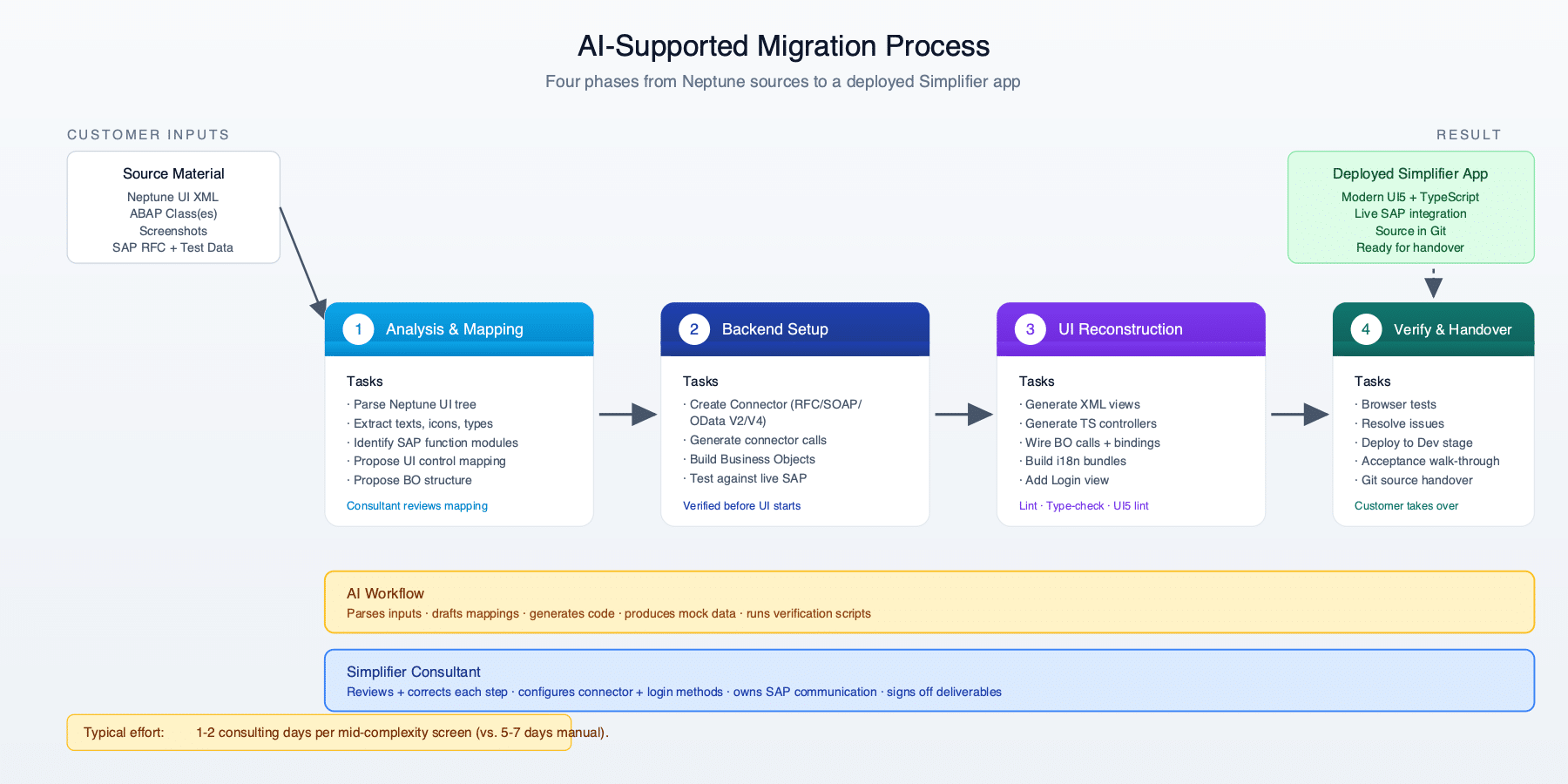
The consultant feeds the Neptune XML, the ABAP class (and any SOAP/OData metadata) and the screenshots into the AI workflow. The AI parses the UI tree, extracts every label, icon, button, tab and visibility flag, and proposes a mapping to OpenUI5 controls. It also reads the ABAP class and service definitions to identify the SAP function modules, BAPIs, SOAP operations or OData entity sets involved and suggests a corresponding Business Object structure on the Simplifier side. The consultant reviews and corrects the mapping before anything is generated.
The consultant uses the Simplifier platform to create the appropriate Connector (RFC, SOAP, OData V2 or V4) with the customer-provided credentials, generates the connector calls for the relevant operations or entity sets, and creates Business Objects that orchestrate those calls. The AI assists by drafting BO function code from the ABAP logic, generating the input/output parameter definitions, and producing a first round of mock data for offline testing. Every BO function is tested against the real SAP backend before any UI work begins.
The AI generates the OpenUI5 XML views (matching the Neptune layout pixel-for-pixel against the screenshots), TypeScript controllers (event handlers, BO calls, view-model state), and i18n resource bundles in the relevant languages. A login view is added to handle Simplifier authentication. The consultant runs lint, type-check and UI5 linter, fixes any remaining issues, and verifies the result in a browser.
Automated browser tests walk through the main user flows against the live SAP backend. Open issues are tracked and resolved. The consultant deploys to the customer’s Simplifier Dev stage, runs an acceptance walk-through with the business owner, and hands the source over via Git. The customer’s own developers can take over from this point with a fully working, modern codebase.
Typical effort: a single mid-complexity Neptune screen (1 input, 1–2 backend calls, 3–4 detail tabs) is migrated in 1–2 consulting days — including SAP connection setup, BO creation, UI reconstruction, and end-to-end test. Without AI support the same effort would typically be 5–7 days.
The migrated application is a standalone Simplifier app: it lives entirely outside SAP NetWeaver, has its own lifecycle, and accesses SAP only as a data source through a well-defined connector. The diagram below shows the target architecture — with all four integration paths (RFC, SOAP, OData V2, OData V4) routed through standard SAP interfaces only, in line with the SAP Clean Core strategy.

A Neptune SAP Edition migration to Simplifier breaks the dependency on SAP NetWeaver as a UI runtime. The customer keeps SAP as a reliable data source — reachable via RFC, SOAP or OData V2/V4 — but gains a modern, IDE-friendly, Git-managed application platform with a much shorter development and deployment cycle — while staying aligned with the SAP Clean Core strategy. With AI-supported tooling on the consultant side, a typical Neptune screen can be migrated in 1–2 days end-to-end — including SAP connectivity, real-data testing and handover.
Talk to your Simplifier contact to scope a migration assessment for your Neptune apps.